SUPERCHARGE YOUR ONLINE VISIBILITY! CONTACT US AND LET’S ACHIEVE EXCELLENCE TOGETHER!
What is a Technical SEO Content Audit?
In a general sense, an SEO content audit is an actionable inventory of indexable content that’s organized in ways to better determine what to consolidate (or remove!), what to improve upon, and what to leave as-is.

In many cases, a specific intention is set to find duplicate content, cannibalization issues, index bloat, or mysterious problems – like persistent layout shifts or JavaScript SEO issues. In other cases, it can be a broader exercise in identifying untapped ideas and new topics to help grow a site’s online footprint.
In this exercise, we are going to look into the specific technical content issues of a website that can cause indexing issues in the search engines that you may be able to detect in Google search console but may not be able to figure out, what’s causing the content to not get indexed.
This is not a Regular Content Audit
There is no shortage of regular content audit, templates and guides that mostly emphasizes some basic metrics that measure the success of different kinds of content in search rankings or in social media and suggest ways to find the optimum content plan. If you are looking to perform a content audit being a beginner, No doubt, they’re useful resources for those getting started, especially learning the basics like what metrics to include in a crawl report, how to organize your spreadsheets, and how to identify duplicate or redundant content.
However, most of these guides skip out the advanced technical SEO issues and high-level strategic perspectives.
Ensure that your Content is Fully Accessible and is Rendered (Introduction to Javascript SEO)
As interactive graphics, videos, and more dynamic forms have replaced static HTML pages as the primary form of web content, so too have the programming languages that serve them. JavaScript is one of the most potent and well-liked of such languages.
JavaScript can power a variety of content types, like dynamic navigation, collapsible accordions, and product sliders, to mention a few. While JavaScript offers a lot of flexibility in terms of presenting rich and interesting content, it can also present some SEO-related restrictions and difficulties.
The problem with more complex JavaScript-driven content is that it can be challenging and potentially time/resource-intensive to process, unlike simple web content that search engine crawlers like Googlebot can easily crawl and index. This is especially true if a site relies on client-side rendering in the browser rather than server-side rendering or pre-rendering.
The issue is that Googlebot won’t always do the labour-intensive tasks necessary to process JavaScript material. As a result, it’s crucial to proactively check your website for accessibility problems and JavaScript errors to make sure the information is being fully rendered and indexed.
Is All the Content on Your Page Discoverable by Search Engines?
When search engine bots are unable to identify and crawl critical content on your pages, this is one of the most common JavaScript issues. This can be due to general coding errors or because the content is not easily accessible for rendering and indexation.
To audit this, you must be able to view the rendered DOM after JavaScript has been executed in order to identify discrepancies with the original response HTML. Essentially, we’re comparing differences between the raw HTML and the rendered HTML – as well as the visible content on the page.
This can be done by applying the following setting in the Crawl configuration.
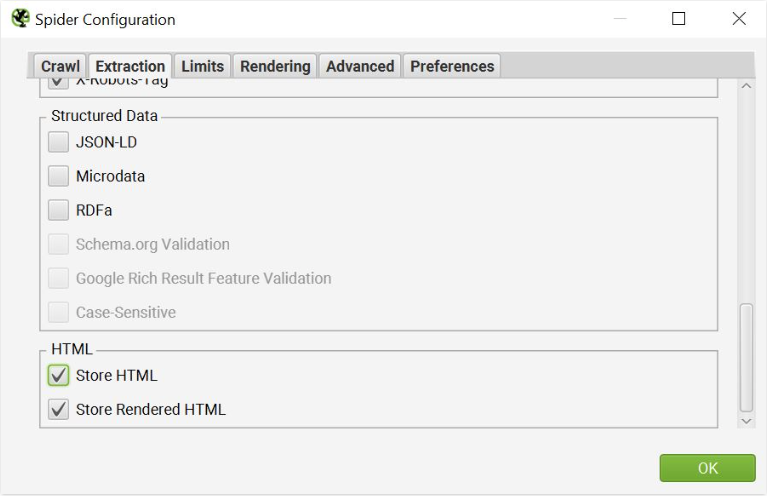
This will display the original source HTML and the rendered HTML side by side in the View Source pane, allowing you to compare differences and assess whether or not critical content and links are actually interpreted in the rendered DOM. The Show Differences checkbox above the original HTML window speeds up the comparison process even more.

Are the URLs using Javascript fully Accessible by Search Engines?
Another common JavaScript-related issue, which is usually more basic and easier to debug, is found in the URLs of your website.
Many JavaScript frameworks do not produce unique URLs that may be accessed independently by default, which is notably true for single-page applications (SPAs) and certain web apps. Instead, the contents of a page alter dynamically for the user while the URL remains unchanged.
As you might expect, when search engines can’t access all of the URLs on a site, it causes a slew of issues for SEO. To see if your URLs are available and indexable, crawl the site with Screaming Frog and create a dashboard of URLs and the data linked with them.
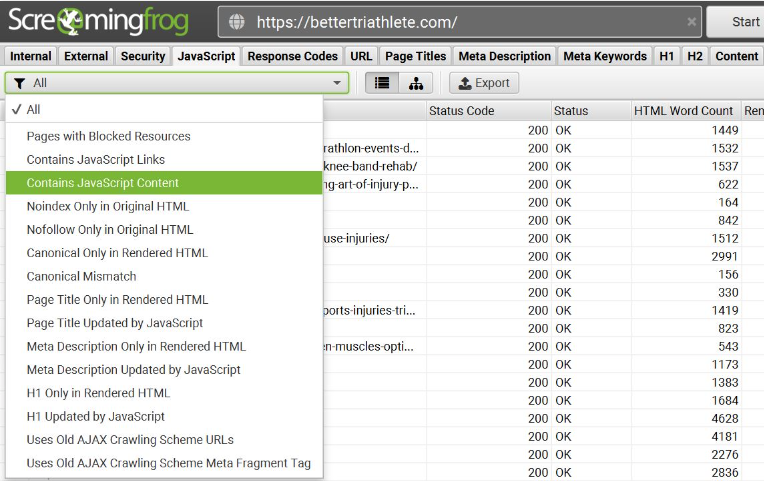
By running a crawl on screaming frog you can quickly identify the potential crawl ability and indexation issues that can be caused by improper rendering of javascript.
If you have certain URLs on your site that should be indexed but aren’t being found, there are problems that need to be addressed. Some of the most common issues to consider on our pages:
- with blocked resources
- that contain a noindex
- that contain a nofollow
- that contain a different canonical link
- redirects being handled at a page level instead of at the server request
- that utilizes a fragment URL (or hash URL)
Core Web Vital Audit and Optimize for Page Speed
While SEO and user behaviour metrics are the most typically employed when doing a content audit, Core Web Vitals can potentially move the needle.
While a fast website cannot compensate for poor-quality content that fails to fulfil the demands of real consumers, optimising for page speed can be a differentiator that allows you to edge ahead in the “competitive race” that is SEO.
Simply defined, these metrics are intended to assess both page speed and user experience. The top three Core Web Vitals are as follows:
- Largest Contentful Paint (LCP) – measures the time it takes for the primary content on a page to become visible to users. Google recommends an LCP of fewer than 2.5 seconds.
- First Input Delay (FID) – measures a page’s response time when a user can interact with the page, such as clicking a link or interacting with JavaScript elements. Google recommends an FID of 100 milliseconds or less.
- Cumulative Layout Shift (CLS) – measures the number of layout shifts that reposition a page’s primary, which ultimately affects a user’s ability to engage with content. Google recommends a CLS score of 0.1 or less.
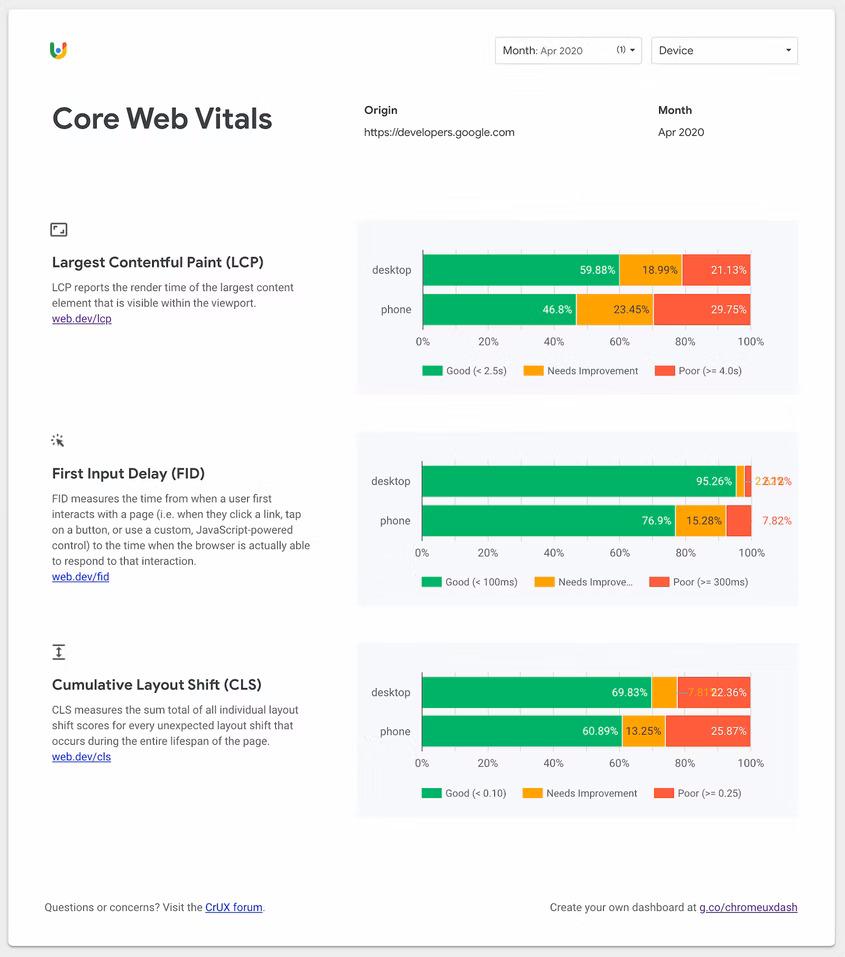
If you need more insights on how to generate the Chrome UX Report check out our blog.
Find out Index Bloat and Prune Content Accordingly
Pages with poor quality material, duplicate content, cannibalising content, or no content should be excluded from search results. These low-value pages squander the crawl budget, dilute keywords, and cause index bloat. As a result, auditing index bloat is a powerful activity designed to address this issue.
What is the cause of index bloat?
Index bloat occurs when a site has an excessive number of URLs that should not be indexed. This happens when search engines discover and index a large number of URLs – more than what is expected or specified in the sitemap. It’s a regular occurrence on very huge websites, such as eComm stores with thousands of pages.
Most often, index bloat is an ominous occurrence that stems from:
- Dynamically generated URLs (unique and indexable pages created by functions like filters, search results, pagination, tracking parameters, categorization, or tagging)
- User-generated content (UGC)
- Coding mistakes (e.g broken URL paths in a site’s footer)
- Subdomains (thin or non-search value pages on domains you accidentally aren’t paying attention to.
- Orphan Pages
How to Detect Index Bloat?
After executing the crawl, export the Internal HTML report to a spreadsheet and isolate all non-indexable URLs into a separate sheet. This gives you a comprehensive picture of all pages that can be identified and indexed.
Following that, you can compare these two lists by crawling and/or arranging all URLs listed in the XML sitemap to filter and detect any outliers that should not be discoverable or indexed, and are otherwise adding bloat to the site. This slightly more manual method is excellent for detecting URLs that should be removed, redirected, or tagged with noindex, nofollow, or canonical tags.
This approach, combined with using a Domain property as the Google Search Console property, provides a complete look into all potential index bloat that may be hindering a site’s SEO performance.
The most common URL indexation issues occur with the following types:
- All HTML URLs that are non-indexable
- Blocked Resource under response Codes
- No Response URLs under response codes
- Redirection (3XX URLs) under response codes
- Redirection (Javascript) under response codes
- Client Error (4xx URLs) under response codes
- Canonical Issues under Canonicals Tab
- Sitemap URL issues under Sitemaps.
- Non Indexable URLs under the Directives Tab
Using Crawl Analysis Feature to Filter Relevant URL Data
To enable certain data points of interest, select Crawl Analysis > Configure at the end of a crawl (or after a crawl has been paused). When troubleshooting index bloat, Sitemaps and Content are the most effective, although all of these options have significance when conducting an SEO content audit.
However, the following is the full spectrum of data shown by the post-crawl analysis feature.
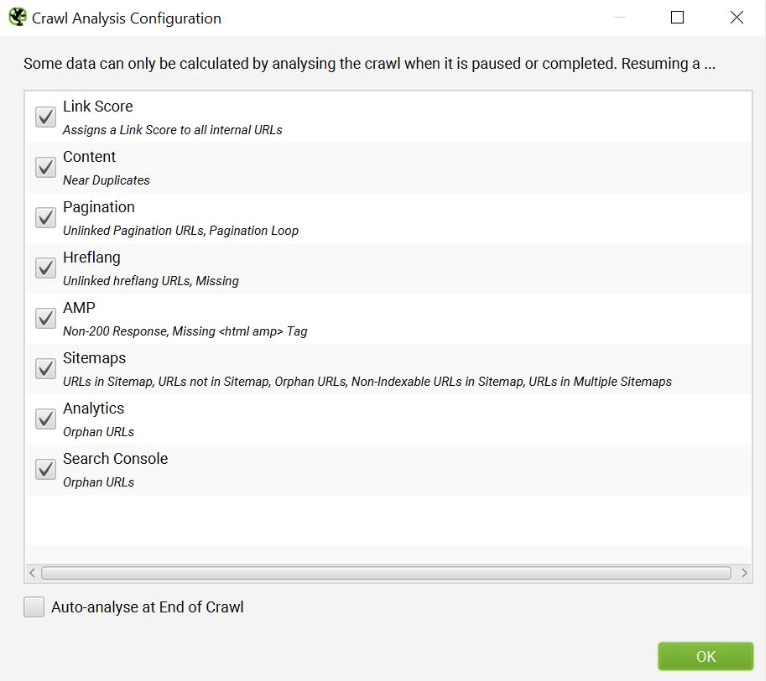
The Crawl analysis window can be accessed from the menu bar and can be run each time after a crawl is completed:

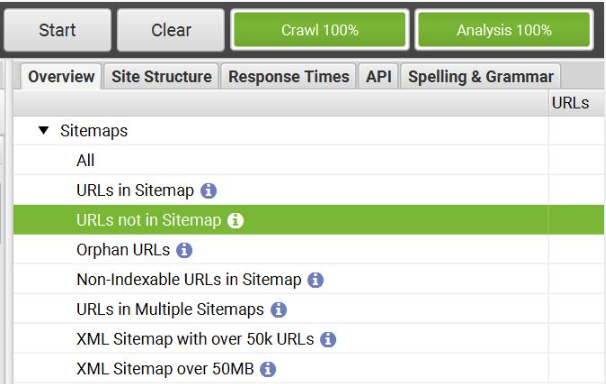
When the Crawl Analysis is finished, the relevant data will be available and filterable in the right-hand ‘overview’ window pane. You can filter the Sitemaps drop-down to see data such as:
- URLs in Sitemap
- URLs not in Sitemap (most useful for auditing unwanted index bloat)
- Non-indexable URLs in Sitemap
- Orphan pages
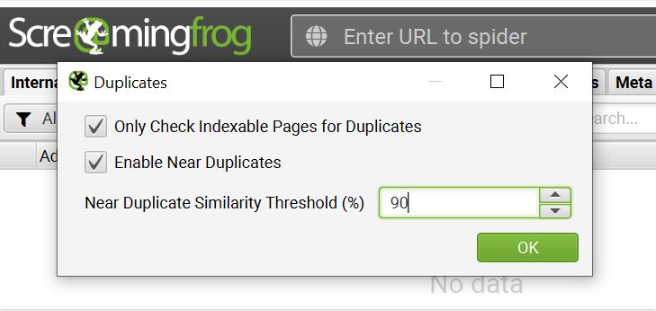
In addition to these data points, the Content filtering tool can assist you to uncover duplicate or near-duplicate content that should be reviewed for keyword redundancy/dilution. The parameters of SEO Spider allow you to define the percentage of duplicate similarity threshold, an algorithm developed to detect similarities in the page text.
The threshold percentage is set to 90% by default, which is extremely sensitive. For large websites, this might be a high percentage that necessitates extensive auditing. Alternatively, you can lower the similarity level to help filter and locate duplicates that are more bloat-indicative and SEO-harmful.
Pruning URLs contributing to Index Bloat
Once you’ve established which URLs are causing index bloat or appear redundant and/or duplicate, the following step is to trim them. This is when an organised spreadsheet containing pertinent metrics, comments, and action items comes in handy.
Before eliminating them all at once from the indexes, it’s vital to undertake a careful assessment of these URLs and how they should be pruned. Some URLs, for example, may be gaining organic traffic or backlinks. Removing them completely (rather than 301 redirecting them) may result in the loss of all SEO value that could have been kept and given to other sites.
Here are a few ways to assess the value of URLs, which can then help you determine how they should be pruned.
- Review organic metrics in Google Analytics, such as organic search traffic, conversions, user behaviour, and engagement to better gauge how much SEO value a URL has.
- Review All User segment metrics as well, so you don’t accidentally prune content that’s driving business value. More about this is below.
- In Google Search Console, use Performance > Search Results to see how certain pages perform across different queries. Near the top are filter options (Search type: Web and Date: Last 3 months will be activated by default; we prefer to review at least 12 months of data at a time to account for seasonality). Add a Page filter to show the search performance of specific URLs of interest. In addition to impressions and clicks from search, you can click into each URL to see if they rank for any specific queries.
- Use the Link Score metric (a value range of 1-100) from the SEO Spider Crawl Analysis. URLs that have a very low Link Score typically indicate a low-value page that could perhaps be pruned via redirect or noindex/removal.
- Additional tools like Ahrefs can help determine if a URL has any backlinks pointing to it. You can also utilize certain metrics that indicate how well a page performs organically, such as organic keywords and (estimated) organic traffic.
- Remove & Redirect – In most cases, the URLs you’d like to prune from index can be removed and redirected to the next most topically relevant URL you wish to prioritize for SEO. This is our preferred method for pruning index bloat, where historical SEO value can be appropriately allocated with the proper 301 redirects.
In cases when strategic business reasons take priority (and remove & redirect are not an option), the next best alternatives include:
- Meta Robots Tags – Depending on the nature of the page, you can set a URL as “noindex,nofollow” or “noindex,follow” using the meta robots tag.
- “Noindex,nofollow” prevents search engines from indexing as well as following any internal links on the page (commonly used for pages you want to be kept entirely private, like sponsored pages, PPC landing pages, or advertorials). You are also welcome to use “Noindex, follow” if preferred, but keep in mind that this follow will eventually be treated as a nofollow.
- Disallow via Robots.txt – In cases that involve tons of pages that need to be entirely omitted from crawling (e.g. complete URL paths, like all tag pages), the “disallow” function via Robots.txt file is the machete in your pruning toolkit. Using robots.txt prevents crawling, which is resourceful for larger sites in preserving crawl budget. But it’s critical to fix indexation issues FIRST and foremost (via removing URLs in Search Console, meta robots noindex tag, and other pruning methods).
- Canonicalization – Not recommended as an end-all solution to fixing index bloat, the canonical tag is a handy tool that tells search engines the target URL you wish to prioritize indexing. The canonical tag is especially vital to ensure proper indexation of pages that are similar or duplicative in nature, like syndicated content or redundant pages that are necessary to keep for business, UX, or other purposes.
In a nutshell, these are the basic trimming possibilities. Before implementing big modifications such as removing/redirecting/blocking URLs, do a performance benchmark to clearly understand the impact once the index bloat has been trimmed.
Final Thoughts
There are numerous approaches to implementing an SEO content audit, and how you collect, organise, and publish your findings might vary greatly.
Knowing how to use your toolset and peeling the onion in all the correct places adds tremendous value.
With so many fundamental how-to instructions available, these suggestions should provide a new perspective on an old issue “Approaching a Content Audit”.