
SUPERCHARGE YOUR Online VISIBILITY! CONTACT US AND LET’S ACHIEVE EXCELLENCE TOGETHER!
Why Crawl Budget is important?
We have conducted this entire guide on our own website for a live demonstration. Crawl budget report will help us to understand if we have some serious issues with any given website, let us take our own website for instance https://thatware.co. The purpose of the guide is to check whether the given website has better crawling and what else we can do for fixing the issues (if any persists). Meanwhile, the Crawl budget stands for the number of pages that a Google bot or a spider can crawl on any given day. It’s the number of webpages which a Google crawler can crawl on a particular day.
Today in this guide we will show you the live demonstration of the following:
- How to measure the crawl budget of your website
- How to identify if you have a crawl budget issue
- How to spot the crawling issues
- Recommendations on fixing the crawling issues
- The real-time demonstration’s on fixing the crawling issues
- The final results obtained and the benefits, now without further ado. Let’s start!

Current Observation’s:
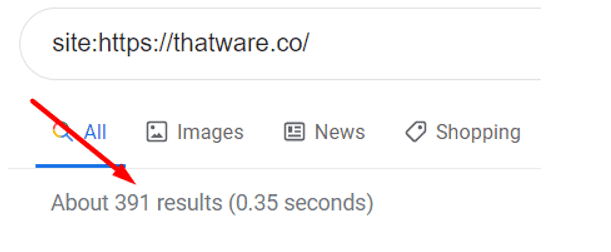
First of all, we need to check the index pages count for the website. The easiest way to do it is to use type Site:{your domain name} in the Google search bar. Google index value for thatware.co = 391 (Check the below screenshot for proof of statement)
Now, it’s time to check the daily crawl rate for the website. Perform the following steps to view the daily crawl stats.
Step 1: Open Google search console
Step 2: Click on Property for the campaign
Step 3: Click on settings
Step 4: Click on “Crawl stats” (check the below screenshot)
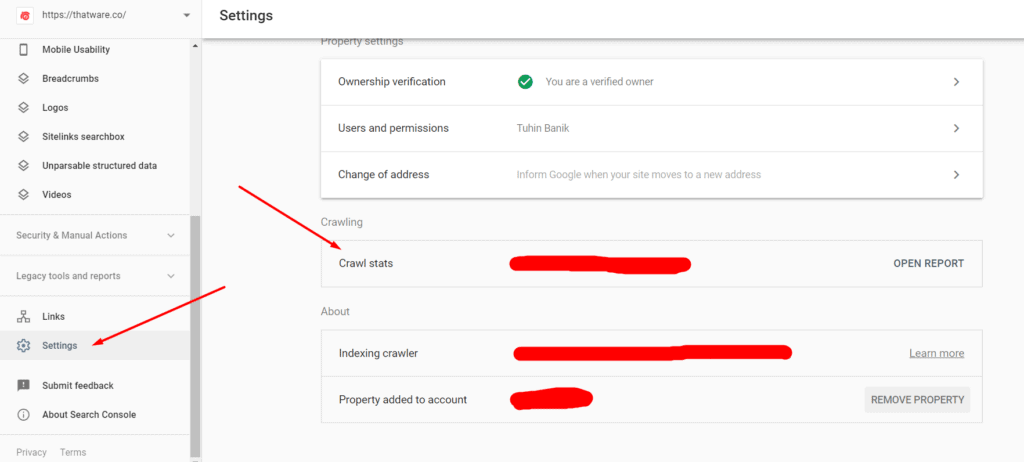
Step 5: Now one can count the value by hovering the mouse over the preferred timeline.
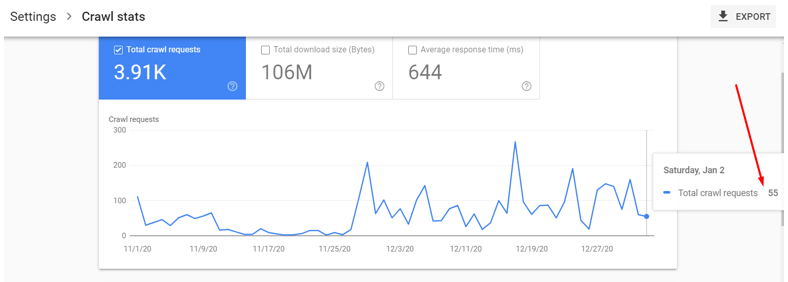
Hence, the daily crawl rate (real-time) for our website is 55 as shown on the above screenshot. Please note, for large websites preferably an eCommerce website one can take 7 days average value as well. Since our website is a service-based website hence we decided to take the real-time value.
How to Optimize Crawl Budget for Better Search Visibility
Optimizing crawl budget starts with helping search engines discover and process the pages that matter most. Begin by reviewing indexed URLs for unwanted, duplicate, broken, or low-value pages that may consume crawling resources unnecessarily. A properly structured XML sitemap can also guide crawlers toward important pages while avoiding broken URLs, redirects, and incorrect canonical references.
When considering how to optimize crawl budget, review the website’s robots.txt configuration and prevent unnecessary paths, such as unwanted category, author, pagination, or internal search URLs, from being crawled. Internal linking should also connect important pages clearly, reducing the risk of valuable pages becoming difficult to discover.
Technical issues such as 4XX errors, 5XX responses, redirect chains, and soft 404s should be monitored regularly. Mobile indexing and page performance also deserve attention because technical barriers can affect how efficiently pages are accessed and processed.
A structured approach helps search engines spend crawling resources on relevant, valuable content rather than unnecessary URLs.
Crawl Budget Calculation and ideal scores:
Crawl budget = (Site Index value) / (Single day crawl stat)
The ideal score are as follows:
- If the Crawl budget is between 1 – 3 = Good
- If the Crawl budget is 3 – 10 = Needs improvement
- If the crawl budget is 10+ = its worst and needs immediate technical fixes
Now coming back to our budget calculation, as per the formula stated above,
Crawl budget for thatware.co = 391 / 55 = 7.10
Now let us compare our Crawl Budget:
The score for thatware.co is 7.10 which is far more than the ideal zone of 1 – 3.
Summary
Hence, the website thatware.co is affected by the crawl budget. In other words, if our website contains 7000 pages (let’s consider); then it would take 7000/7 = 1000 days for completing a single crawling cycle. This would be a deadly situation for an SEO of a website since any changes to any webpages might take ages for Google to crawl and reflect the revised rankings in SERP.
The proposed solution for the rectification
In layman’s terms, the most effective way of fixing crawl budget issues is to make sure there are no crawling issues on the websites. These are the issues that will cause delay or error when Google spider will try to crawl the given website. We have identified several issues that might lead to crawl budget wastage and needs to be fixed with an immediate impact. The proposed solutions for our website are as under:
Chapter 1: Sitemap XML optimization
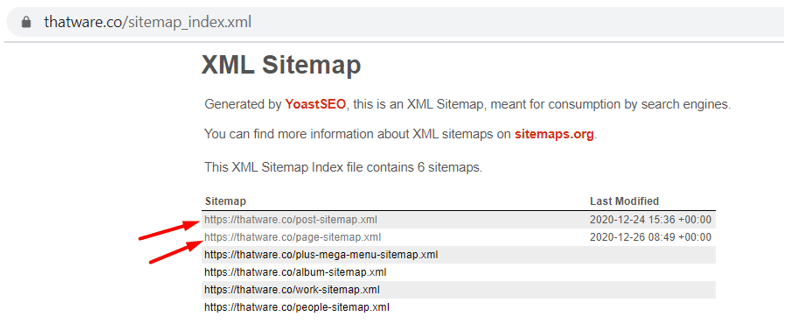
Check the above screenshot, our sitemap contains separate Post and pages sitemaps which are not optimized as per proper protocol orders. We suggest performing the below steps to make sure everything is fine:
Step 1: Make sure the XML sitemap contains the below hierarchy
{Should start with Homepage with priority set to 1.0 and change frequency value = Daily}
{Then it should be followed with Top navigation pages with priority set to 0.95 and change frequency value = Daily}
{Then it should be followed with top landing and service pages with priority set to 0.90 and change frequency value = Daily}
{Then it should be followed with Blog pages with priority set to 0.80 and change frequency value = Weekly}
{Then it should be followed with Miscellaneous pages with priority set to 0.70 and change frequency value = Monthly}
Step 2: After that, put the sitemap path in Robots.txt
Step 3: Also, declare the sitemap on search console as well
Chapter 2: Mobility Issues check-up
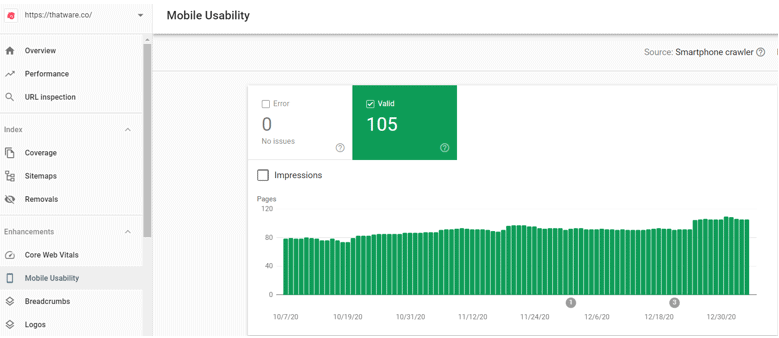
As per the above screenshot obtained from the Google search console, the Mobile usability we can see that we don’t have errors on mobile issues which is Good. But there is a negative point here,
Remember we had 391 pages indexed but the screenshot above shows that there are only 105 valid mobile pages. Hence, we can conclude that there is an issue with mobile-first indexing.
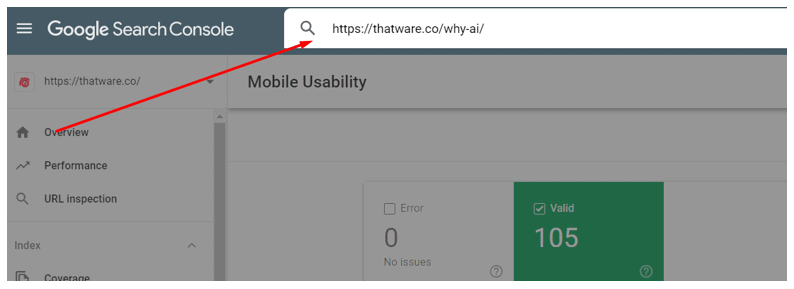
This issue can be solved, once the above sitemap has been optimized properly and then all live URL’s should be fetched manually via Google search Console. The steps are as under:
Step 1: Take the URL and paste on the bar as shown on the below screenshot and press enter
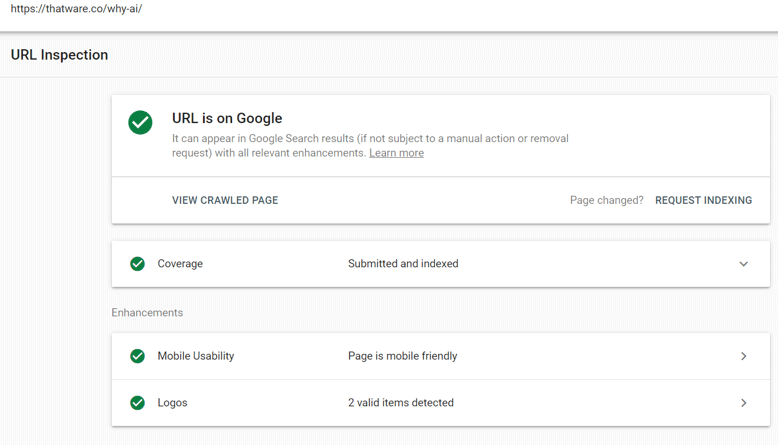
Step 2: Once you press enter you will see something like this as shown on the below screenshot. Make sure “Coverage” and “Mobile Usability” is ticked green. If not, then click them further to see the issues.
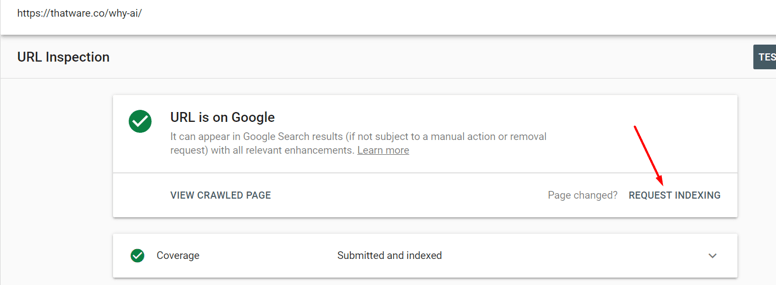
Step 3: Click on “Request Indexing” and then Google will take the latest index feed of your website within 48 hours max. This will solve the mobile issues once and for all.
Chapter 3: Coverage issues and Index Bloat check-up
Before going further, let us explain what Index bloat actually means. In layman term, index bloat means the index of random pages in Google which have almost no user value. These kinds of pages should be de-indexed or deleted from the website. A couple of common index bloat scenarios are as under:
1. 4XX errors
2. 5XX errors
3. Redirect chains
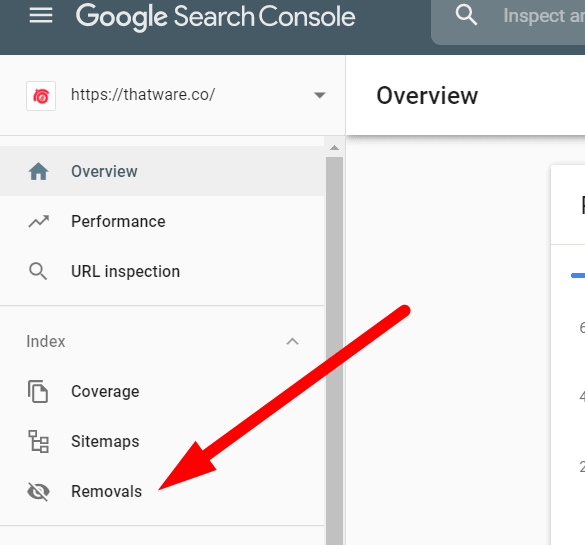
4. Removing unwanted pages from Google index via “removal tool”
5. Zombie pages needs to be de-indexed such as “Category pages”, “tag pages”, “author pages” etc
6. Incorrect Robots.txt
7. Excluded pages as seen from Google search console (check the screenshot below)
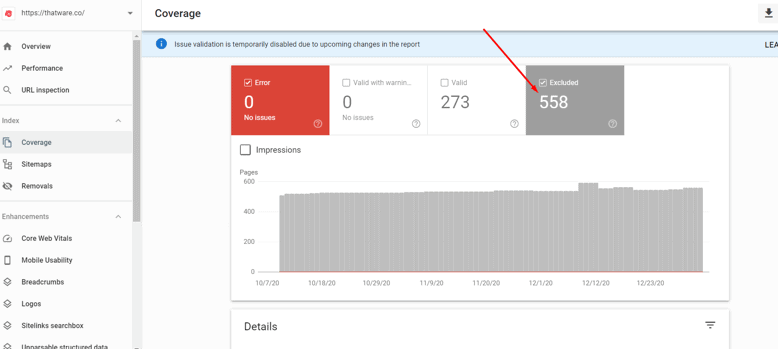
However, common technical findings based on chapter 3 for thatware.co are as under:
1. Index of unwanted pages such as /categories, /author
2. 4XX pages indexed as seen from Excluded in GSC
3. Improper index due to non-optimized Robots
4. Improper no-index distribution
Here’s what we actually did to fix the issues
Case 1: Re-optimized Robots.txt
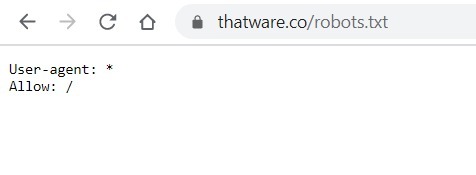
Our initial Robots.txt code is shown as under
After that, we have revised our robots.txt as shown under, you can view the full robot’s code by visiting here: https://thatware.co/robots.txt
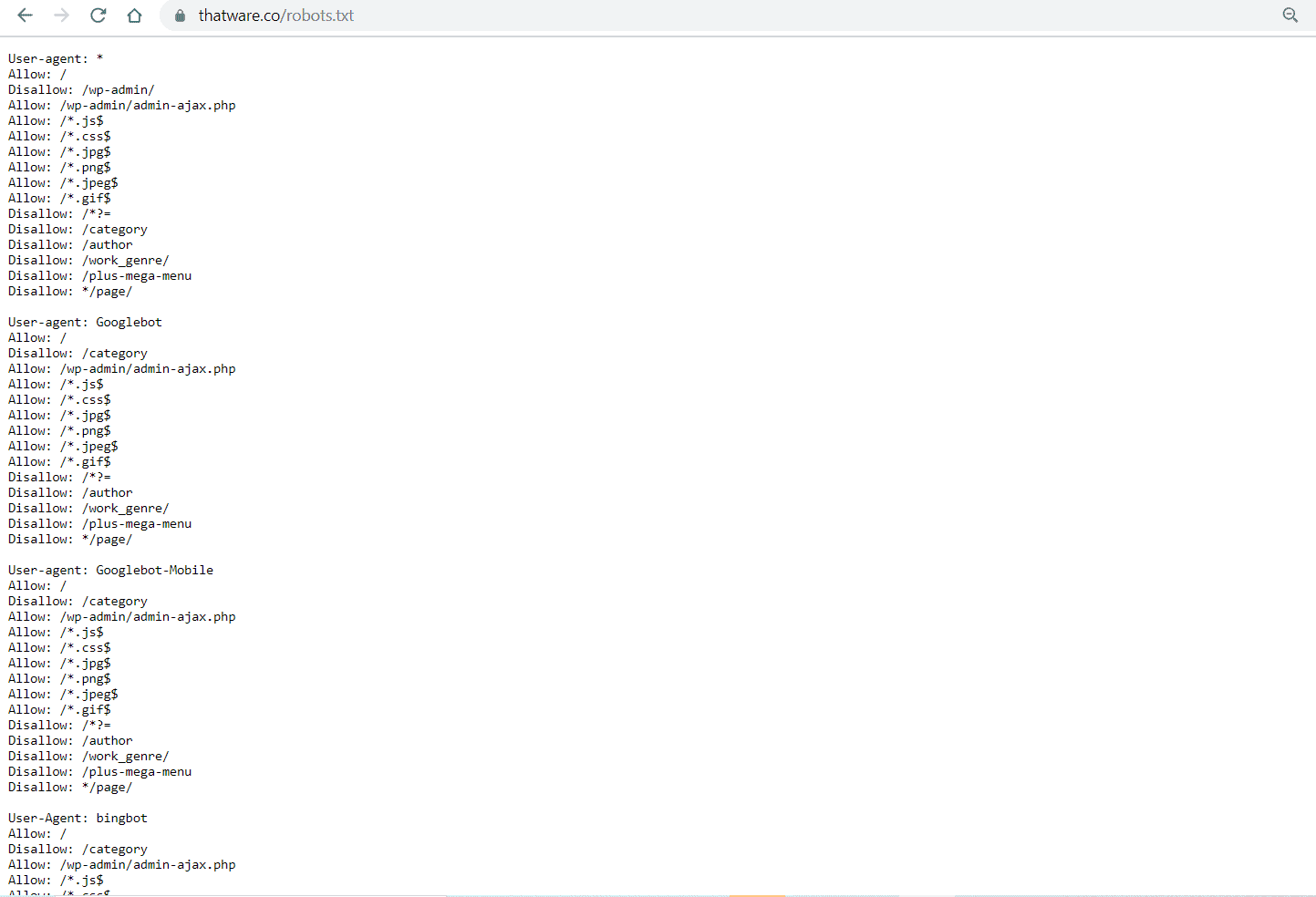
Did you get confused right? haha! Okay, let us explain what actually we have done to our robots.
- Individual Crawler Declaration: We have declared each crawler individually to specify which ones we want our website to index. This gives us more control over which search engine bots can crawl our site and which ones should be excluded.
- Allowing Essential Assets: All necessary assets such as .css, .js, and .jpg files are allowed to be crawled by the search engine bots. These resources are essential for rendering the website properly and ensuring that search engines understand the design and content structure.
- Disallowing Unwanted Paths: To avoid unnecessary index bloats, we have disallowed crawling of specific pages such as category pages, author pages, and paginated pages. These pages often don’t provide unique content and can lead to duplicate content issues, which may negatively impact SEO.
- Use of Wildcards for Path Specifications: We have used the “*” wildcard to indicate that search engine bots should crawl or de-crawl anything starting after the asterisk in the URL path. This ensures that only the relevant content is indexed, while anything following the asterisk, such as session IDs or other dynamically generated content, is excluded from crawling.
- Path Endings with $ Sign: The “$” symbol has been used to specify that robots should crawl or de-crawl any URL path that ends before the dollar sign. This ensures that only specific pages with a defined path are considered for crawling, while avoiding the indexing of extraneous or irrelevant content that may end with query parameters or session information.
- Disallowing Search Query Pages: Automated search query pages are disallowed from being crawled, as they are often dynamically generated and lead to 404 errors. Allowing these pages to be indexed could result in broken links, negatively affecting the site’s overall crawl efficiency and SEO performance.
- Enhanced Crawling and Indexing Efficiency: These modifications are specifically designed to ensure better crawling efficiency by reducing the likelihood of search engine bots wasting resources crawling unnecessary or redundant pages. By focusing on valuable content and excluding irrelevant pages, the site’s index becomes cleaner and more optimized for SEO purposes.
These all modifications have been done which will help with more enhanced crawling and better indexing of our website.
Case 2: Removal of unwanted pages
Removing unwanted indexed pages from Google will help to preserve the crawl budget. This will also help to eliminate index bloat. We have performed the following steps:
Step 1: We have once again used site:https://thatware.co on the Google search bar and manually checked all indexed results.
Step 2: We made a list of all unwanted results which we don’t want to be indexed. One example, as shown under. This is an example of URL’s which we definitely don’t want to be displayed and indexed.
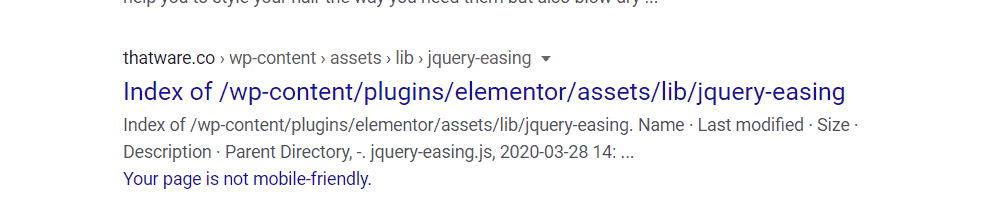
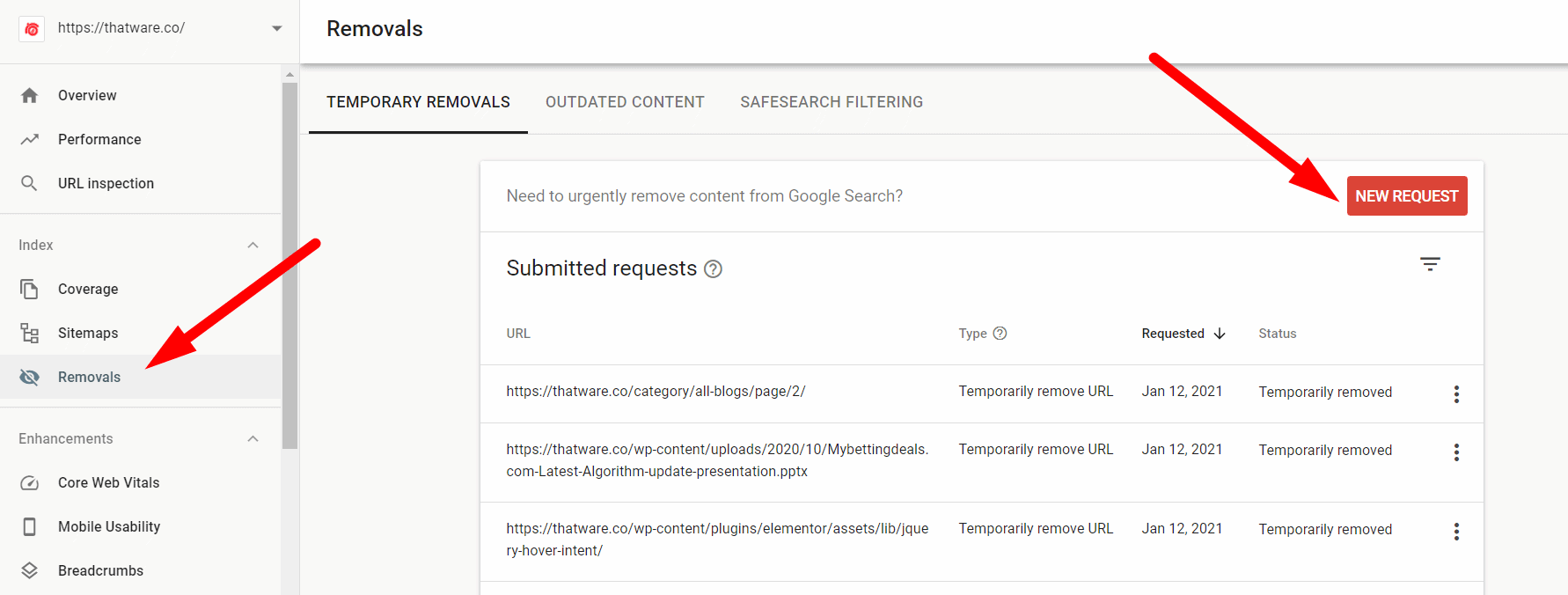
Step 3: Once, we got all the list of the URLs. Then we used the removal tool from the Google search console and have updated them on Google to be de-indexed from SERP. The process is shown in the screenshot below. Click on “Removals” from the search console and click on “New request”.
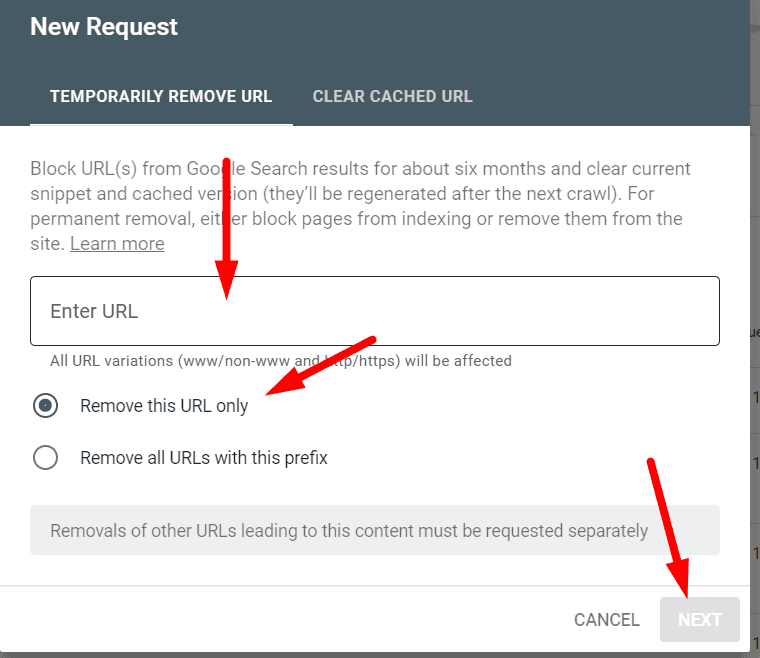
Step 4: Once you click on “new request” as stated in the previous step. Then you will get a message box as shown in the below screenshot. Just enter the URL which you want to de-index and click “next”. Job is done! make sure to choose option one only “remove this URL only” as shown in the screenshot under. Please note, the request needs approx 18 hours to be processed successfully.
Hence, unwanted URL removal can make the crawl budget wastage down and will improve the crawl ratio for the website. Since it reduces index bloat up-to a greater extent.
Case 3: Web Vitals Fixes
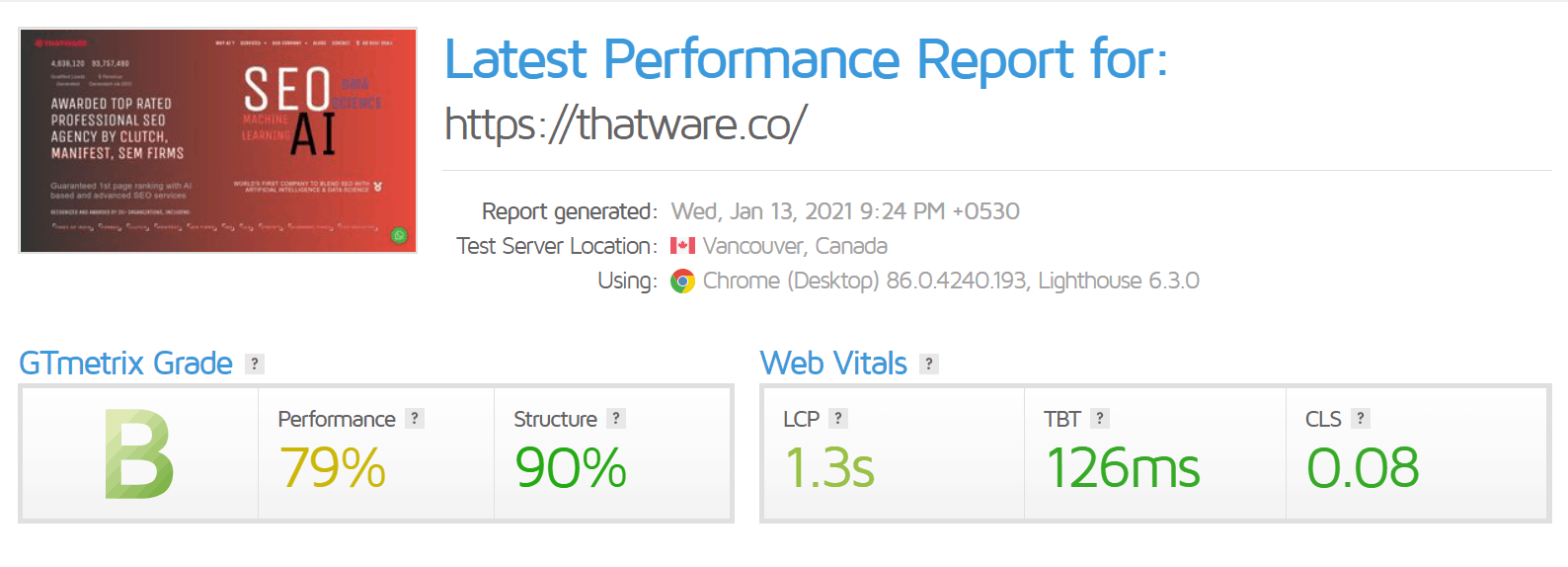
You can use GTmetrix to check your WEB Vitals. This is a tech portion and hence you can ask your developers to fix the Web Vitals scores. Some of the common fixes are as under:
- Make sure there are lesser round-trips
- Low DOM requests
- Server-side rendering
- JS optimization
- CSS optimization
- First-fold optimization, and much more. . .
Our Web Vitals have been already fixed by our Dev team, the latest scores are as under (not that bad huh!):
Case 4: Taxonomy modification’s
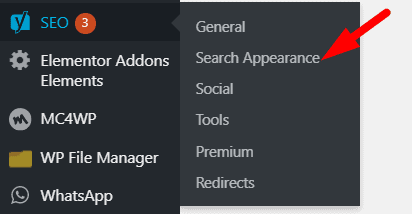
In our case, we are using WordPress as our CMS. The purpose of this step is to ensure that our unwanted pages such as category pages, author pages, etc are disabled to appear on the search index. In other words, we are declaring meta robots no-follow and no-index on the unwanted pages. The steps are as under:
Step 1: Click Yoast SEO and go to “Search Appearance”. Check the below screenshot.
Step 2: Then click on”Taxonomies” as shown on the below screenshot and choose all option’s as “NO” which you don’t want to index on search engine result pages (SERP).
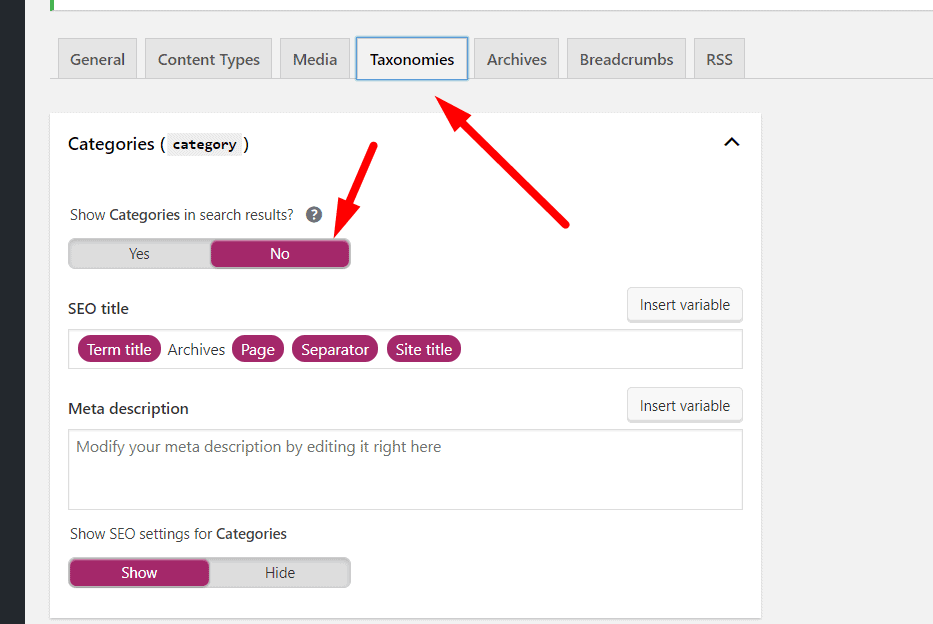
This step would prevent unwanted index of pages which normally provides no customer value or user experience. Now the thing is what you can do if you don’t have WordPress as your CMS? The answer is below:
Well, in case of a situation where your CMS is not WordPress then just paste the below code on <head> on the pages where you don’t want them to be indexed.

Case 5: Sitemap optimization
We have optimized our XML sitemap as under:
- We have used the proper hierarchy of the sitemap (as earlier explained above). In other words, we have assigned proper priority and frequency order based on the priority of the pages which we want to serve our audience like-wise.
- We have ensured no broken or unwanted URLs are there on our current XML
- We have also ensured there are no redirection’s or canonical issues on our current XML
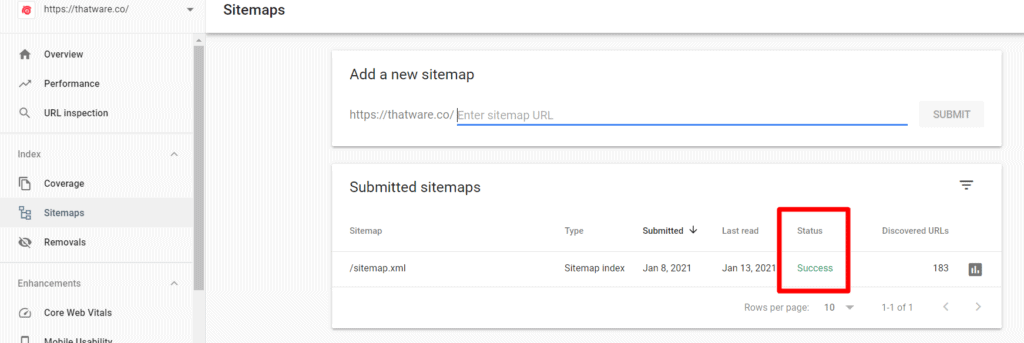
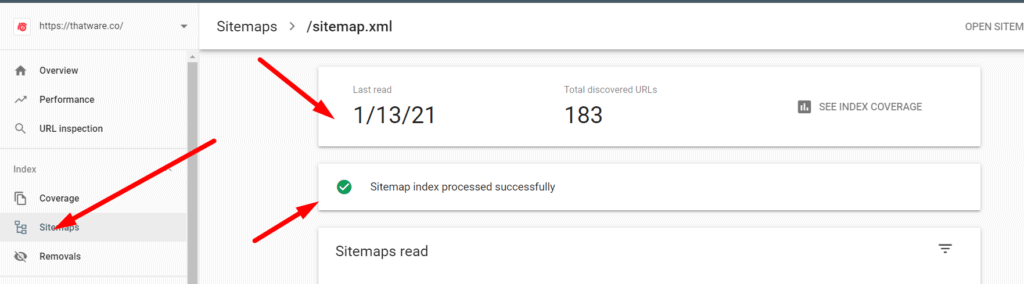
- We have updated the latest sitemap on the Google search and also have ensured the Google search console triggered no possible errors or issues. Check the screenshot below for a better understanding. The screenshot will showcase that when we updated our XML sitemap in GSC, it had no errors and the status was ‘Successful’.
- Proper Hierarchy in the Sitemap: We have implemented a well-structured XML sitemap with a clear hierarchy that accurately represents the importance of the pages. This means that we have assigned proper priority and frequency values to different pages based on their importance and relevance. For instance, core pages like the homepage, category pages, and top-performing content are assigned higher priority, whereas less important or peripheral pages are assigned lower priority. The frequency of updates is also tailored accordingly, ensuring that frequently updated content is crawled more often, while static pages are updated less frequently. This helps search engines understand which pages should be crawled more often and ensures that important content is prioritized in search results.
- Ensuring No Broken or Unwanted URLs: In our XML sitemap, we have thoroughly checked and removed any broken links or unwanted URLs that may lead to 404 errors. Broken links not only disrupt the user experience but can also harm the site’s SEO performance by sending search engines to non-existent pages. By eliminating these issues, we are ensuring that all the URLs listed in the sitemap are valid and accessible, which contributes to a more efficient and successful crawling process by search engines.
- Addressing Redirections and Canonical Issues: Another critical step we took was verifying that there are no redirection or canonical issues within the current XML sitemap. Redirections (such as 301 or 302) can confuse search engines and potentially waste crawling resources, while canonical issues may result in duplicate content being indexed, which can negatively impact search engine rankings. By ensuring that there are no such issues in the sitemap, we help search engines understand the intended structure and relationships between pages on the site, improving crawling efficiency and avoiding penalties related to duplicate content or incorrect page redirection.
- Updating the Sitemap in Google Search Console: Once the XML sitemap was properly optimized and free of errors, we updated it in Google Search Console (GSC). This is an important step, as GSC serves as a direct communication channel between the website and Google’s search algorithms. After submitting the updated sitemap, we monitored the status in GSC to ensure that there were no errors or issues. This is crucial for confirming that the search engine is receiving and correctly interpreting the updated sitemap. When we checked the status after submitting, we found that the submission was successful, and there were no reported errors. This means that Google is now working with an accurate and efficient sitemap, and the site is set up for optimal crawling and indexing.
- No Errors and ‘Successful’ Status in GSC: The screenshot (which will be referenced) clearly shows that when the XML sitemap was updated in GSC, there were no errors and the status was marked as ‘Successful’. This indicates that Google accepted the sitemap without any issues and is now able to crawl the pages listed in it efficiently. A “successful” status in GSC ensures that the search engine is able to properly index the content of the website, which is essential for improving search engine rankings and visibility.
By focusing on these key areas — prioritizing important pages, removing broken links, fixing redirection or canonical issues, and ensuring proper integration with Google Search Console — we have optimized the XML sitemap to enhance crawling and indexing efficiency. This will ultimately lead to better search engine performance, higher rankings, and a more user-friendly experience for those visiting the site. Additionally, these actions help to prevent issues that could negatively impact SEO, such as duplicate content or inaccessible pages, ensuring that the website maintains its credibility and relevance in search engine results.
How Internal Linking Impacts Crawl Budget
One of the most overlooked areas in technical SEO is internal linking optimization. Many websites focus heavily on backlinks and content publishing, but ignore the importance of a strong internal linking structure. However, internal linking directly affects how search engine crawlers discover and prioritize webpages.
Google bots use internal links to navigate through a website. If important pages are not linked properly, crawlers may struggle to discover them efficiently. As a result, valuable pages may remain under-crawled or poorly indexed.

Orphan Pages and Crawl Wastage
Orphan pages are webpages that have no internal links pointing toward them. Since search engine bots rely on links to discover content, these pages often receive very little crawl attention.
This creates a major issue for crawl efficiency because Google may not revisit these pages regularly. Consequently, updated content or important landing pages may remain unnoticed for longer periods.
To avoid this issue, websites should regularly audit internal links and ensure every important page is connected within the site architecture.
Strategic Internal Linking for Better Crawl Depth
A strong internal linking strategy helps search engines move smoothly across the website. Furthermore, linking high-priority pages from authoritative sections such as the homepage or navigation menu signals their importance to Google.
Contextual links placed naturally inside blog content also improve crawl depth. These links help search engines understand semantic relationships between pages more effectively.
For example, linking related service pages, guides, and blog articles together creates a stronger content ecosystem. This improves website indexing while helping search engines prioritize valuable pages.
Importance of Crawl Path Optimization
Site structure plays an important role in crawl budget management. Pages buried deep within multiple folders or categories often receive lower crawl frequency.
Therefore, maintaining a clean website hierarchy is essential for proper crawl path optimization. Ideally, important pages should remain accessible within a few clicks from the homepage.
A well-structured architecture improves user experience and supports better crawl budget optimization simultaneously.
Server Response Codes and Their Impact on Crawl Efficiency
Apart from internal linking, server response codes can influence how efficiently search engines crawl a website. When Googlebot visits a URL, the server response helps determine how that page should be processed. Understanding these responses is therefore an important part of Website crawl budget management.
Effective Googlebot crawl optimization also requires attention to how servers respond to crawler requests. By maintaining accessible pages, reducing unnecessary redirects, and resolving recurring server errors, websites can help Googlebot navigate important URLs more efficiently and use available crawling resources effectively.
Understanding these codes is essential for improving technical SEO performance.
200 Status Codes and Healthy Crawling
A 200 status code means the page is functioning correctly and accessible for crawling. This is the ideal server response because it allows search engines to crawl and index content without interruptions.
Websites with stable 200 response pages generally experience smoother crawling and better indexing performance.
Redirect Chains and Crawl Resource Waste
301 redirects are commonly used when URLs permanently move to new locations. While redirects are normal, excessive redirect chains can waste crawl resources.
For example, if one URL redirects to another multiple times before reaching the final destination, Googlebot must spend additional crawl time processing each step. This reduces overall crawl efficiency.
Therefore, websites should minimize unnecessary redirects whenever possible.
404 and Soft 404 Errors
404 errors occur when webpages no longer exist. A few broken pages are acceptable on large websites. However, excessive 404 errors create crawl traps that waste valuable crawling opportunities.
Soft 404 pages create another hidden problem. These pages may technically load successfully, but contain little or no meaningful content. Search engines often treat them as low-value pages, which contributes to index bloat.
500 Errors and Server Downtime
Server-side 500 errors are among the most damaging technical issues for crawling. These errors indicate server instability or temporary downtime.
If search engine bots repeatedly encounter server failures, crawl frequency may decrease over time. Consequently, important pages may take longer to index or update within search results.
Regular server monitoring and technical maintenance help prevent these issues while improving overall crawl stability and SEO performance.
Conclusion
As a result of all our efforts, our latest daily crawl stats is 155, as shown in the screenshot below:
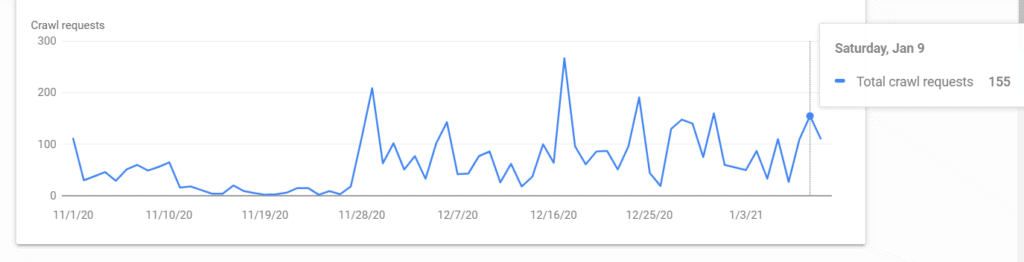
Latest index stats of our website is 265 as shown in the screenshot below:
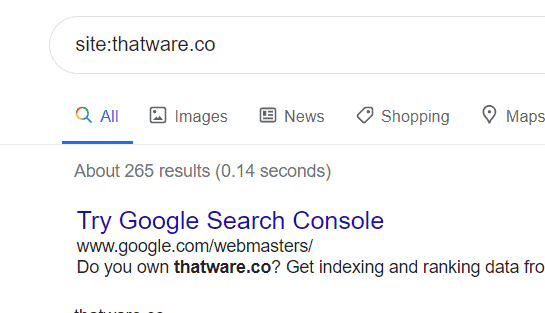
Hence, the latest crawl budget of our website is 265/155 = 1.7, hence our crawl budget score is perfectly optimized.
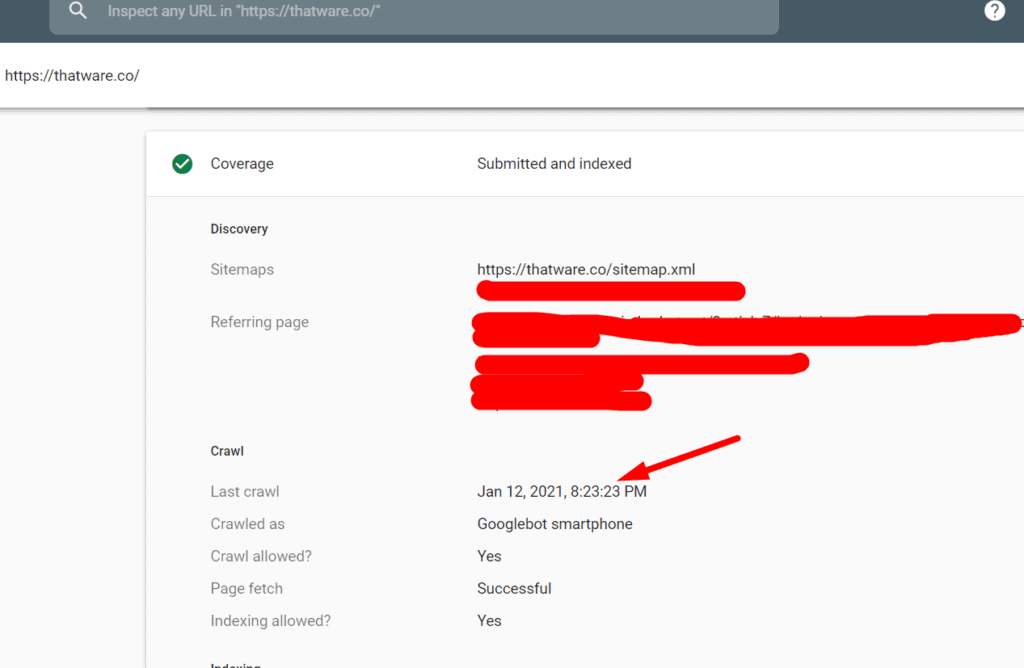
The finest benefit which we are enjoying right now due to a good crawl budget score is the frequent index of our webpages. Check the screenshot below, our website is getting crawled almost daily. This will help us in achieving more SEO benefits. We hope, this guide will also help you to solve your crawl budget statistics! Hope you loved the guide, do share!
You can read more about the on-page SEO definitive guide here: https://thatware.co/on-page-audit/
You can read more about Passage Indexing here: https://thatware.co/passage-indexing/
ThatWare vs Other Companies: Comparing Crawl Budget Strategies
| Crawl Budget Factor | ThatWare | Other Companies |
| Crawl Budget Audit | Measures indexed pages against daily crawl rate and calculates the crawl budget. | May provide general technical SEO audits without this specific methodology. |
| Technical Issue Detection | Checks index bloat, 4XX/5XX errors, redirects, robots.txt, mobile indexing and sitemap issues. Pasted text | Technical checks may vary by provider and audit scope. |
| Robots.txt Optimisation | Refines crawler declarations, essential assets, unwanted paths, wildcards and search-query exclusions. Pasted text | Implementation depends on the SEO provider. |
| Sitemap Optimisation | Structures priorities, removes broken URLs and addresses redirects/canonical issues. Pasted text | Sitemap work varies by technical SEO process. |
| Internal Linking | Optimises crawl paths, orphan pages and important-page accessibility. Pasted text | Internal-linking depth depends on the provider’s approach. |
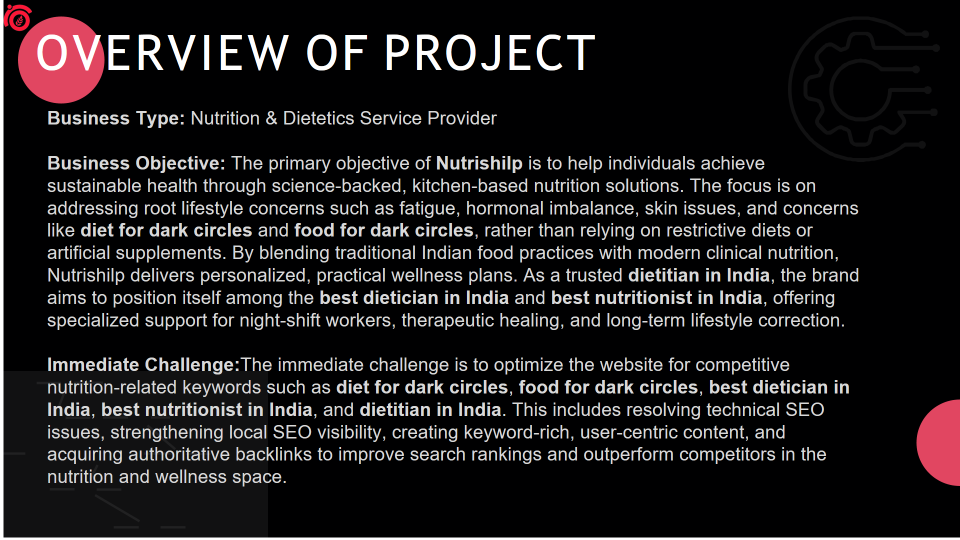
Case Study: How ThatWare Strengthened Crawl Efficiency and Search Visibility for a Nutrition & Dietetics Business
For a nutrition and dietetics business, visibility in search depends on more than publishing content around popular health terms. Search engines need to discover, understand, and efficiently process relevant pages before those pages can compete for valuable search queries.
ThatWare approached this challenge by combining Crawl budget SEO principles with technical SEO, structured content, semantic relevance, and AI-search-focused optimization. The objective was to create a website structure that made important nutrition content easier to discover while aligning it with the specific questions and concerns of its target audience.
The campaign focused on competitive terms such as diet for dark circles, food for dark circles, best dietician in India, best nutritionist in India, and dietitian in India.
The Challenge: Improving Visibility Without Losing Crawl Efficiency
The company operates in the nutrition and dietetics space, providing science-backed, kitchen-based nutrition solutions designed around sustainable health and lifestyle correction. Its approach combines traditional Indian food practices with modern clinical nutrition.
The immediate SEO challenge was to increase visibility for competitive nutrition-related searches while strengthening the website’s technical foundation.
The target queries covered different forms of search intent. Some users were looking for practical solutions, such as a diet for dark circles or suitable food for dark circles, while others were searching for professional nutrition support through terms such as best dietician in India and dietitian in India.
This meant the website needed more than keyword placement. Important pages had to be discoverable, logically connected, and supported by content that directly addressed user intent.
The website also had an Authority Score of 13 and a traffic share of 6%, creating a clear requirement for stronger organic visibility and topical relevance.
ThatWare’s Crawl Budget SEO Approach
ThatWare treated crawl efficiency as part of the wider Technical SEO crawl budget process rather than as an isolated activity.
A website’s crawl budget determines how efficiently search-engine crawlers can discover and process its pages. When unnecessary, duplicate, weak, or poorly structured URLs consume crawling resources, important content may not receive the attention it requires.
The Crawl budget optimization process therefore focused on making the website easier for search engines to navigate and understand.
The methodology included examining technical SEO factors that can influence crawling, including website structure, indexable pages, internal linking, sitemap organization, unwanted URLs, redirects, server responses, and other crawling barriers.
This approach follows the same practical principles demonstrated in ThatWare’s crawl-budget methodology, where technical issues such as index bloat, unwanted indexed pages, sitemap problems, robots.txt configuration, redirects, and orphan pages were treated as factors affecting crawling efficiency.
The objective was not simply to increase the number of pages crawled. It was to help search engines spend their crawling resources on pages that matter to the business.
Aligning Content With High-Intent Nutrition Searches
Technical improvements were supported by a content strategy focused on specific, informational, and intent-rich searches.
Rather than creating broad content around generic nutrition topics, ThatWare structured content around queries such as diet for dark circles and food for dark circles. These topics connect directly with specific concerns users may have and provide opportunities to deliver practical, relevant information.
The same approach was applied to professional-intent searches associated with finding nutrition expertise, including best nutritionist in India, best dietician in India, and dietitian in India.
This created a stronger connection between the website’s content and the questions users were actually searching for.
Semantic Structure for Search and AI Visibility
ThatWare also focused on how information was presented within the content.
Pages were structured with clear semantic headings, concise explanations, and organized bullet points. This made the information easier for users to scan while providing a cleaner HTML-friendly structure for search systems.
For example, content addressing a nutrition concern could begin with a concise explanatory paragraph and then organize supporting information into clearly defined points.
This structure is particularly relevant to modern search experiences where search engines and AI systems need to identify direct answers, supporting context, and relationships between entities.
The company name was also naturally incorporated as an entity within relevant content. This helped establish a clearer connection between the business and the nutrition topics it addressed.
As a result, the content was designed not only for traditional organic search but also for featured snippets, AI-generated summaries, and AI Overviews.

SEO Crawl Optimization Across the Website
The technical and content strategies worked together.
Effective SEO crawl optimization requires important pages to be easy to discover and understand. Internal linking can help search engines move from one relevant page to another, while logical page relationships can clarify the importance and topical context of individual URLs.
Sitemap and indexing considerations were also treated as part of the overall optimization process. The focus was on reducing unnecessary crawling and directing attention toward valuable, relevant content.
This approach is particularly important for websites that publish information across multiple nutrition topics. As content expands, maintaining a logical structure becomes increasingly important for both users and search engines.
ThatWare therefore connected technical SEO with content organization instead of treating the two as separate activities.
Building Stronger Topical Relevance
The strategy also supported the website’s broader authority within nutrition and wellness.
Content addressing specific concerns, professional nutrition services, and practical dietary solutions created multiple contextual connections around the core subject.
The entity-rich approach strengthened the association between the business and its areas of expertise, while long-tail content provided opportunities to address more precise search intent.
This helped create content that was informative and user-centric while remaining aligned with the company’s positioning around personalized nutrition, therapeutic healing, night-shift workers, and long-term lifestyle correction.
Results: Measurable Growth in Search Performance
The optimization produced measurable improvements across key search and engagement metrics.
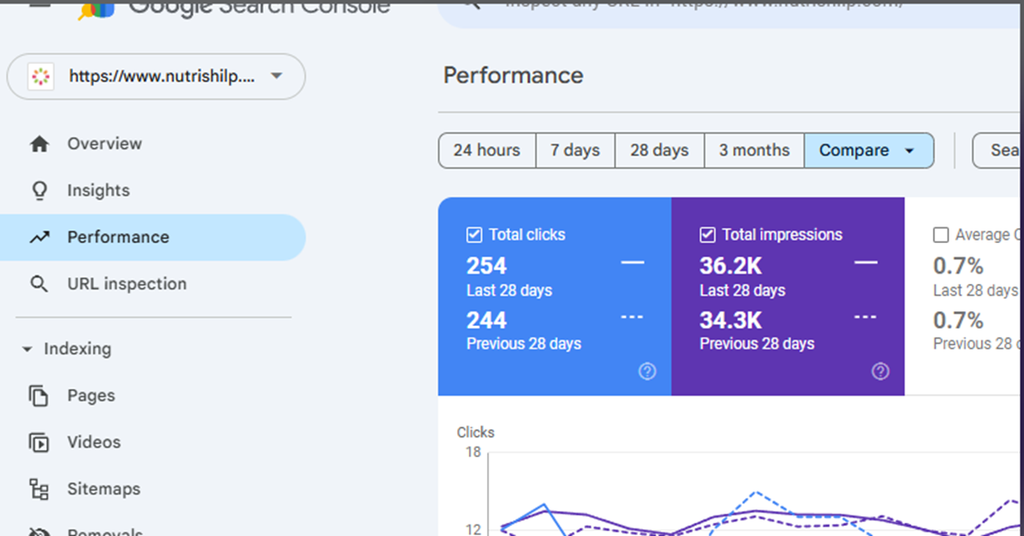
Search impressions increased from 34.3K to 36.2K, indicating that the website appeared in search results across a larger volume of impressions.
Clicks increased from 244 to 254, showing growth in the number of users reaching the website through search.
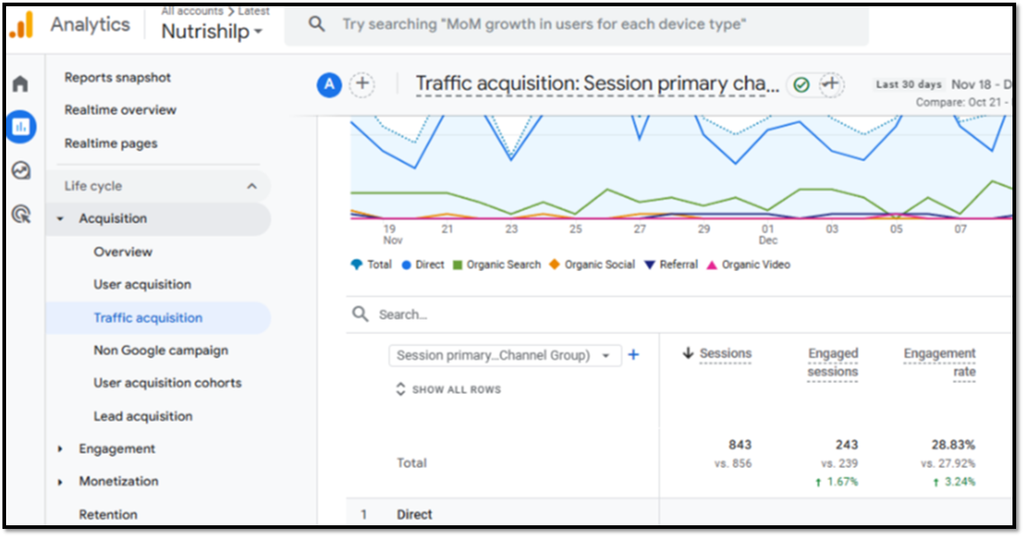
The campaign also recorded a 1.67% increase in total Engaged Sessions, reflecting an improvement in the number of sessions involving meaningful user engagement.
At the same time, total Sessions increased by 3.24%, demonstrating additional growth in website visits.
These results were achieved alongside the technical, content, and semantic optimization strategy rather than through keyword targeting alone.
The Outcome
ThatWare’s approach connected crawl efficiency with broader organic search performance.
By applying Google crawl budget principles to technical SEO, strengthening internal content relationships, targeting specific nutrition queries, and structuring information for both conventional and AI-driven search, the website was positioned to make better use of its existing content opportunities.
The campaign demonstrates that crawl optimization is not simply about getting search engines to crawl more URLs. It is about helping them discover and process the right pages efficiently while ensuring those pages provide clear, relevant answers to users.
For a nutrition and dietetics business competing across high-intent searches, this combination of technical structure, content relevance, and semantic clarity created a stronger foundation for continued organic and AI-search visibility.
Strengthen Your Crawl Budget With ThatWare
Ready to improve your website’s crawl efficiency and technical SEO performance? ThatWare can help identify crawling barriers, optimize website architecture, strengthen indexing efficiency, and build a more search-friendly foundation. Connect with our SEO experts to explore a practical crawl budget optimization strategy tailored to your website.