
Get a Customized Website SEO Audit and Online Marketing Strategy and Action Plan
In today’s digital landscape, video content is one of the most powerful tools for engaging audiences. However, simply uploading a video is not enough to ensure its discoverability in search engine results. To improve search rankings and user experience, structured data plays a crucial role in enhancing video indexing.
Google and other search engines rely on structured data to understand the content within videos. With the introduction of Clip and SeekToAction structured data, website owners can now provide key moments within their videos, allowing users to navigate content more efficiently. This upgrade enhances the video search experience, improves click-through rates (CTR), and boosts engagement.
In this blog, we will explore the importance of video schema markup, the role of Clip and SeekToAction, and a step-by-step guide on implementing these structured data formats for better video SEO.
Understanding Video Schema Markup
What is Video Schema Markup?
Video schema markup is a form of structured data that provides search engines with metadata about a video. This metadata includes details such as:
- Title
- Description
- Thumbnail URL
- Duration
- Upload date
- Video content URL
By implementing video schema, webmasters can increase the chances of their videos appearing in Google search results, video carousels, and Google Discover.
Role of Structured Data in Video SEO
Structured data helps search engines understand the content of videos, allowing them to:
- Index videos efficiently and associate them with relevant search queries
- Display key moments within videos on search result pages
- Enhance user engagement by enabling users to jump to specific sections
Without structured data, search engines must rely solely on page content and video transcripts, which may not always be accurate or sufficient for ranking purposes.
Understanding Video Schema Markup
What is Video Schema Markup?
Video schema markup is a form of structured data that provides search engines with metadata about a video. This metadata includes details such as:
- Title
- Description
- Thumbnail URL
- Duration
- Upload date
- Video content URL
By implementing video schema, webmasters can increase the chances of their videos appearing in Google search results, video carousels, and Google Discover.
Role of Structured Data in Video SEO
Structured data helps search engines understand the content of videos, allowing them to:
- Index videos efficiently and associate them with relevant search queries
- Display key moments within videos on search result pages
- Enhance user engagement by enabling users to jump to specific sections
Without structured data, search engines must rely solely on page content and video transcripts, which may not always be accurate or sufficient for ranking purposes.
Introduction to Clip and SeekToAction Structured Data
What is Clip Structured Data?
The Clip structured data type allows website owners to manually define key moments within a video. This helps search engines highlight important timestamps, making it easier for users to navigate directly to specific sections without watching the entire video.
How Clip Schema Works:
- The website owner defines specific segments (clips) within a video.
- Each clip has a name, start time (startOffset), end time (endOffset), and a URL pointing to that moment.
- When implemented correctly, these key moments appear in Google search results, allowing users to jump directly to specific video parts.
Benefits of Clip Schema Markup:
- Manually controls video timestamps: Website owners have complete control over which moments are highlighted in search results.
- Enhances search appearance: Key moments appear as rich snippets in Google search, making the content more attractive.
- Improves user experience: Users can easily navigate to relevant sections, reducing frustration and increasing engagement.
What is SeekToAction Structured Data?
The SeekToAction structured data type enables Google to automatically identify key moments in a video, eliminating the need for manual timestamp definitions. Unlike Clip structured data, SeekToAction allows Google’s algorithm to analyze the video and generate jump-to sections dynamically.
How SeekToAction Schema Works:
- Instead of manually defining key moments, the schema provides a seek action URL that Google uses to process timestamps.
- Google analyzes the video and determines the most relevant sections for users.
- These sections appear in search results as clickable key moments.
Benefits of SeekToAction Schema Markup:
- Automatically generates key moments: Saves time and effort by allowing Google to determine timestamps.
- More scalable for large video libraries: Suitable for websites with extensive video content.
- Ensures videos appear in Google’s ‘Key Moments’ feature: Improves discoverability and click-through rates.
By using both Clip and SeekToAction schema, you provide search engines with a complete understanding of video content, making it more SEO-friendly, engaging, and discoverable.
Benefits of Upgrading Video Schema with Clip & SeekToAction
1. Improved Video Search Appearance
- Videos with Clip and SeekToAction markup are more likely to appear in Google’s video carousels and key moments feature.
- Search results display timestamps with clickable key moments, allowing users to jump directly to relevant sections.
- Rich snippets improve the visual appeal of search results, leading to higher click-through rates (CTR).
2. Enhanced User Engagement
- Users can quickly find and jump to the most relevant parts of a video instead of watching the entire content.
- Improved navigation reduces user frustration and enhances the overall experience.
- Encourages longer video watch times, which can boost engagement metrics and retention rates.
- Increases the time spent on a website, reducing bounce rates and increasing the chances of conversion.
3. SEO Advantages
- Higher engagement and structured navigation lead to improved rankings in search results.
- Better indexing and discoverability: Google can process and understand videos more efficiently.
- Videos are more likely to be featured in Google Discover, reaching a wider audience.
- Improved video analytics: Content creators can optimize future videos for better performance by tracking how users interact with key moments.
Implementing Clip and SeekToAction Markup
A. Adding Clip Schema Markup (Manual Key Moments)
JSON-LD Example of Clip Markup
{
“@context”: “https://schema.org”,
“@type”: “VideoObject”,
“name”: “How to Bake a Cake”,
“description”: “A step-by-step guide on baking a cake.”,
“thumbnailUrl”: “https://example.com/thumbnail.jpg”,
“contentUrl”: “https://example.com/video.mp4”,
“uploadDate”: “2024-01-15T08:00:00+00:00”,
“hasPart”: [
{
“@type”: “Clip”,
“name”: “Mixing Ingredients”,
“startOffset”: 30,
“endOffset”: 90,
“url”: “https://example.com/video?t=30”
},
{
“@type”: “Clip”,
“name”: “Baking Process”,
“startOffset”: 120,
“endOffset”: 300,
“url”: “https://example.com/video?t=120”
}
]
}
B. Adding SeekToAction Schema Markup (Auto Key Moments)
JSON-LD Example of SeekToAction Markup
{
“@context”: “https://schema.org”,
“@type”: “VideoObject”,
“name”: “How to Bake a Cake”,
“description”: “A step-by-step guide on baking a cake.”,
“thumbnailUrl”: “https://example.com/thumbnail.jpg”,
“contentUrl”: “https://example.com/video.mp4”,
“uploadDate”: “2024-01-15T08:00:00+00:00”,
“potentialAction”: {
“@type”: “SeekToAction”,
“target”: “https://example.com/video?t={seek_to_second_number}”,
“startOffset-input”: “required name=seek_to_second_number”
}
}
Steps to Implement SeekToAction Markup
- Define seek_to_second_number as a variable for time-based navigation.
- Ensure the URL structure allows users to skip to different video parts.
- Test the markup using Google’s Rich Results Test tool.
How We Did It At ThatWare?
Scenario: I was working on the structure data for the website, https://digitalscholar.in/ and on the home page, there are different types of content in terms of texts, tables, FAQs, UGCs, Images, and videos available where we can have opportunities to generate various kinds of featured snippets.
So, for this particular website, the main focus is to provide courses related to digital marketing. Here is an excellent opportunity to have a detailed video schema for generating user-interactive rich snippets.
Observation:
Here are three schema present, but in the “VideoObject” schema, it is configured very simple like you can see as follows:
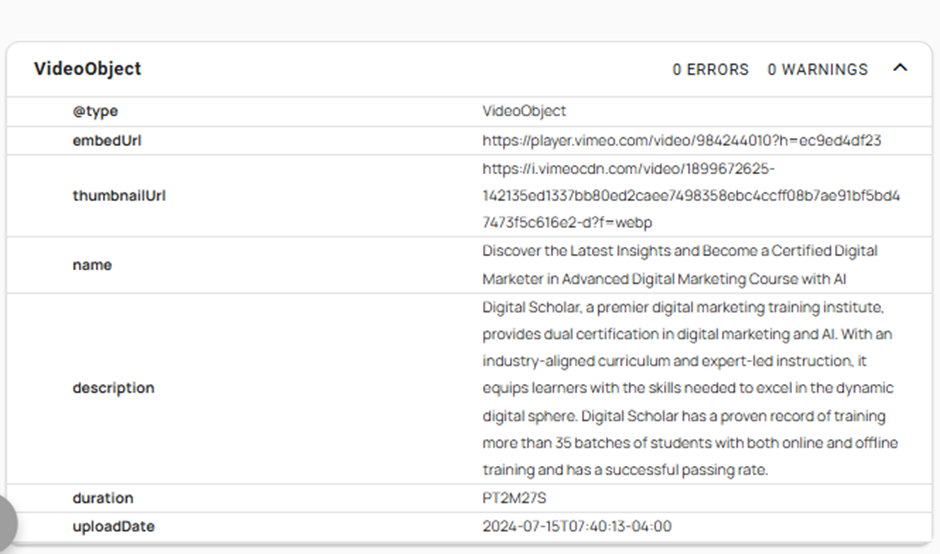
Here is the Rich Result Test result:

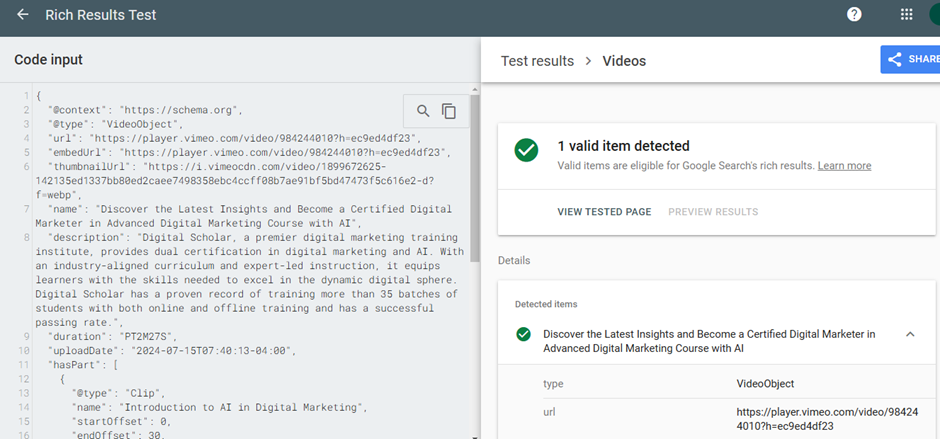
So, to get the following types for video-rich snippets, we need to optimize the video schema further with “Clip” and “SeekToAction” structure data,
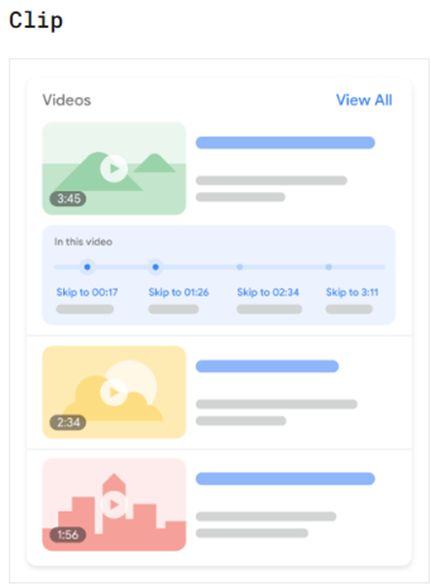
Clip Structured Data: Define each segment’s precise start and end times and assign a corresponding label. This feature is available in all languages and is supported by Google Search.
SeekToAction Structured Data: Indicate where timestamps appear in your URL structure, allowing Google to automatically detect key moments and direct users to specific points within the video.
Here is the recommended schema code for achieving desired result:
{
“@context”: “https://schema.org”,
“@type”: “VideoObject”,
“url”: “https://player.vimeo.com/video/984244010?h=ec9ed4df23”,
“embedUrl”: “https://player.vimeo.com/video/984244010?h=ec9ed4df23”,
“thumbnailUrl”: “https://i.vimeocdn.com/video/1899672625-142135ed1337bb80ed2caee7498358ebc4ccff08b7ae91bf5bd47473f5c616e2-d?f=webp”,
“name”: “Discover the Latest Insights and Become a Certified Digital Marketer in Advanced Digital Marketing Course with AI”,
“description”: “Digital Scholar, a premier digital marketing training institute, provides dual digital marketing and AI certification. An industry-aligned curriculum and expert-led instruction equip learners with the skills needed to excel in the dynamic digital sphere. Digital Scholar has a proven record of training more than 35 batches of students with both online and offline training and has a successful passing rate.”,
“duration”: “PT2M27S”,
“uploadDate”: “2024-07-15T07:40:13-04:00”,
“hasPart”: [
{
“@type”: “Clip”,
“name”: “Introduction to AI in Digital Marketing”,
“startOffset”: 0,
“endOffset”: 30,
“url”: “https://player.vimeo.com/video/984244010?h=ec9ed4df23&t=0”
},
{
“@type”: “Clip”,
“name”: “Dual Certification Benefits”,
“startOffset”: 31,
“endOffset”: 90,
“url”: “https://player.vimeo.com/video/984244010?h=ec9ed4df23&t=31”
},
{
“@type”: “Clip”,
“name”: “Success Stories & Training Highlights”,
“startOffset”: 91,
“endOffset”: 147,
“url”: “https://player.vimeo.com/video/984244010?h=ec9ed4df23&t=91”
}
],
“potentialAction”: {
“@type”: “SeekToAction”,
“target”: “https://player.vimeo.com/video/984244010?h=ec9ed4df23&t={seek_to_second}”,
“startOffset-input”: “required name=seek_to_second”
}
}
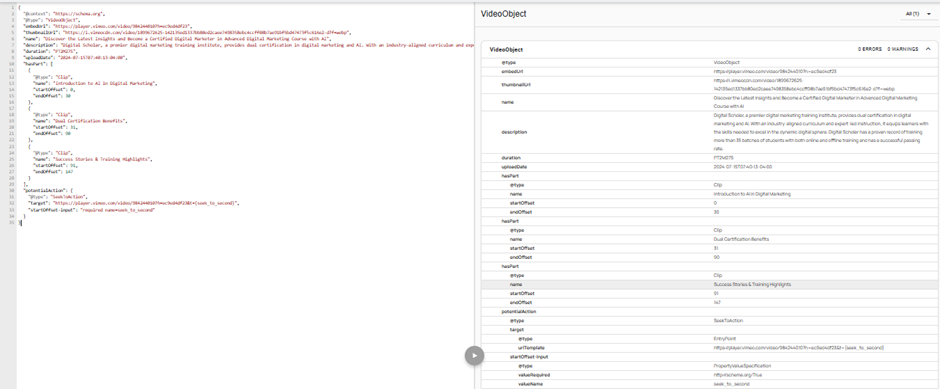
Test results:
Best Practices for Video Schema Upgradation
- Use Clip schema when you want to manually highlight key moments that are critical to user engagement.
- Enable SeekToAction schema for automated timestamping, allowing Google to process video content dynamically.
- Ensure all video URLs are accessible and properly formatted to avoid indexing issues.
- Test structured data implementation using Google’s Rich Results Test or Schema Validator to verify correct deployment.
- Regularly update structured data to include new video content and maintain accuracy in search indexing.
Common Errors and Troubleshooting
1. Incorrect JSON-LD Format
Issue: The structured data contains syntax errors or incorrect JSON-LD formatting. Solution: Validate the schema using Google’s Rich Results Test and ensure correct formatting.
2. Broken Video URLs
Issue: Video content is inaccessible, or links are broken. Solution: Ensure all video URLs are live, publicly accessible, and correctly linked in the structured data markup.
3. Missing Key Moments in Search Results
Issue: Google is not displaying key moments despite proper schema implementation. Solution:
- Allow Google some time to process the structured data.
- Monitor Google Search Console for warnings or errors related to video indexing.
- Ensure the video content is high quality and follows Google’s video SEO guidelines.
Conclusion
Upgrading video schema markup with Clip and SeekToAction structured data significantly enhances video discoverability, search appearance, and user engagement. By providing rich snippets with key moments, businesses can improve CTR, SEO rankings, and content accessibility.
These schema upgrades ensure your videos are properly indexed by Google, making them more searchable and interactive. Stay ahead in video SEO by adopting these structured data techniques and optimizing your video content for better reach and visibility.
Start upgrading your video schema today to gain a competitive edge in search rankings!