SUPERCHARGE YOUR ONLINE VISIBILITY! CONTACT US AND LET’S ACHIEVE EXCELLENCE TOGETHER!
CRSEO (Cognitive Resonance Search Optimization) is a solution that combines human intent, AI reasoning, and brand psychology. It addresses the current market disruption where traditional keyword mapping and AI’s logical responses don’t align with human emotional intent and brand psychology. CRSEO aims to synchronize these elements by optimizing for emotional intent vectors, using AI logical flow paths, and employing persuasive answer sequencing. This approach considers factors like fear, risk avoidance, confidence, authority, and social proof to achieve “cognitive dominance” rather than just visibility.

But the question is how can we analyse and take the implementation steps for achieving the CRSEO, so there are some set of different stages for analyzing the data sets.
Here I am providing step by by step procedure for getting the researched data outputs of each stages,
Emotional Intent Vectorization using embedding similarity and CORA – CRSEO Stage 1
Identification of emotional intent vectors behind your audience’s searches
Mapping of: Fear, Risk avoidance, Confidence gaps, Safety needs, Authority ,expectations, Social proof triggers
Final Output Client value: You understand why users search—not just what they type Eliminates guesswork in intent mapping
Below is a Google Colab Python Program that:
- Takes CSV or Excel of search queries as input
- Computes “emotional intent vectors” per query using embedding similarity (like word vectors → intent vectors)
- Maps each query onto these dimensions:
- Fear
- Risk avoidance
- Confidence gaps
- Safety needs
- Authority expectations
- Social proof triggers
- Exports results to Excel (.xlsx)
- Generates graphs (heatmap + distributions + intent averages)
This uses Sentence Transformers embeddings and a prototype-anchor vector for each intent dimension
Here is the following Code Example:
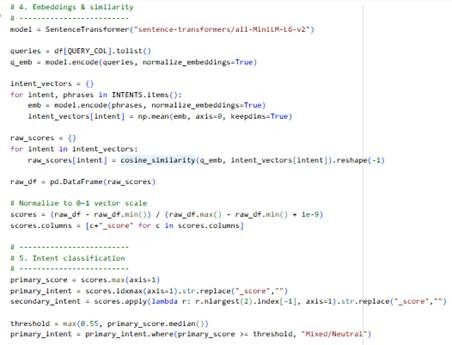
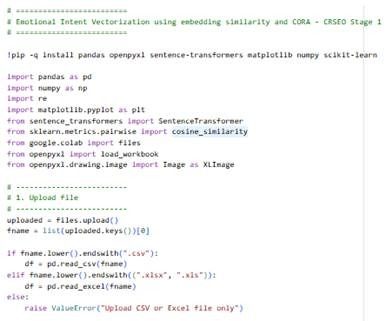
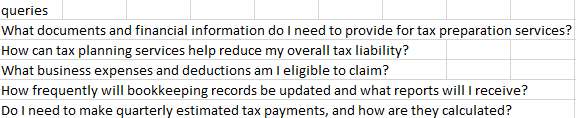
Here is the sample input: Where we have given set of search queries which is typically used on different platforms(Search Engine, LLMs, Social Media)
And here is the output of the analysis:

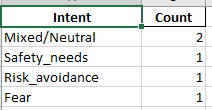
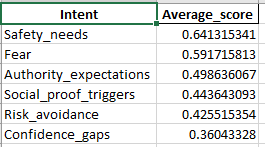
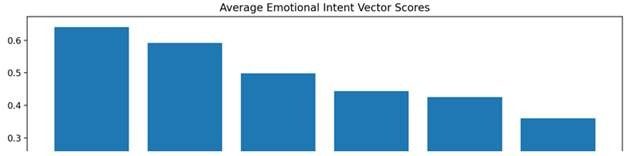
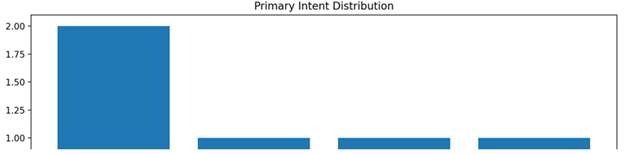
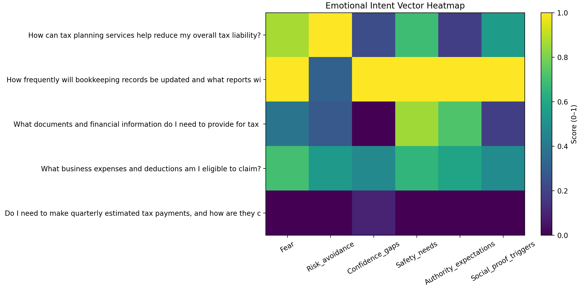
Implementation stage on the website content according to the emotional intent mapping:
Vector-based emotional intent scoring (not rules, not keywords)
Works across ANY business niche
Psychological intent dominance per query
Excel-ready intelligence for:
- Content strategy
- Conversion architecture
- AI-search readiness foundations
Now based on the analysis and by getting the appropriate emotional intent behind a particular search, we can design the content accordingly to justify the emotional intent of the search by the user.
Emotional Intent Vector Map (EIVM) Clustering – CRSEO Stage 2
Input: the Excel output from Module 1 (your “Intent_Vectors” sheet / file)
Output: a strategic map across funnel stages:
- Awareness
- Evaluation
- Decision
- Post-purchase trust
The analytical program will perform:
- Read the intent-vector scores (Fear_score, Risk_avoidance_score, etc.)
- Build stage vectors (domain-agnostic) via embeddings and score each query to a stage
- Run clustering over the emotional vectors (KMeans) to uncover natural groups
- Map clusters → stages using stage prototype similarity
Here is the following Code Example:
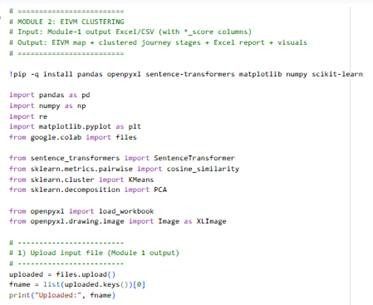
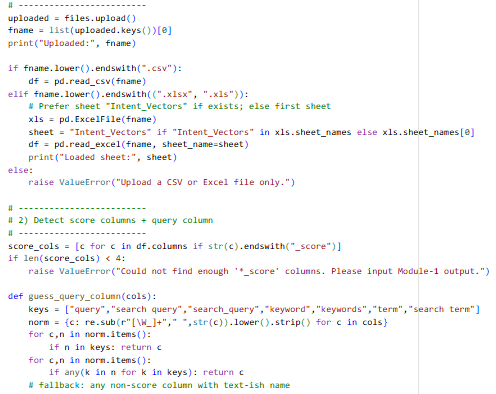
Here is the sample input: Upload the excel/csv file of the output you have got from the Module 1

And here is the output of the analysis:

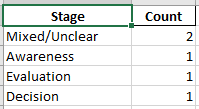
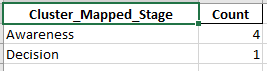
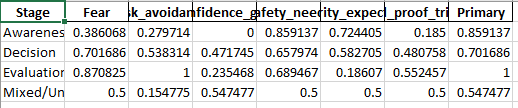
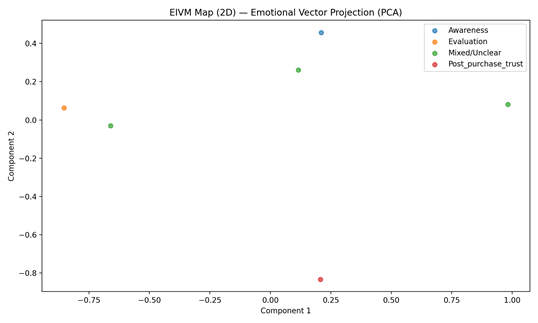
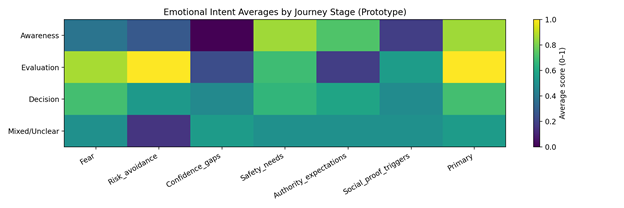
Implementation stage on the website according to the emotional intent vector map clustering:
1) Stage assignment per query
Each query gets labeled as one of:
- Awareness (learning / problem recognition)
- Evaluation (comparing / validating / checking proof)
- Decision (ready to act / pricing / booking / signup)
- Post-purchase trust (support, refunds, setup, troubleshooting, reassurance)
Why it matters: you stop serving the wrong page type to the wrong mindset.
2) Emotional vector intensity per stage
For each stage, you get averages like:
- Awareness might be high in Confidence gaps
- Evaluation might spike in Risk avoidance + Social proof
- Decision might spike in Authority expectations + Safety
- Post-purchase might spike in Safety + Fear + Risk avoidance
Why it matters: you learn what blocks users psychologically at each stage.
3) Clusters inside the emotional space
KMeans groups queries into “emotional patterns”. Example patterns you’ll see in real data:
- “high fear + safety” cluster (people need reassurance)
- “high social proof + confidence gaps” cluster (people need examples)
- “high authority expectations” cluster (people need credibility cues)
Why it matters: you can create content modules that target each pattern and reuse them across pages.
4) Mixed/Unclear bucket
Queries with weak stage signal go to Mixed/Unclear.
Why it matters: these often need a hub page or a “guided path” (interactive) rather than a single static page.
How to implement on the website using the data
Step 1: Create a page map from the “Stage_Distribution”
Use the stage counts to decide what to build first:
- If Awareness dominates → build more educational hubs and glossary pages
- If Evaluation dominates → build comparisons, proof pages, “why us” pages
- If Decision dominates → optimize landing pages, pricing, checkout/lead forms
- If Post-purchase dominates → build support center, onboarding, reassurance content
Implementation output: a content roadmap prioritized by demand.
Step 2: Route queries to the “right page type”
From Top_Awareness, Top_Evaluation, etc. in the Excel:
Awareness pages should look like:
- “What is X / How it works”
- Problem framing
- Clear definitions
- Low-pressure CTA (“See options”, “Compare solutions”)
Evaluation pages should look like:
- Comparisons (X vs Y)
- Use cases
- Reviews/testimonials
- Proof blocks (case studies, stats, outcomes)
- Risk reduction blocks (warranty/refund/guarantee)
Decision pages should look like:
- Pricing + packages
- Clear next steps
- FAQs that reduce hesitation
- Authority signals close to CTA (certs, credentials, “trusted by”)
- Strong “safety reassurance” around checkout/lead form
Post-purchase trust pages should look like:
- Setup guides
- Troubleshooting
- Returns/refunds/warranty
- “What to expect next”
- Contact/support visibility
Implementation output: each stage becomes a specific page template.
Step 3: Convert emotional vectors into “content blocks” (reusable modules)
Use Emotion_Avg_By_Stage and also per-query _score to decide what blocks must appear.
If Fear is high:
Add:
- “What could go wrong (and how we prevent it)”
- Safety disclaimers
- “Common worries” section
- Transparent limitations
If Risk_avoidance is high:
Add:
- Refund/return/guarantee block near CTA
- “No-risk trial” framing
- Pricing transparency
- “Decision checklist” section
If Confidence_gaps is high:
Add:
- Step-by-step guidance
- “How to choose” quizzes
- Explainers, “for beginners”
- Comparison tables
If Safety_needs is high:
Add:
- Security/privacy/compliance section
- Trust badges (real ones)
- Data handling explanations
- “How we keep you safe” page
If Authority_expectations is high:
Add:
- Credentials, certifications, authorship
- Expert quotes
- “As seen in / backed by”
- Sources & references
If Social_proof is high:
Add:
- Testimonials near decision points
- Case studies
- Review snippets + star rating schema where valid
- Community proof (“10,000+ users”)
Implementation output: a block library mapped to intent.
Step 4: Fix drop-offs by stage (conversion tuning)
Use stage + emotion to fix the “why users hesitate” point:
- If Decision + Risk_avoidance high → the CTA is too early; add guarantee, FAQs, pricing clarity
- If Evaluation + Authority high → you need stronger proof (expertise, citations, “how we do it”)
- If Awareness + Confidence gaps high → simplify language, add guided flows
Implementation output: conversion improvements that are psychological, not cosmetic.
A simple way to operationalize this:
- Export top 50 queries per stage
- For each stage:
- pick top 10 queries by stage score
- build/refresh 1 page template + 2 content blocks
- Track changes in:
- stage distribution shift
- average fear/risk scores
- conversions by stage pages
AI Logical Flow Path Modeling– CRSEO Stage 3
Input: Upload the EMV cluster file which you have got from the experiment module 2 (CRSEO stage -2)
What this Module 3 delivers (in output)
- AI Logical Flow Path Modeling per query:
- How an AI system is likely to:
- interpret the query
- decide what it needs (definitions, steps, comparisons, proof, safety)
- choose authoritative sources
- compose the final answer
- Diagrammatic flow models:
- Flow diagrams per Stage and per Cluster-Stage
- Each diagram highlights the “reasoning steps” emphasized by the emotional vectors (Fear/Risk/Authority/Social proof etc.)
- Implementation-ready recommendations:
- For each stage/cluster: “what to add on the page” so AI answer engines pick you (E-E-A-T signals, citations, FAQs, schema hints, trust anchors, comparisons, etc.)
Here is the following Code Example:
Here is the sample input: Upload the excel/csv file of the output you have got from the Module 2 (CRSEO stage 2)
And here is the output of the analysis:
How to implement this output on your website (practical steps)
From the Module-3 Excel:
1) Use Stage_Playbook as your website blueprint
For each stage (Awareness/Evaluation/Decision/Post-purchase):
- Build a page template
- Insert the recommended “content modules” (FAQ, comparison, proof, safety caveats, expert byline, citations, etc.)
This aligns your pages with how AI systems rank answers (they look for: direct answer, structured steps, evidence, authority, constraints, comparisons, and trust signals).
2) Use Flow_By_Query to drive content creation
Pick the top queries and implement the exact modules suggested in:
- Recommended_content_modules
- AI_logical_flow_path
Example:
- If flow emphasizes Authority_Check + Retrieve_Evidence → add:
- author bio + credentials
- citations (primary sources)
- methodology
- “last updated” freshness
- If flow emphasizes Risk_Safety_Check → add:
- “Risks & how we mitigate” section
- clear caveats
- refund/warranty/support information near CTAs
3) Use the diagrams to structure your pages in AI-friendly order
If your diagram is:
Interpret -> Clarify -> Evidence -> Authority -> Compare -> Social proof -> Summary
Then your page should follow that same sequence:
- Short answer first
- Clarify constraints
- Evidence + citations
- Authority proof
- Comparison / alternatives
- Social proof
- Summary + next steps
That sequencing increases selection in AI Overviews/SGE because it resembles an answer-engine “reasoning trace”.
Content Gap Validation using AI Logical Flow Path Modeling– CRSEO Stage 4
In this module we will analyze and find out the gaps in contents according to AI logical Flow Path Modeling
so, What your input sheet should look like:
What the output means:
- expected_coverage_score_0_1: how well the page matches the stage template needed for AI answer selection.
- missing_expected_modules: exactly what modules to add (FAQ, citations, author bio, etc.)
- Priority_Fixes: your “do these first” list.
- Charts: instantly see which stage and which modules are hurting you.
Here is the following Code Example:
Here is the sample input: Upload the excel/csv file containing the pages that you want to analyze the gaps
Here is the output:
1) Start from the right sheet
Open Content_Gap_Validator_Report.xlsx and work in this order:
- Priority_Fixes → fastest ROI pages to fix first
- Stage_Summary → tells which stage is structurally weak across the site
- Gap_Output → the exact page-level missing modules
2) Decide the page objective using stage_used
Every page must be treated as one of these page types:
Awareness page (learning)
Goal: educate + reduce confusion.
Best for: “what is”, “how it works”, “meaning”, “guide”.
Evaluation page (comparison/validation)
Goal: prove + compare + reduce risk.
Best for: “vs”, “best”, “reviews”, “alternatives”.
Decision page (action)
Goal: commit + remove hesitation.
Best for: “pricing”, “buy”, “book”, “sign up”.
Post-purchase trust page (retention/support)
Goal: reassure + solve issues.
Best for: “refund”, “setup”, “support”, “troubleshooting”.
If a page is misclassified or trying to do all stages at once, split it:
- one page = one intent + one stage
3) Implement modules (the site-wide “block library”)
In Gap_Output, look at missing_expected_modules. These are the blocks you must add.
Here’s exactly how to implement each module on a page (copy this into your SOP):
A) Direct_answer_block (Top-of-page “Answer First”)
Where: Within the first screen (top 300–600px).
What to add:
- 1–3 sentence direct answer
- followed by a short bullet list “Key takeaways”
Why: AI Overviews and answer engines prioritize pages that answer immediately.
B) Key_points_list
Where: directly after the direct answer.
What to add:
- 5–8 bullets that summarize the page
Why: AI systems extract list snippets easily.
C) FAQ_section
Where: near the bottom + also place 2–3 “top objections” mid-page near CTA.
What to add:
- 6–12 questions
- include fear/risk questions explicitly:
- “Is it safe…?”
- “What can go wrong…?”
- “Who is this NOT for…?”
Bonus: Add FAQ schema if possible.
D) Citations_or_sources
Where: after key claims (stats, medical/legal/technical advice).
What to add:
- “Sources” section with 3–10 credible references
- link to primary sources (gov/edu/official docs)
Why: authority selection improves.
E) Author_bio_or_cred (E-E-A-T)
Where: near top OR end of article (visible).
What to add:
- Author name + role + experience
- link to author page
- editorial policy link if you have one
Why: AI wants credibility signals.
F) Last_updated_freshness
Where: top of page near title.
What to add:
- “Updated on: 2026-01-20” style date
- update whenever you change the page
Why: answer engines prefer fresh pages for evolving topics.
G) Comparison_table
Where: evaluation pages, mid-content.
What to add:
- a table comparing options by:
- cost, features, suitability, risks, best for
Why: AI extracts comparison snippets.
H) Social_proof
Where: evaluation pages and decision pages near CTA.
What to add:
- testimonials, review snippets
- case study summary cards
- “trusted by X companies” proof (real)
Why: reduces uncertainty + helps conversion.
I) Risk_safety_caveats
Where: before CTA and in FAQ.
What to add:
- “Risks & limitations” section
- “Who should avoid this” section
- mitigation steps
Why: reduces fear + increases trust.
J) Step_by_step
Where: awareness + post-purchase pages.
What to add:
- numbered steps
- screenshots / examples if possible
Why: AI likes procedural clarity (HowTo format).
K) Support_or_contact
Where: decision pages (near CTA) + post-purchase pages (top + bottom).
What to add:
- support link + email/chat/phone
- response time promise
Why: boosts post-purchase trust + reduces hesitation.
L) Refund_warranty_policy
Where: decision pages, near pricing/CTA.
What to add:
- refund terms, warranty terms, cancellation terms
Why: removes risk avoidance barrier.
M) Schema_like_QA
Where: site code (JSON-LD).
What to add:
- FAQPage schema for FAQs
- HowTo schema for step-by-step pages
- Organization schema + Author schema
Why: improves machine readability and snippet selection.
4) Use the scoring to prioritize fixes
In Gap_Output:
Fix first:
- missing_count high
- expected_coverage_score_0_1 low
- Pages in stages where Stage_Summary shows weak averages
This gives you the fastest improvement with least work.
Persuasive Answer Sequencing Framework – CRSEO stage 5
What it does:
· Generates structured answer flows that acknowledge fear, reduce risk, build confidence, signal authority,
· add social proof, provide safety reassurance — tailored per query and per stage/cluster.
· Produces reusable “Answer Sequence Templates” per stage and per dominant emotional cluster.
Here is the sample code:
Sample Input: Module-2 EIVM_Clustering_Report.xlsx OR Module-3 output (with *_score + stage columns + query)
Here is the output:
What the output gives you:
Per_Query_Sequencing: For every query, it generates:
- the ordered persuasive blocks
- a ready-to-copy “Answer Blueprint”
- dominant emotional drivers (why this sequence is chosen)
- Stage_Templates: Reusable flow templates for each journey stage
- Cluster_Templates: (if you have EIVM_cluster_id) more granular flows per emotional cluster
Persuasive Answer Sequencing – Page Implementation
1. Always start with a Direct Answer (Top of Page)
- Add 1–3 sentences answering the query immediately
- Place it above the fold
- Follow with 3–5 bullet key points
✅ AI picks this first
✅ Users feel guided, not sold
2. Acknowledge Fear Early (If Fear/Risk Scores Are High)
- Add a short line like:
- “It’s normal to worry about…”
- “The biggest concern people have is…”
- Place right after the direct answer
✅ Reduces psychological resistance
✅ Increases trust instantly
3. Reduce Risk Before Asking for Action
- Add one of these near the CTA:
- Refund / guarantee
- “Start small” option
- Reversible step explanation
- Show what happens if it doesn’t work
✅ Removes hesitation
✅ Improves conversion quality
4. Build Confidence With Clarity
- Add:
- Step-by-step explanation OR
- “How to choose” checklist
- Use simple language (no jargon)
✅ Helps confused users move forward
✅ Reduces drop-offs
5. Signal Authority (Before the CTA)
- Add at least 2 of these:
- Author bio + credentials
- Expert quotes or standards
- Sources / citations
- “Last updated” date
✅ AI trusts the page more
✅ Users believe the content
6. Reinforce Social Proof Near Decision Points
- Add:
- Testimonials
- Case studies
- Usage numbers (real)
- Place right above or below CTA
✅ Validates the decision
✅ Prevents second-guessing
7. Provide Safety & Reassurance
- Add a small section:
- “Who this is NOT for”
- “Risks & limitations”
- “Common mistakes to avoid”
✅ Increases perceived honesty
✅ Builds long-term trust
8. Add an Objection-Handling FAQ
- 5–10 FAQs covering:
- Safety
- Risk
- Cost
- Legitimacy
- Place after main content
✅ AI answer engines love this
✅ Users feel fully informed
9. End With a Soft, Stage-Matched CTA
- Awareness → “Learn more / Explore”
- Evaluation → “Compare / See examples”
- Decision → “Start / Book / Choose”
- Post-purchase → “Get support / Fix issue”
❌ No hard selling
✅ Feels natural
Cognitive Content Architecture – CRSEO Stage 6
What it does:
# – Takes Module-2/3/4 outputs (with EIVM stage + emotional vector scores) and generates:
# 1) Page Structure Blueprints (per query, per stage, per cluster)
# 2) Cognitive Headers (H1/H2/H3 suggestions)
# 3) Trust Anchors + Authority Signals placement plan
# 4) Emotional Reinforcement Blocks (fear/risk/confidence/safety/social proof)
Here is the sample code:
Sample input:
Here is the output:
What the output gives you (very practical)
- Per_Query_Blueprints: for each query you get:
- exact page structure sequence
- suggested H1 and H2 headers
- exactly what trust anchors, authority signals, and emotional reinforcement blocks to insert
- Stage_Templates: reusable templates to apply across pages
- Cluster_Templates: hyper-specific templates per emotional cluster
Cognitive Content Architecture – Practical Page Implementation
1. Identify the Page’s Role (Mandatory First Step)
Source column: Stage
Each page must serve one primary cognitive stage only.
| Stage | Page Intent |
| Awareness | Educate, explain, remove confusion |
| Evaluation | Compare, validate, reduce doubt |
| Decision | Enable commitment, reduce risk |
| Post_purchase_trust | Reassure, support, retain |
| Mixed/Unclear | Hub or routing page |
Implementation rule:
- If a page is trying to do more than one stage → split it.
2. Build the Page in the Exact Order Given
Source column: Page_structure_sequence
Example:
Cognitive_Header → Direct_Answer → Key_Takeaways → Emotional_Reinforcement → Trust_Anchors → Authority_Signals → Social_Proof_Block → FAQ_Objections → CTA_Block → Summary
Implementation rule:
- Each arrow (→) = one visible page section
- Sections must appear in the same order
- Do not rearrange for design or aesthetics
This order mirrors how AI systems reason and how users psychologically progress.
3. Implement Cognitive Headers (Memory + AI Clarity)
Source columns: H1_suggestion, H2_suggestions
H1 (Page Title)
- Use H1_suggestion verbatim or near-verbatim
- Must reflect the user’s original question
H2s (Section Headers)
- Each item in H2_suggestions becomes one H2
- Do not invent extra H2s unless explicitly required by data
Why this matters:
- Headers are how AI engines understand reasoning
- Headers also drive user recall
4. Insert Emotional Reinforcement Blocks (Psychological Safety)
Source column: Emotional_reinforcement_blocks
Each listed item must be implemented as a dedicated section.
Examples:
- “Is it normal to worry about this?”
- “Common fears explained honestly”
- “How to avoid mistakes”
Rules:
- Name the fear or doubt explicitly
- Reassure with facts, not hype
- Never bury emotional reassurance inside generic paragraphs
5. Add Trust Anchors (Risk Reduction)
Source column: Trust_anchors_to_add
Each item listed must be visibly present before the CTA.
Typical trust anchors:
- Refund / guarantee explanation
- Support or contact visibility
- Privacy / safety / compliance notes
- “Who this is NOT for”
Rule:
If Fear_score, Risk_avoidance_score, or Safety_needs_score > 0.6, trust anchors are mandatory.
6. Place Authority Signals Where Claims Are Made
Source column: Authority_signals_to_add
Implementation requirements:
- Author byline with credentials
- Citations placed next to claims (not just at the bottom)
- Methodology or standards referenced
- Visible “Last updated” date
Rule:
Authority must appear inside the page, not only on About pages.
7. Reinforce Social Proof at Decision Points
Triggered when:
Social_proof_triggers_score > 0.6
Implementation:
- Place testimonials or case summaries near CTAs
- Use short, specific proof (outcomes, results)
- Avoid generic praise
Example section:
“How others solved this problem”
8. Use FAQs to Resolve Final Objections
Source: FAQ_Objections block in structure
FAQ must address:
- Safety concerns
- Risk and failure scenarios
- Cost and reversibility
- Legitimacy and trust
Best practice:
- 5–10 FAQs
- Clear, direct answers
- Add FAQ schema if possible
9. Apply Stage-Matched CTAs Only
CTA placement and wording must match the stage.
| Stage | CTA Style |
| Awareness | Learn more / Explore |
| Evaluation | Compare / See examples |
| Decision | Start / Book / Choose |
| Post_purchase_trust | Get support / Fix issue |
Rule:
Never place CTA before fear, risk, and authority sections are resolved.
10. Validate Completion (Publish Checklist)
A page is considered complete only if:
- All sections in Page_structure_sequence exist
- All items in Trust_anchors_to_add are visible
- All items in Authority_signals_to_add are visible
- Emotional blocks are explicit
- Headers match H1 + H2 suggestions
- CTA matches stage
If any item is missing → page is not publish-ready.
Execution Principle (Non-Negotiable)
Do not add content unless the data demands it, and do not ask users to convert until fear, risk, and authority have been resolved.
This document should be used as a standard operating procedure (SOP) for implementing Module 5 outputs across the website.
Cognitive Conversion Path Mapping – CRSEO stage 7
What it does (end-to-end):
# – Takes URL list
# – Fetches each page, extracts visible text + structure signals
# – Re-runs the “needful” prior logic internally:
(1) Emotional intent vectors (Fear, Risk avoidance, Confidence gaps, Safety needs, Authority expectations, Social proof)
(2) EIVM journey stage (Awareness/Evaluation/Decision/Post-purchase trust)
(3) AI logical flow steps (what answer engines expect)
(4) Persuasive answer sequencing suggestion
(5) Content-gap checks (missing trust/authority/proof/etc.)
# – Produces final: Cognitive Conversion Path Map per URL:
# * Why users hesitate
# * Where they lose confidence
# * What makes them commit (commitment triggers)
# * Fix plan beyond CTA buttons
Here is the sample code:
Here is the sample input:
Here is the output:
How to implement (use these output columns)
1) Fix “Where_confidence_drops” first (it tells where to edit)
Column: Where_confidence_drops
Action rules:
- If it says “Top of page: no clear direct answer”
Add a 1–3 sentence “Direct Answer” + Key Takeaways bullets in the first screen. - If it says “Before CTA: missing risks/limitations section”
Insert a Risks & Limitations / Who this is not for block right before CTA. - If it says “Bottom: missing objection-handling FAQ”
Add FAQ section (6–12 Qs) at the end + FAQ schema.
2) Apply fixes based on “Why_users_hesitate” (it tells why they don’t convert)
Column: Why_users_hesitate
Action mapping:
- If it includes Fear not resolved
Add:- “Is it safe?” section
- “Risks & limitations”
- “How to avoid mistakes”
- If it includes Evaluation friction (no comparisons/alternatives)
Add:- Comparison table
- Alternatives section
- “Best for” recommendations
- If it includes Authority doubt
Add:- Author credentials
- Sources/citations beside key claims
- “Last updated”
- If it includes Social proof missing
Add:- Testimonials/case snippets near CTA
- “Results” or “Used by” proof
3) Use the _present columns as your checklist (binary implementation)
Columns like:
- Direct_answer_block_present
- FAQ_section_present
- Risk_safety_caveats_present
- Comparison_table_present
- Last_updated_freshness_present
- Schema_like_QA_present
Action rule:
- Anything < 0.5 = must add that module on the page.
Stage-based implementation (use EIVM_stage)
If EIVM_stage = Awareness
Goal: reduce confusion + fear early
Add in order:
- Direct answer + takeaways (top)
- Simple explanation (no jargon)
- Risks/limitations (if fear scores are high)
- FAQ
- Soft CTA (“Learn more / Explore”)
If EIVM_stage = Evaluation
Goal: help them choose (not convince them)
Add in order:
- Direct answer + takeaways (top)
- Comparison table
- Best-for recommendations
- Proof + sources
- FAQ
- CTA (“Compare / Choose”)
If EIVM_stage = Post_purchase_trust
Goal: restore confidence + prevent regret
Add in order:
- Direct fix / answer at top
- Step-by-step “what to do now”
- Safety/limitations
- Support/contact + policy visibility
- FAQ (“common problems”)
According to the output we have got from the above analysis, here are the needful steps to follow for further implementations:
From your Priority_Fixes rows, the highest-impact fixes repeatedly are:
A) Add “Direct Answer” block on every page
Because your report flags: Top of page: no clear direct answer on multiple URLs.
Implement:
- 1–3 sentence answer
- 3–6 bullets “Key Takeaways”
B) Add “Risks & Limitations” before CTA on pages showing Fear friction
Because your report flags: Fear not resolved + Before CTA missing risks/limitations.
Implement:
- “What can go wrong”
- “Who should avoid this”
- “How to do it safely”
C) Add an Objection-handling FAQ + FAQ schema
Because your report flags missing objection handling.
Implement:
- 6–12 FAQs (safety, cost, results, mistakes)
- Add FAQPage JSON-LD schema
D) Add Comparison module on Evaluation pages
Because your report flags: Evaluation friction (no comparisons/alternatives).
Implement:
- table: option vs option
- alternatives
- “best for X” guidance
E) Add “Last updated” + citations (trust upgrade)
Because Last_updated_freshness_present and Citations_or_sources_present are missing on priority pages.
Implement:
- “Last updated: YYYY-MM-DD” near top
- cite sources beside claims (not only at bottom)
“Do this first” (simple execution order)
- Open Priority_Fixes sheet
- For each URL, implement modules where *_present < 0.5 in this order:
- Direct Answer (top)
- Risk/Safety block (before CTA)
- FAQ (bottom)
- Comparison (Evaluation pages)
- Authority (author + citations + last updated)
- Schema (FAQPage/HowTo)
AI Search Readiness Optimization and Cognitive Dominance Dashboard -CRSEO Final stage
Example code:
INPUT: Upload an Excel/CSV with a column containing URLs (e.g., url, URLs, page_url, link)
Here is the output:
Below are actual, do-this-now action steps that are directly driven by the output columns/sheets from Module 8 (AI Search Readiness) and Module 9 (Cognitive Dominance Dashboard).
1) Start with the right sheet (what to do first)
Sheet: Fix_Plan_By_URL
Sort by:
- Priority_Opportunity_0_1 (DESC)
Action: Work top → down.
This sheet already gives you the “what to change” per URL.
2) Execution rules by score (the “if score then do” system)
A) If AI_Readiness_Index_0_1 < 0.65
Your content is not framed for AI selection.
Do these edits on the page (in this exact order):
- Add Direct Answer block at the top (1–3 lines)
- Add Key Takeaways bullets (3–6 bullets)
- Add FAQ section (6–12 questions)
- Add FAQPage schema (JSON-LD)
- Add “Last updated” near top
B) If Selection_Risk_0_1 > 0.35
AI systems are likely to skip your page even if it ranks.
Do these edits (minimum set):
- Add citations/sources beside key claims
- Add author byline + credentials
- Add Risks & limitations / Who-not-for section
- Add internal links to next-step pages (explained below)
C) If Credibility_EEAT_explicit < 0.60 OR Trust_Signals_Index_0_1 < 0.60
Your page lacks trust signals.
Add these blocks (visible, not footer-only):
- Author box with credentials
- Editorial policy / review process link
- Sources/References section (and inline citations)
- Last updated
- If it’s product/service: support + refund/warranty block
D) If Conversational_QA_explicit < 0.60
You’re not “answer-engine friendly”.
Fix:
- Rewrite key sections into Q → A mini blocks
- Add FAQ where every question mirrors how users ask in chat:
- “Is it safe?”
- “What if it doesn’t work?”
- “How long does it take?”
- “Who is it for / not for?”
E) If Risk_Safety_explicit < 0.60
You’re missing reassurance (major reason for AI and user drop-offs).
Add this exact block before CTA:
“Risks & Limitations”
- what can go wrong
- who should avoid
- mitigation steps
- what you do to keep it safe/privacy-compliant
F) If Proof_Trust_explicit < 0.60 OR Recommendation_Likelihood_0_1 < 0.60
You’re missing proof signals.
Add near CTA + near key claims:
- 3–6 testimonials (specific outcomes)
- 1–2 short case studies (before/after)
- “Trusted by” proof (logos/metrics)
G) If Structure_explicit < 0.60
Your page isn’t “machine-readable”.
Add:
- More H2/H3 sections (clear headings)
- At least one:
- table (comparison/decision matrix) or
- ordered step list
- Short paragraphs + bullets
3) Build the “AI Selection Layout” (one template you apply everywhere)
When you edit any URL, force this structure:
- Direct Answer (top)
- Key Takeaways (bullets)
- Explanation / steps
- Authority proof (author + citations)
- Risk & limitations
- Social proof
- FAQ objections
- CTA
This layout directly improves:
- Answer_First
- Credibility_EEAT
- Conversational_QA
- Risk_Safety
- Proof_Trust
4) Internal linking steps (based on readiness + dominance)
Use Per_URL_AIO_Readiness and your page type logic:
Rule: every page must link forward.
- Educational → link to comparison
- Comparison → link to pricing/decision
- Decision → link to support/trust
Action:
If sig_internal_links is low OR your int_links < 5, then:
- Add a Next step block with 3 internal links:
- “Compare options”
- “See pricing / book”
- “Support / policies”
This increases:
- AI comprehension
- Engagement_Depth_0_1
- Recommendation_Likelihood_0_1
5) How leadership should read the dashboard
Sheet: Cognitive_Dominance_Dashboard
Use these decisions:
If Cognitive_Dominance_Index_0_1 is high BUT AI_Readiness_Index_0_1 is low
You’re strong as a brand, but AI won’t select you.
Action: Add Answer-first + schema + citations to make AI pick you.
If AI_Readiness_Index_0_1 is high BUT Trust_Signals_Index_0_1 is low
You’re structured, but not trusted.
Action: Add author, sources, updated date, policies, proof.
If Recall_Proxy_0_1 is low
People won’t remember you.
Action:
- include brand token in:
- H1 or hero
- conclusion
- proof blocks (case studies)
- add consistent branded “framework name” sections
6) The simplest action plan per URL (what your team should literally do)
For every URL in the top of Fix_Plan_By_URL:
- Implement every missing evidence signal where:
- has_direct_answer = 0 → add Direct Answer block
- has_author = 0 → add Author block
- has_sources = 0 → add Sources + inline citations
- has_last_updated = 0 → add Last updated
- has_social_proof = 0 → add Proof block
- has_risk_safety = 0 → add Risks & limitations
- has_faq = 0 → add FAQ
- has_jsonld = 0 → add schema
- Re-run module after updates and track:
- AI_Readiness_Index_0_1 should move toward 0.75+
- Selection_Risk_0_1 should drop below 0.25
- Trust_Signals_Index_0_1 should rise above 0.70