How To Fix Mobile Usability Using Screaming Frog

How To Fix Mobile Usability Using Screaming Frog

SUPERCHARGE YOUR ONLINE VISIBILITY! CONTACT US AND LET’S ACHIEVE EXCELLENCE TOGETHER!

    In an era where mobile devices dominate our daily lives, ensuring that your website is mobile-friendly is crucial. Fix Mobile usability not only affects your search engine rankings but also plays a significant role in user satisfaction. One powerful tool that can help you achieve mobile usability excellence is Screaming Frog SEO Spider. In this blog, we’ll explore how you can use Screaming Frog to fix mobile usability issues and enhance your website’s overall performance.

    In this blog we try to crawl the important pages of a Website and try to analyze how Google Crawler is able to see and scan the web pages.

    Most often the Webpages are not crawled properly by Google Bot crawlers due to Blocked Resources. Lets analyse your Website in this case.

    Mobile Usability Fix Using Screaming Frog

    Why Mobile Usability Matters:

    Before diving into how to use Screaming Frog, let’s briefly discuss why mobile usability is so important:

    1. User Experience: Mobile users expect a seamless and user-friendly experience. If your website isn’t optimized for mobile devices, visitors are more likely to bounce, leading to lost potential customers.
    2. SEO Rankings: Google considers mobile-friendliness as a ranking factor. Websites that provide a better mobile experience are more likely to rank higher in search results.
    3. Competitive Advantage: In a competitive online landscape, having a mobile-friendly website can set you apart from competitors and attract a wider audience.

    Step 1: Open Screaming Frog > Crawl Configuration > Enable Javascript Rendering.
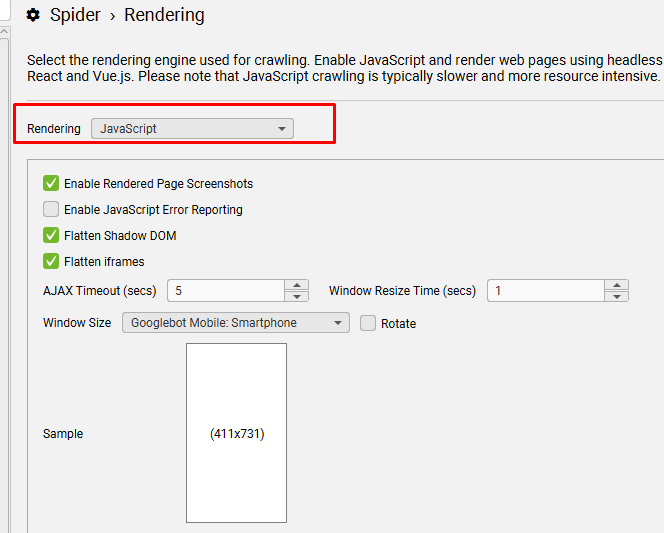
    Step 2: Run a Crawl of the website’s most important pages.

    You can use the list mode as a full crawl is not necessary.

    Step 3: Select one of the pages and then select the Rendered Page Tab as shown in the Screenshot.

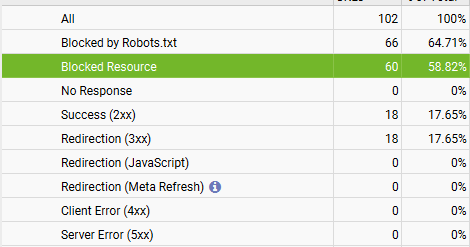
    Observation: If you check the screenshot accurately, then one can see that the web page is not loaded properly.
    \

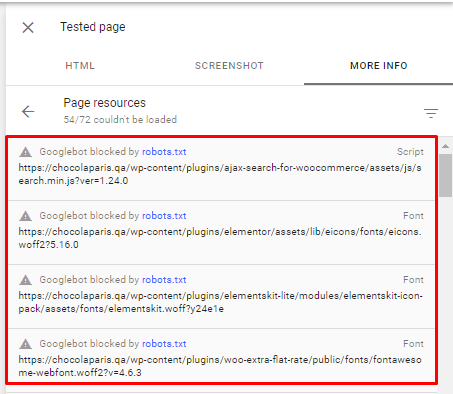
    This is because most of the resources required to load the webpage are blocked by Robots.txt.
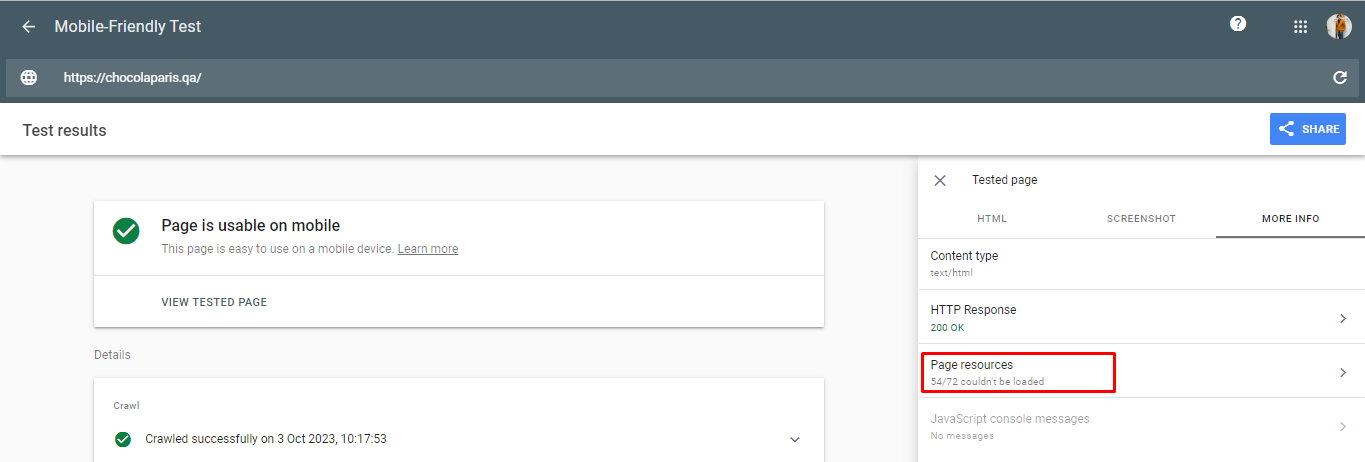
    By running a Test in Mobile Usability Tester of Google also yields the same observation.

    Whats the Fix?

    Step 4 : Choose one of the Blocked Resources and Test against the Robots.txt.
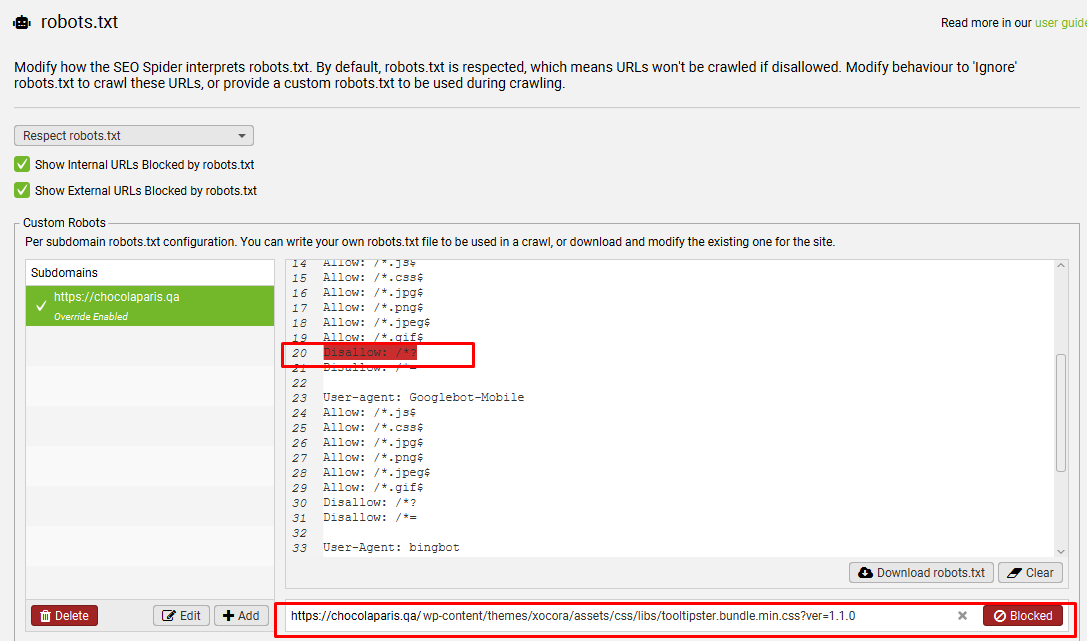
    As you can see its blocked. We need to modify the following codes in robots.txt.

    Disallow: /*?

    Disallow: /*=

    By making the above modifications, we can see the resources are unblocked from robots.txt.

    Step 5: Making the above changes Index the Website Once and it should Fix the Issue.

    Screaming Frog SEO Spider is a valuable tool for improving mobile usability on your website. By following the steps outlined in this guide, you can identify and address mobile usability issues, enhancing both the user experience and your site’s SEO performance. Remember that a mobile-friendly website is not just an option; it’s a necessity in today’s digital landscape. So, don’t wait—start using Screaming Frog to fix mobile usability issues and ensure your website is ready to impress mobile users and search engines alike.

    FAQ

     Mobile usability refers to how easily visitors can navigate and interact with a website on mobile devices. It impacts user experience, SEO rankings, and overall site performance.

     Google considers mobile-friendliness a ranking factor. Sites optimized for mobile have better visibility and can rank higher in search results.


     Screaming Frog is a website crawling tool that helps analyze webpages, detect issues, and improve SEO and mobile usability.

     It crawls important pages, renders them as Google sees them, and identifies blocked resources or other mobile usability problems.

     Blocked resources are files or scripts that Googlebot cannot access due to restrictions like robots.txt, preventing proper rendering of pages.

     Go to Crawl Configuration > Enable Javascript Rendering to allow Screaming Frog to render pages like a browser would.

     No. You can use list mode to crawl only the most important pages instead of a full website crawl.

     After running a crawl, select a page and check the Rendered Page Tab. Pages not loading properly indicate potential issues.

     If critical resources like scripts or stylesheets are blocked by robots.txt, Google cannot render the page correctly, leading to mobile usability errors.

     Modify rules such as Disallow: /*? or Disallow: /*= to allow Googlebot to access necessary resources.

     Index the website again in Google Search Console to ensure the changes take effect and mobile usability issues are resolved.

     Yes. It helps confirm if mobile usability issues identified by Screaming Frog are resolved after fixes.

     Regular checks are recommended, especially after website updates or design changes, to maintain a seamless mobile experience.

     No. While it improves SEO, it also enhances user experience, reduces bounce rates, and increases conversions on mobile devices.

     It helps proactively identify and fix mobile usability issues, improving both SEO performance and visitor satisfaction on mobile devices.


    Summary of the Page - RAG-Ready Highlights

    Below are concise, structured insights summarizing the key principles, entities, and technologies discussed on this page.

    Mobile usability is crucial for both user experience and SEO performance. Websites that are not optimized for mobile devices risk higher bounce rates and lower search rankings. Ensuring a seamless mobile experience provides a competitive advantage by attracting and retaining more visitors.

    Screaming Frog SEO Spider can help identify mobile usability issues by crawling a website and analyzing how Google’s crawler views the pages. Blocked resources, often caused by robots.txt rules, can prevent pages from rendering properly on mobile. Observations from Screaming Frog and Google’s Mobile Usability Tester highlight these issues.

    Fixing mobile usability involves modifying robots.txt to unblock critical resources, re-indexing the site, and ensuring pages render correctly on mobile devices. Following these steps enhances user experience, improves SEO rankings, and prepares the website for optimal performance on mobile platforms. Using Screaming Frog strategically can make these improvements efficient and effective.

    Tuhin Banik - Author

    Tuhin Banik

    Thatware | Founder & CEO

    Tuhin is recognized across the globe for his vision to revolutionize digital transformation industry with the help of cutting-edge technology. He won bronze for India at the Stevie Awards USA as well as winning the India Business Awards, India Technology Award, Top 100 influential tech leaders from Analytics Insights, Clutch Global Front runner in digital marketing, founder of the fastest growing company in Asia by The CEO Magazine and is a TEDx speaker and BrightonSEO speaker.

    Leave a Reply

    Your email address will not be published. Required fields are marked *