SUPERCHARGE YOUR ONLINE VISIBILITY! CONTACT US AND LET’S ACHIEVE EXCELLENCE TOGETHER!
Stage 1: Build Internal Reasoning Path for the User queries
Input: Website Url, Number page crawls, and set of questions as excel or csv file
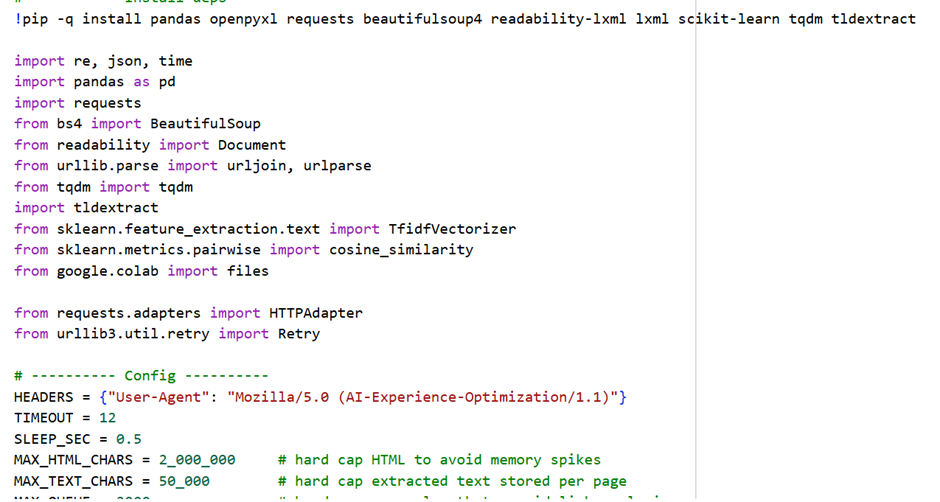
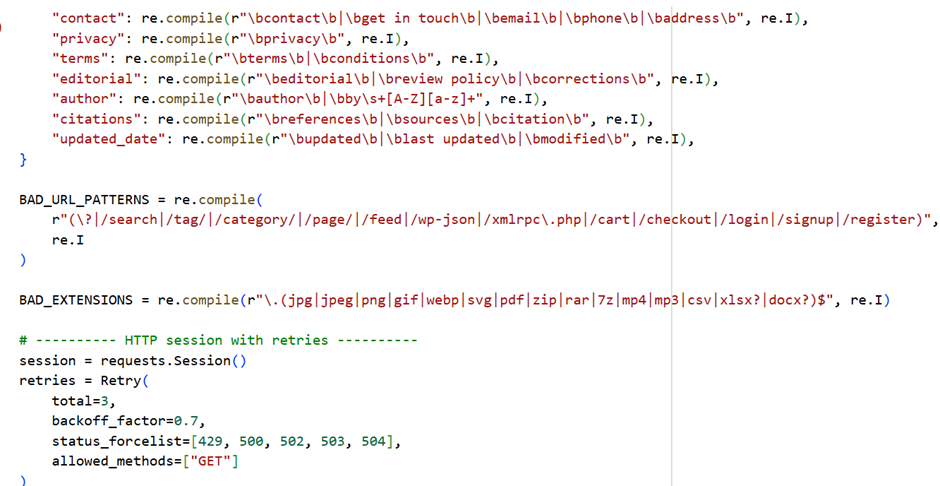
Here is the sample code:
Here is the following output:
What each output means
1) site_pages_audit.csv
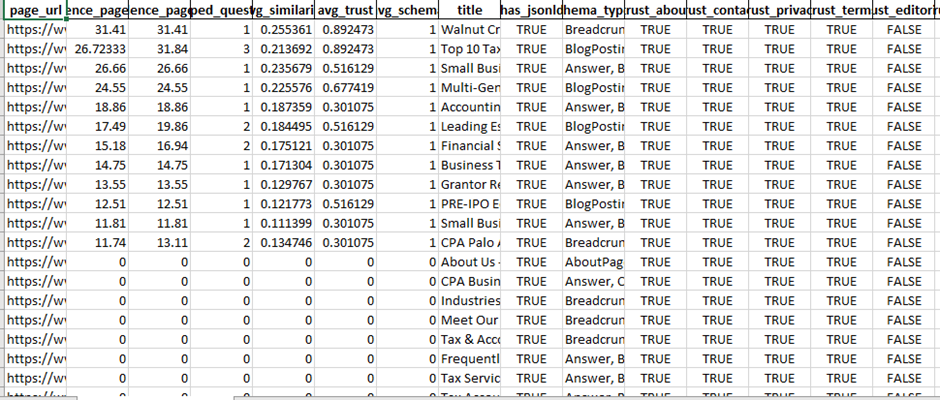
One row per crawled page. This is your “inventory + trust map”.
Key columns:
· url, title – which pages were crawled
· has_jsonld, schema_types – whether the page has structured data and what types (e.g., Organization, Article, FAQPage, Product)
· trust_about, trust_contact, trust_privacy, trust_terms, trust_editorial, trust_author, trust_citations, trust_updated_date
Boolean flags showing if the page likely contains those signals (based on text/link cues)
How to read it:
· Find pages that already have strong signals (many trust_* = True).
· Spot gaps quickly: for example, if almost no pages have trust_author=True or trust_citations=True, that’s a big trust weakness for LLM mentionability.
2) question_page_matches.csv
For each question, the program lists the Top-K best matching pages.
Key columns:
· question – question from your file
· rank – 1 is best match
· similarity – relevance score (higher is better)
· page_url, page_title – where the answer probably lives
· trust flags + schema flags for that matched page (same as above)
How to read it:
· For each question, check rank=1 first.
· If similarity is low and/or matched pages lack trust signals, it means:
o the site may not have a clear answer, or
o it has the answer but it’s buried/unclear, or
o it lacks credibility markers (author, citations, updated date, etc.)
This file is your action list, because it tells you:
· Which page should be improved for each question, and
· What trust/structure is missing on those pages.
3) reasoning_workflow_diagram.md and .mmd
Just the Mermaid diagram (pipeline). Good for documentation or client reporting.
4) reasoning_workflow_diagram.png
A PNG version of the same workflow diagram.
How to turn outputs into practical website changes (next steps)
Step 1 — Pick your “AI Visibility Target Pages”
From question_page_matches.csv:
1. Filter to rank = 1 (best page per question)
2. Group by page_url and count how many questions map to each page
Outcome: You’ll see the small set of pages that influence the most questions. Those become your Priority AI Visibility Pages.
What to do on those pages:
· Add explicit answers (short + direct)
· Add structured data
· Add trust signals
Step 2 — Fix “Answerability” first (content edits)
For each top page (from Step 1), look at the questions mapped to it.
Implement this structure on the page:
A) Add an “Answer Box” near top
· 40–80 words, direct answer
· Include the entity name and qualifiers (location, version, pricing conditions, etc.)
B) Add a dedicated FAQ section
· Use the exact questions from your input file as FAQ headings
· Provide short, precise answers first, then details
C) Add internal links
· Link the FAQ answers to deeper sections (pricing, process, features, etc.)
This makes the page easy for LLMs to extract and cite.
Step 3 — Add structured data (high impact for AI systems)
Use schema_types in site_pages_audit.csv to see what’s missing.
Practical schema add plan:
· Site-wide:
o Organization (+ sameAs social profiles)
o WebSite + SearchAction (if internal search exists)
o BreadcrumbList
· Content pages:
o Article or BlogPosting + author, datePublished, dateModified
· If you add FAQs:
o FAQPage schema on pages with Q/A
· How-to content:
o HowTo schema
· Products/services:
o Product / Service (where appropriate)
Mapping rule: If your top matched page answers many questions → it should almost always get an FAQ block + FAQPage schema.
Step 4 — Add trust signals where the CSV shows gaps
Use site_pages_audit.csv to find pages where trust_author, trust_citations, trust_updated_date are false (especially on the priority pages).
Practical additions:
· Author box (name, role, expertise, link to bio page)
· “Reviewed by” (optional for YMYL topics)
· Last updated date (visible + ideally in markup)
· Sources/References section (2–8 citations to reputable sources)
· Editorial policy page and link it site-wide (footer/header)
Also ensure these exist (site-level):
· About
· Contact (with address/phone/email)
· Privacy + Terms
LLMs often use these to judge “real business / real experts”.
Step 5 — Build “AI landing pages” if similarity is low
If many questions have low similarity scores (or irrelevant matches), create new pages:
Examples:
· “<Topic> FAQ” page for clusters of related questions
· Comparison pages (“X vs Y”, “Best for …”)
· Glossary pages (definitions)
· Troubleshooting / steps pages
Then rerun the tool and confirm those questions now map to these new pages with high similarity.
A simple priority framework (so you don’t get lost)
For each question’s rank=1 page:
Priority = (Questions mapped to page) × (Business importance) × (Trust gaps)
Start with pages that:
· match many questions
· are commercial/high conversion
· lack trust signals or schema
Recommended “implementation checklist” for each priority page
1. Add 1–2 paragraph “Answer Box”
2. Add FAQ section (use exact questions)
3. Add FAQPage schema
4. Add author + updated date
5. Add references
6. Add internal links to About/Contact/Policies in footer (site-wide)
Stage 2: Confidence Score Engineering
Input: Previous site audit and question matching path results in an excel sheet in two different sheets
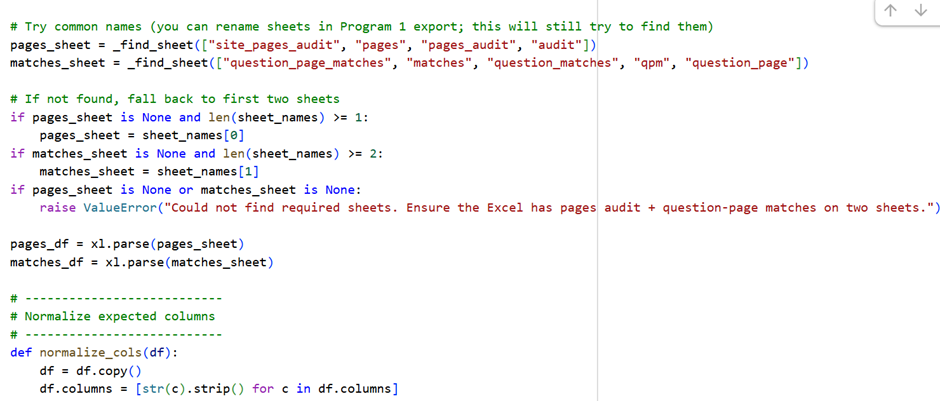
Here is the sample code:
Here is the output:
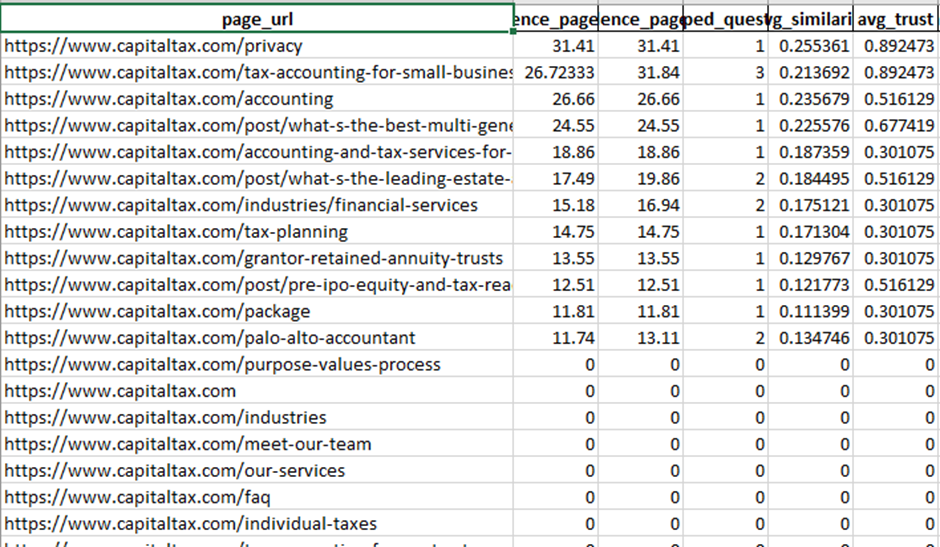
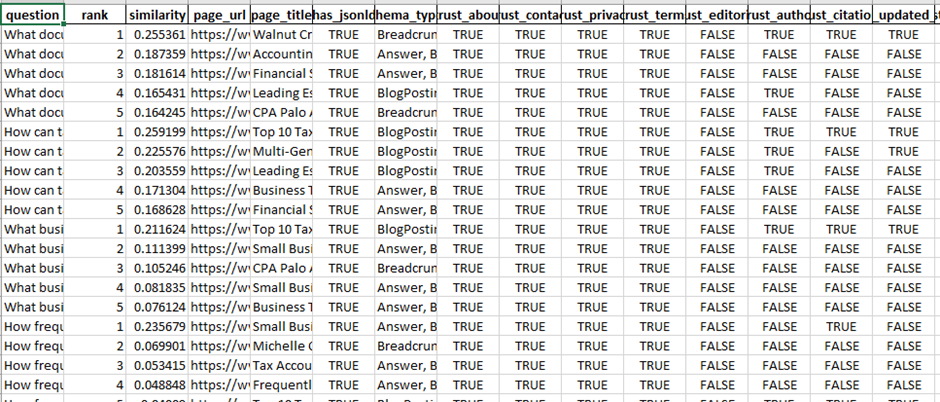

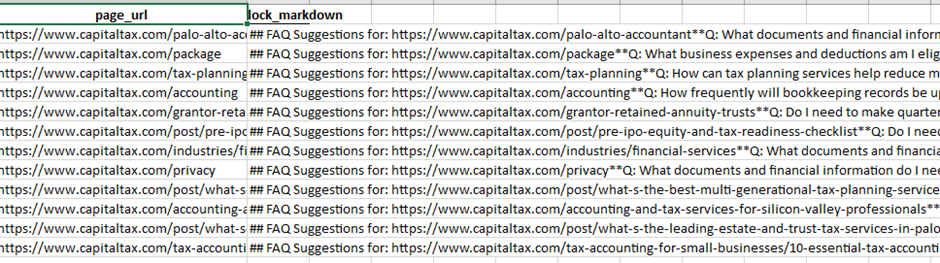
What Program 2 Outputs Mean:
Program 2 does AI confidence modeling.
It estimates how likely an LLM (ChatGPT, Gemini, Claude, etc.) is to “trust + like” a page when answering the questions you provided.
Think of it as:
“If an LLM had to answer these questions today, how confident would it be using THIS page?”
1️⃣ Page Confidence Score (0–100)
Where it is
- Excel → PageConfidenceScores sheet
- Also visualized in confidence_scores.png
What it means
- 0–30 → Very weak for AI answers
- 30–60 → Partial confidence (may be used indirectly)
- 60–80 → Strong AI candidate
- 80–100 → Highly mentionable / quotable by LLMs
How it’s calculated (high-level)
A page scores higher when it:
- Matches many questions strongly
- Has clear answers (high similarity)
- Shows trust signals (author, citations, updated date)
- Uses structured data
- Ranks as the best page for multiple questions
🔧 What to do on the website (Page Score)
Pages scoring <40
- Content is either unclear or untrusted
- Action:
- Add direct answers
- Add author + last updated
- Add FAQ section
- Add schema
Pages scoring 40–70
- Content exists but is weakly structured
- Action:
- Improve clarity (short answers)
- Add FAQ schema
- Add references
Pages scoring >70
- These are your AI authority pages
- Action:
- Protect them
- Keep updated
- Expand FAQ coverage
- Link to them internally
2️⃣ Confidence Score Diagram (confidence_scores.png)
What it shows
- Visual ranking of your top 25 pages by AI confidence
Why this matters
This chart tells you:
- Which pages LLMs are most likely to cite
- Which pages deserve priority investment
- Which pages should become AI landing pages
🔧 Website actions using the diagram
- Take Top 5 bars → Make them:
- FAQ-rich
- Internally linked from nav/footer
- Editorially strong
- Take Bottom bars → Either:
- Improve
- Merge
- Or deprioritize
3️⃣ Per-Question Confidence Score (0–100)
Where it is
- Excel → QuestionPageScores
- Excel → BestPagePerQuestion
What it means
This score answers:
“For THIS specific question, how confident is an LLM using THIS page?”
🔧 Website actions (Question-level)
For each question:
| Confidence | Meaning | Action |
| <30 | No clear answer | Create new section or page |
| 30–60 | Partial answer | Add explicit Q/A |
| 60–80 | Good answer | Improve trust signals |
| >80 | Excellent | Lock it in with schema |
This allows question-by-question optimization, not guesswork.
4️⃣ Suggested FAQ Q/A Blocks (Per Page)
Where it is
- Excel → FAQSuggestions
Each row contains:
- Page URL
- A ready-to-use Markdown FAQ block
What it means
These are the exact questions your site should answer visibly on each page.
🔧 How to implement FAQs on the website
For each page:
- Scroll to the bottom of the page
- Add a new section:
- <section class=”faq”>
- <h2>Frequently Asked Questions</h2>
- Convert each suggested Q/A into:
- <h3> for question
- <p> for answer (1–3 sentences)
- Answers must be:
- Direct
- Factual
- No marketing fluff
💡 This dramatically improves LLM extraction accuracy.
5️⃣ Suggested Schema JSON-LD Snippets
Where it is
- Excel → SchemaSuggestions
Each row gives:
- Page URL
- Ready-to-paste JSON-LD
Includes:
- FAQPage
- Article
- WebPage
- Or combined @graph
🔧 How to implement schema safely
For each page:
- Open page source or CMS editor
- Paste JSON-LD inside:
- <script type=”application/ld+json”>
- { … }
- </script>
- Ensure:
- Content in schema matches visible text
- FAQ answers are actually shown on page
- Test with:
- Google Rich Results Test
- Schema Validator
⚠️ Never add FAQ schema without visible FAQs.
6️⃣ Final Excel: How to use it as an action plan
Sheet → Purpose
| Sheet | Use |
| PageConfidenceScores | Page prioritization |
| QuestionPageScores | Fix weak answers |
| BestPagePerQuestion | One best page per query |
| FAQSuggestions | Content writing tasks |
| SchemaSuggestions | Developer implementation |
🔹 Recommended Implementation Roadmap (Practical)
Phase 1 — Quick Wins (1–2 weeks)
- Implement FAQs on top 10 pages
- Add FAQ schema
- Add author + updated date
- Add citations
Phase 2 — Structural Trust (2–4 weeks)
- Create / improve:
- About page
- Editorial policy
- Author bio pages
- Add Organization schema
Phase 3 — AI Landing Pages
- Create dedicated pages for:
- Question clusters
- Comparisons
- Definitions
- Re-run Program 1 + 2
🔹 How this helps AI visibility (why it works)
LLMs prefer content that is:
- Explicit (direct answers)
- Structured (FAQ, headings)
- Trustworthy (authors, dates, sources)
- Consistent (entity clarity)
Your pipeline now:
- Detects gaps
- Quantifies confidence
- Gives exact fixes
This is AI Experience Optimization, not traditional SEO.
Stage 3: Stage 3: Recommendation Bias Reinforcement + Competitor Drift Analysis | AIEO
Input: Target website url, number of pages to be crawled, user search question in a excel sheet, set of competitors in a excel sheet
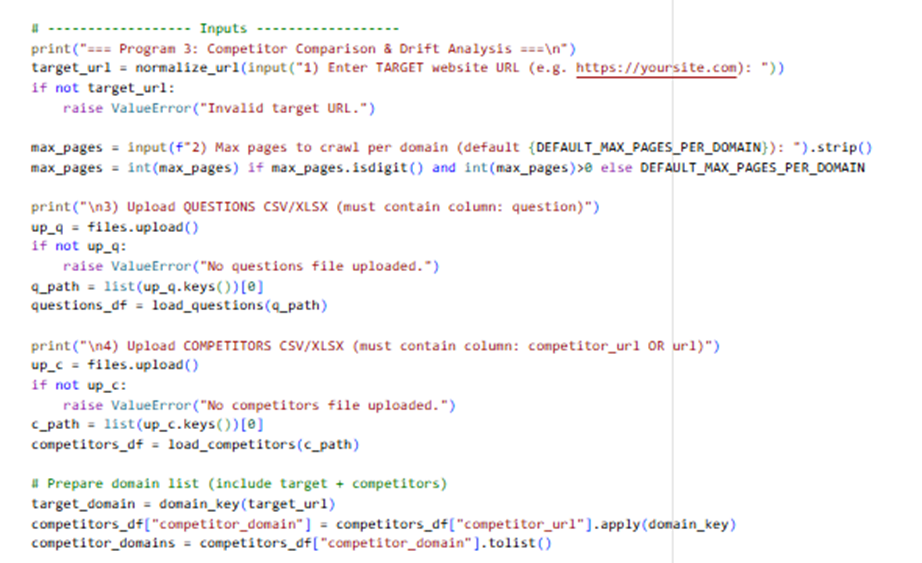
# Goals:
# – Comparative prompts (target vs competitors)
# – Preference leakage signals (marketing/affiliate/superlatives, competitor mentions)
# – Competitor drift analysis (which domains/pages look more “LLM-recommendable” for the same questions)
# – Competitor comparison scoring
Here is the sample code:
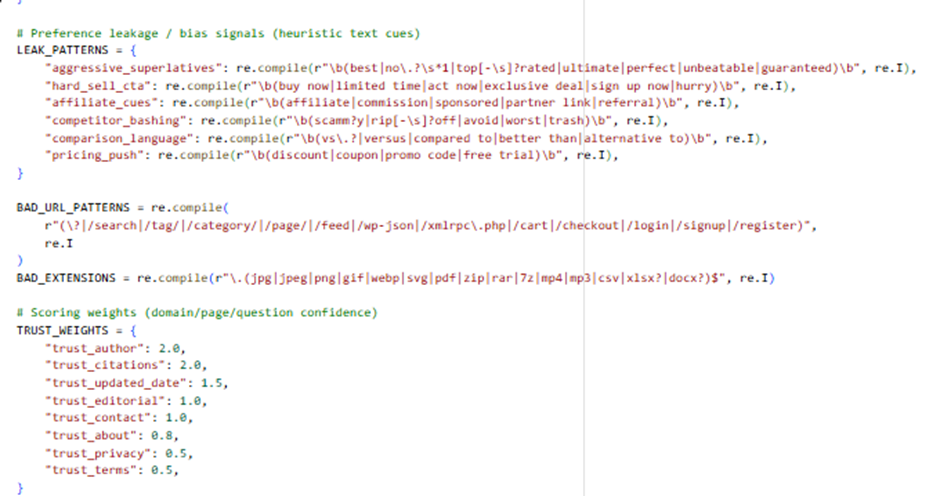
Here is the Output:
Key sheets to review:
– DomainComparisonScores: who is winning and why (confidence vs leakage)
– DriftByQuestion: questions where competitors beat the target (gap + best domain/page)
– ComparativePrompts: ready prompts for evaluator/LLM testing
– QuestionPageScores: all question-page confidence scores across all domains
What Program 3 Is Actually Doing (Conceptually)
Program 3 simulates how LLMs drift toward competitors when answering the same questions, based on:
- Content clarity
- Trust signals
- Structured data
- Bias / marketing leakage
- Comparative language patterns
It answers:
“If an LLM had to recommend or compare providers, which domain would it naturally favor—and why?”
📊 OUTPUT EXPLANATION (One by One)
1️⃣ DomainComparisonScores (Excel)
What this sheet represents
A domain-level leaderboard.
Each row = one domain (your site + competitors).
Key columns explained
| Column | Meaning |
| domain_confidence_mean | Average LLM confidence across all questions |
| domain_confidence_max | Best possible answer confidence |
| mapped_questions | How many questions the domain answers well |
| avg_trust | Average trust strength (authors, citations, updates) |
| avg_schema | Average structured data strength |
| leakage_mean_0_100 | Marketing / bias signal density |
| comparison_score | Final recommendation score |
| drift_vs_target | How much better/worse than your site |
How to read it
- Higher comparison_score = more likely LLM recommendation
- If a competitor has:
- higher confidence
- lower leakage
→ LLMs will prefer them in neutral comparisons
🔧 Practical actions (Domain level)
If competitor beats you:
- They are cleaner + clearer, not necessarily bigger
- Your fix is structure and tone, not ads or backlinks
Actions:
- Remove hype language
- Add neutral explanations
- Add factual comparisons
- Improve schema + author credibility
2️⃣ DriftByQuestion (Excel)
What this is
This is your most powerful sheet.
It shows:
“For THIS exact question, which domain LLMs would prefer—and how far behind you are.”
Key columns
| Column | Meaning |
| question | The user intent |
| best_domain | Domain most likely recommended |
| best_page_url | Their winning page |
| best_confidence_0_100 | Their confidence score |
| target_best_confidence_0_100 | Your best score |
| confidence_gap_vs_best | How much you’re losing by |
| is_competitor_drift | TRUE = urgent |
🔧 Practical actions (Question level)
For every row where:
is_competitor_drift = TRUE
Step-by-step fix:
- Open competitor’s winning page
- Identify:
- What question they answer explicitly
- Where they show trust (author, citations)
- On your page:
- Add a direct answer section
- Add an FAQ using that question
- Add FAQPage schema
- Add a neutral comparison paragraph
💡 You don’t need to copy content—just answer better and cleaner.
3️⃣ QuestionPageScores (Excel)
What it shows
All question → page → confidence mappings across all domains.
Use it to:
- See where you lose rank
- Identify pages that could be merged
- Detect content cannibalization
🔧 Practical actions
- If multiple pages score similarly for the same question:
- Consolidate into one authority page
- If competitor scores higher with fewer pages:
- They are more focused—copy the structure, not content
4️⃣ ComparativePrompts (Excel)
What this is
These are pre-built evaluation prompts you can use to:
- Test LLM behavior manually
- QA drift over time
- Validate improvements
Example prompt:
“Compare yoursite.com with competitor.com for question X…”
🔧 How to use these prompts
- Paste into:
- ChatGPT
- Gemini
- Claude
- Observe:
- Who gets recommended
- Why
- After site changes:
- Re-test
- Confirm drift reduction
This turns LLM testing into a repeatable QA process.
5️⃣ Charts (Visual Signals)
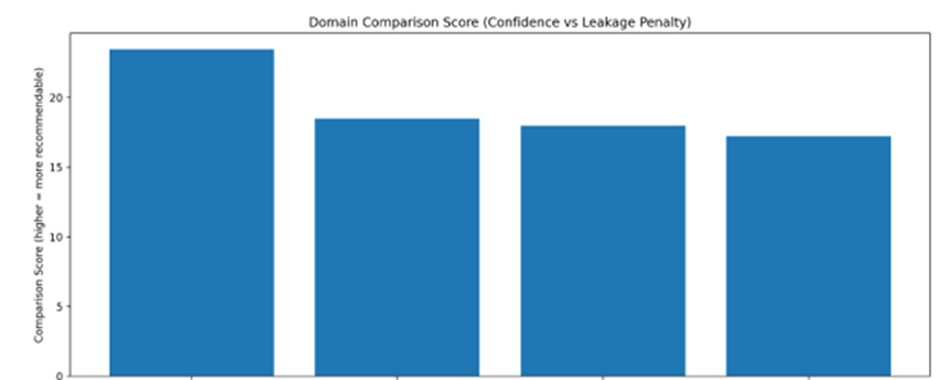
📈 domain_confidence_comparison.png
Shows:
- Which domains are most “recommendable”
Action:
- If your bar is lower → fix trust + clarity
- Goal: move into top 1–2 bars
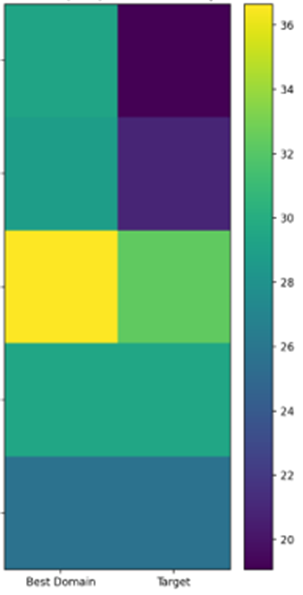
🔥 drift_heatmap_top_questions.png
Shows:
- Questions where competitors dominate visually
Action:
- These questions should get:
- Dedicated sections
- FAQ blocks
- Schema
- Citations
⚠️ preference_leakage_comparison.png
Shows:
- Which domains are “too salesy”
LLMs penalize hype.
Action:
- Remove:
- “Best”, “#1”, “Guaranteed”
- Hard CTAs near informational content
- Move CTAs lower on page
Stage 4: Risk & Hallucination Suppression | AIEO
INPUT:
# – Upload the previous analysis output Excel (from Program 3)
# Expected sheets (names can vary; program will auto-detect):
# * DomainComparisonScores
# * DriftByQuestion
# * QuestionPageScores
# * PagesAudit_NoText
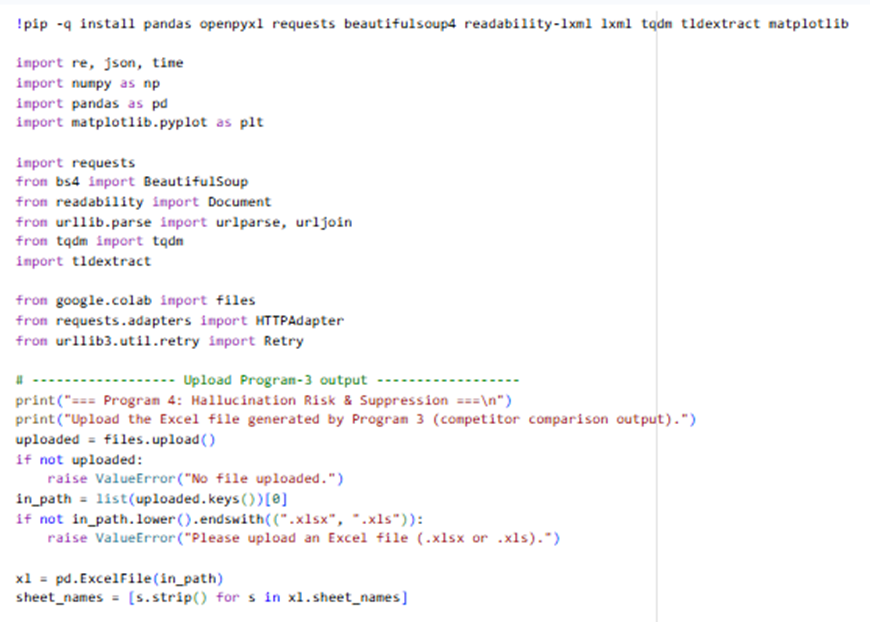
WHAT THIS PROGRAM DOES:
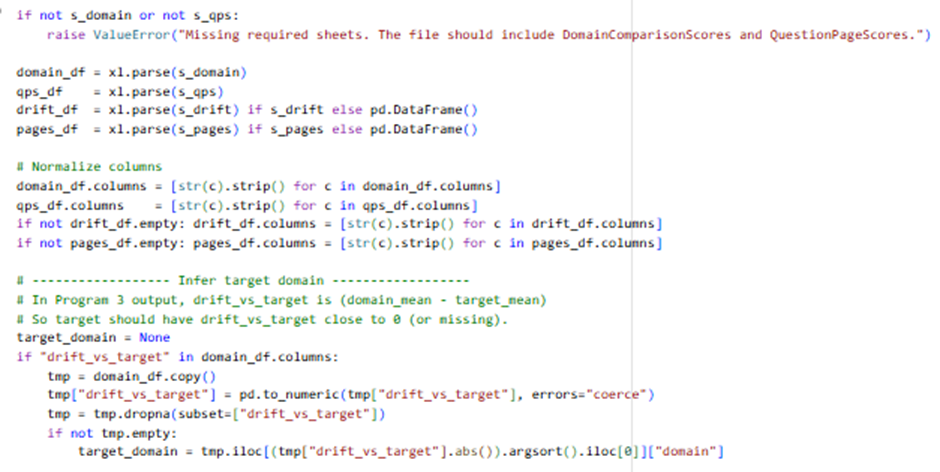
# 1) Infers TARGET domain from the Program-3 file (domain with drift_vs_target ~ 0)
# 2) Pulls the target’s key URLs (top mapped pages), fetches them live, and:
# – Extracts “claims” (heuristic sentence extraction)
# – Verifies evidence signals on-page (citations, outbound refs, author, dates, policies, schema, contact)
# 3) Computes:
# – Hallucination Risk Score (0–100, higher = riskier)
# – Per-page risk breakdown
# – Per-question risk (YMYL weighted)
# 4) Produces suggestions to reduce risk + a projected risk reduction after implementing them
Here is the sample code:
OUTPUT:
# – program4_hallucination_risk_output.xlsx
# – risk_by_page.png
# – risk_components.png
# – before_after_projection.png
What Stage 4 Is Really Measuring
Stage 4 answers one core question:
“If an LLM mentions this site, how likely is it to hallucinate, exaggerate, or mix in incorrect/competitor information?”
Hallucination risk increases when:
- Claims are strong but weakly evidenced
- Pages are ambiguous or incomplete
- Trust signals are missing
- Competitors are more authoritative for the same questions
- Content touches YMYL areas (health, finance, legal)
📁 OUTPUT EXPLANATION (What Each File/Sheet Means)
1️⃣ Summary Sheet (Excel)
Key fields explained
| Column | Meaning |
| hallucination_risk_0_100 | Overall risk that LLMs misrepresent your site |
| projected_risk_reduction_percent | Expected reduction after fixes |
| projected_risk_after_0_100 | Risk level after implementation |
| notes | Interpretation guidance |
How to interpret scores
| Score | Meaning |
| 0–20 | Very safe (LLMs likely accurate) |
| 20–40 | Moderate risk |
| 40–60 | High risk |
| 60+ | Critical hallucination exposure |
🔧 Practical actions (Summary level)
- If risk ≥40 → Hallucination suppression must be prioritized
- If projected reduction is <15% → you need structural changes, not just content tweaks
2️⃣ PageRisk Sheet
What this is
Per-page hallucination risk breakdown.
Each row = one important page that LLMs are likely to cite.
Key columns
| Column | Meaning |
| hallucination_risk_0_100 | Page-level risk |
| claim_count | Number of risky claims |
| risk_claim_component_0_1 | Claim-driven risk |
| risk_evidence_component_0_1 | Missing evidence risk |
| risk_ambiguity_component_0_1 | Incomplete / unclear content |
| risk_drift_component_0_1 | Competitor confusion risk |
🔧 Practical actions (Page-level)
For pages with risk >50:
- Rewrite claim-heavy sections
- Remove absolutes (“guaranteed”, “best”, “#1”)
- Add qualifiers (“may”, “typically”, “depending on”)
- Attach evidence directly
- Statistics → citations
- Compliance → official docs
- Performance → methodology
- Add visible trust blocks
- Author bio
- Last updated date
- Editorial policy link
3️⃣ QuestionRisk Sheet
What this shows
Risk at the question level.
Some questions are more dangerous for hallucination than others.
Key drivers
- Low confidence answers
- High competitor drift
- YMYL topics
🔧 Practical actions (Question-level)
For questions with risk ≥50:
- Create a dedicated answer section
- Add:
- Clear definition
- Scope & limitations
- “What this does NOT mean” paragraph
- Avoid marketing language completely
This sharply reduces LLM fill-in behavior.
4️⃣ ExtractedClaimsSample Sheet
What this is
Actual sentences extracted from your pages that are likely to be:
- Quoted incorrectly
- Overgeneralized
- Hallucinated
This is gold for editors.
🔧 Practical actions (Editorial review)
For each extracted sentence:
- Ask: “Can this be misquoted without context?”
- If yes:
- Rewrite
- Add a footnote
- Add a qualifier
- Place evidence immediately after the claim
5️⃣ Suggestions Sheet
What it contains
System-generated risk reduction actions, each mapped to a cause.
Examples:
- Add references
- Add authors
- Add editorial policy
- Reduce absolute claims
- Add structured data
🔧 How to implement suggestions systematically
Suggested order (highest impact first)
- References / citations
- Author + reviewer
- Updated date
- Editorial policy
- Schema alignment
- Claim softening
📊 VISUAL DIAGRAMS EXPLAINED
📈 risk_by_page.png
Shows the riskiest pages visually.
Action:
- Top 5 bars = immediate rewrite candidates
- These pages are where LLM hallucination will most likely occur
🧩 risk_components.png
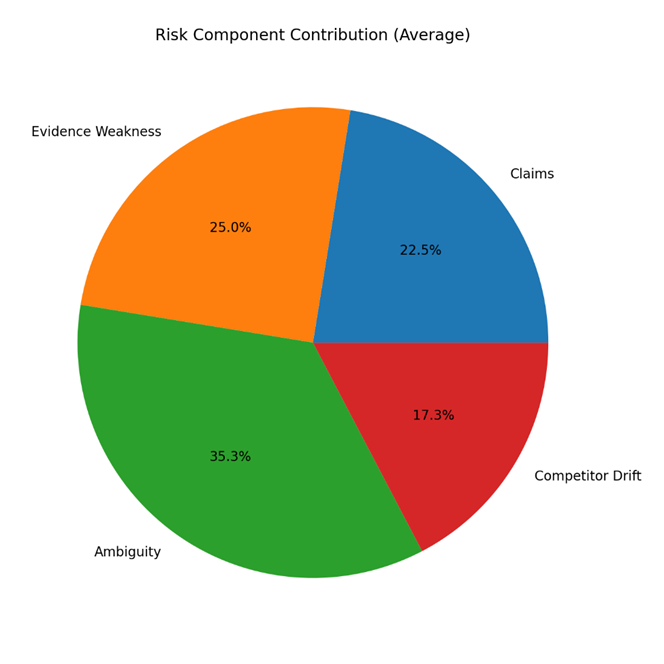
Pie chart showing why risk exists.
Example:
- Evidence Weakness = 45%
- Claims = 30%
Action:
- Don’t waste time fixing low-impact areas
- Fix the largest slice first
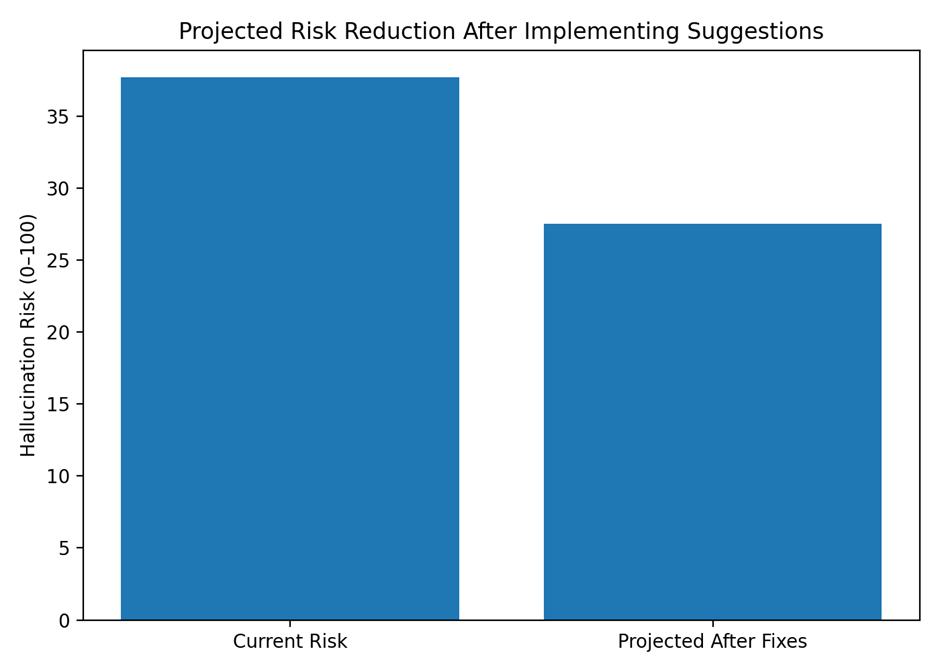
📉 before_after_projection.png
Shows risk reduction after fixes.
This is ideal for:
- Client reporting
- ROI justification
- Change validation
🛠️ PRACTICAL IMPLEMENTATION ROADMAP (TARGET WEBSITE)
Phase 1 — Safety Stabilization (Week 1–2)
Goal: Stop LLM hallucinations immediately
- Remove absolutes and guarantees
- Add visible references
- Add author + updated date
- Add disclaimers for YMYL content
Phase 2 — Structural Trust (Week 3–4)
Goal: Give LLMs confidence anchors
- Create:
- Editorial policy page
- Methodology page
- Add:
- Organization schema
- Article/FAQ schema
- Standardize content templates
Phase 3 — Precision Reinforcement (Ongoing)
Goal: Prevent future hallucinations
- Add “Limits & scope” sections
- Update content quarterly
- Monitor drift monthly with Program 3
- Re-run Stage 4 after major updates
🎯 What This Achieves in Real Terms
After implementation:
- LLM mentions become more accurate
- Fewer exaggerated or mixed claims
- Reduced legal/compliance exposure
- Stronger trust signals for AI platforms
You’re not just optimizing for ranking — you’re optimizing for safe, correct AI citation.