SUPERCHARGE YOUR ONLINE VISIBILITY! CONTACT US AND LET’S ACHIEVE EXCELLENCE TOGETHER!
This project introduces a data-driven system designed to evaluate how effectively a webpage guides a user along a natural conversion path. Using advanced semantic modeling, each page is analyzed to determine whether its content supports progressive movement from awareness-level information toward action-oriented decisions. The system breaks the page into meaningful sections, interprets the role each section plays, measures alignment consistency, and assesses whether the content structure helps maintain user momentum toward key actions.

The core capability of the project lies in assigning semantic roles to content blocks—such as awareness, consideration, decision, or action—and examining how well these roles are distributed across the page. This makes it possible to detect structural gaps, misplaced sections, or weak progression patterns that may interrupt the conversion flow. Additionally, calls-to-action are evaluated for intent support, contextual relevance, and readiness, creating a holistic view of how conversion opportunities are presented.
The analysis outputs clear metrics and visualizations that highlight role distribution, section-level performance, readiness of conversion elements, and the presence of structural gaps. Together, these components provide an in-depth understanding of how effectively a page speaks to users at different moments of their journey and whether it encourages forward movement toward meaningful actions.
Project Purpose
The primary purpose of this project is to provide a structured, semantic evaluation of how effectively a webpage supports a user’s progression toward meaningful actions. Rather than focusing on surface-level elements or keyword patterns, the system examines the deeper intent and functional role of each content block. This enables a clear understanding of whether the page’s structure helps guide users from initial awareness to final action in a coherent, friction-free manner.
The model determines how each section contributes to the conversion journey, identifies where the narrative loses momentum, and reveals gaps that may dilute intent or interrupt user flow. By translating these insights into measurable scores, role distributions, and actionable interpretations, the project helps uncover strengths, weaknesses, and opportunities within the content architecture.
The overall purpose is to enable evidence-based improvements that enhance topical clarity, strengthen section-to-section continuity, optimize calls-to-action, and reinforce the intended conversion path. This creates a precise, semantically grounded perspective on how well a page facilitates meaningful user movement toward desired outcomes.
Project’s Key Topics Explanation and Understanding
A conversion-focused webpage relies on more than isolated keywords or generic optimization techniques. It depends on a coherent semantic journey that guides users from initial exposure to final action. This project evaluates that journey through several core concepts that define how content influences user progression.
Below are the key topics essential to understanding the foundation and functioning of the Semantic Conversion Flow Analysis system.
Conversion Path Semantics
A conversion path is not merely a sequence of page elements—it is the underlying semantic flow that guides a user from awareness to action. This concept captures how meaning, intent, and informational depth shift across the content.
Key ideas include:
- How each content block contributes to the user’s evolving informational needs.
- Whether the narrative strengthens motivation, reduces friction, and maintains clarity as the user continues reading.
- How intent signals gradually shift from broad orientation toward specific decision-supporting details and action prompts.
Understanding these semantics allows the system to determine whether the page structure genuinely supports the intended journey or unintentionally disrupts it.
Funnel Role Classification
Each content section carries a functional role within the conversion flow. The project uses role classification to determine the position and purpose of individual content segments within the funnel.
Roles covered:
- Awareness — broad context, introductory insights, high-level orientation.
- Consideration — feature explanations, comparisons, supportive details.
- Decision — persuasive elements, trust signals, actionable insights.
- Action — direct calls-to-action, final encouragement, next-step facilitation.
- Other — tangential or low-intent content not aligned to the funnel.
This classification is central to identifying whether the page creates a balanced, strategically ordered flow that guides users naturally toward desired outcomes.
Section-Level Scoring
Section scoring quantifies how strongly a content block supports movement toward conversion. Scores incorporate model-based intent alignment, semantic clarity, role appropriateness, and confidence of classification.
This produces:
- An objective measure of how each section performs.
- A ranking of the strongest and weakest contributors.
- A top-K view that highlights sections most influential to the conversion journey.
These scores form the basis for interpreting the quality and consistency of the page’s conversion path.
Role Distribution Analysis
This analysis determines how much of the page is dedicated to each funnel stage. It reveals whether the page:
- Over-invests in early-stage informational content,
- Lacks decision-supporting elements,
- Has insufficient action-driving material,
- Or maintains a healthy balance throughout.
Role distribution is one of the clearest indicators of whether the structural composition supports a complete, logical path toward action.
Gap Detection and Conversion Flow Interruptions
Gaps represent areas where the semantic journey loses clarity or direction. Typical gap types include:
- Ambiguous roles where the intent is unclear or weakly communicated.
- Missing transitional elements between funnel stages.
- Misaligned content that introduces unrelated topics or breaks continuity.
Gap detection identifies friction points within the journey where users may disengage or fail to progress naturally.
CTA Readiness and Support Evaluation
Calls-to-action are most effective when the surrounding content sufficiently prepares the user. CTA readiness evaluates:
- Whether the CTA is supported by relevant context,
- Whether trust-building elements are present,
- Whether tone and intent match the rest of the conversion narrative.
Higher readiness scores indicate that the page has established enough informational and motivational groundwork for the CTA to succeed.
Overall Conversion Flow Integrity
This is the cumulative assessment of how well the entire page functions as a unified conversion path. It reflects:
- Structural coherence,
- Semantic progression,
- Clarity of intent,
- Strength of decision-supporting layers,
- Effectiveness of action-orienting elements.
This final metric consolidates section-level insights into a complete, holistic understanding of the page’s conversion performance.
Q&A Section — Understanding the Project’s Value and Importance
Why is it important to analyze a webpage’s conversion flow instead of focusing only on keywords or rankings?
A webpage may rank well and attract traffic, but rankings alone do not guarantee meaningful actions such as inquiries, sign-ups, or purchases. Conversion flow analysis focuses on how effectively the content guides users from initial interest to final action. It identifies whether the narrative builds trust, reduces uncertainty, and maintains clarity across the entire reading journey. This deeper semantic understanding reveals structural weaknesses that are invisible to keyword-based optimization, helping ensure that traffic does not simply arrive—but also progresses toward action.
How does evaluating funnel roles (Awareness → Consideration → Decision → Action) help improve content performance?
Funnel roles represent the stages users naturally move through when evaluating information. By classifying each section into one of these roles, it becomes clear whether the page maintains a logical, persuasive structure. If early sections provide high-level context but later sections lack decision-supporting material, users may feel unsure or unconvinced. Conversely, if content pushes for action too quickly, readers may disengage due to insufficient information. Role evaluation ensures the content order and depth align with user expectations and decision-making behavior, making engagement smoother and more productive.
What is the benefit of scoring individual content sections?
Every content block contributes differently to the overall experience. Section-level scoring exposes which parts of the page are doing the “heavy lifting” and which parts underperform. High-scoring sections indicate strong alignment with user intent, clarity of communication, and support for conversion. Lower-scoring sections highlight opportunities for refinement—such as sharpening messaging, restructuring information, or clarifying intent. Instead of guessing which content areas matter, this scoring framework provides a precise, data-driven view of performance.
Why is detecting semantic gaps essential for strengthening the conversion journey?
Gaps reflect moments where the user’s progression is interrupted. These interruptions can stem from unclear messaging, abrupt topic changes, or missing transitional elements. Even small gaps weaken user confidence and reduce the likelihood of action. Identifying these issues makes it possible to reinforce continuity, ensure logical flow between sections, and maintain momentum as the reader moves through the page. Addressing gaps often leads to substantial improvements even without major content rewrites, because the focus is on restoring structural clarity rather than adding more text.
How does analyzing CTA readiness improve conversion outcomes?
A call-to-action is most effective when the reader has been prepared with the right information and intent signals. CTA readiness analysis determines whether the surrounding content builds trust, offers context, and matches the tone required for commitment. When a CTA appears too early, lacks relevant supporting information, or is not aligned with the semantic flow, users are less likely to act. Understanding readiness helps align CTAs with user psychology—ensuring that prompts to act appear at the right moment, supported by meaningful content that motivates engagement.
akes the overall conversion flow score valuable for content decisions?
Optimizing a webpage often involves numerous small decisions—restructuring paragraphs, reordering information, refining CTAs, or strengthening persuasive material. The overall conversion flow score consolidates these aspects into a single, interpretable benchmark. It reflects how well the page operates as a cohesive funnel rather than a collection of isolated elements. This score makes it easier to evaluate progress over time, compare performance across pages, and prioritize improvements where they will have the greatest impact.
How does this analysis help create content that is more aligned with user intent?
Users arrive with expectations shaped by their informational needs and their stage in the decision process. By evaluating roles, scoring sections, examining CTA readiness, and identifying gaps, the analysis highlights where content supports or conflicts with these expectations. Aligning content with user intent reduces friction, improves engagement, and increases the likelihood of meaningful actions. It transforms pages from static information repositories into semantically guided experiences designed to meet user needs at every stage.
Why is this project valuable for long-term content strategy?
The insights generated do not only solve short-term issues on a single page—they reveal broader patterns in how content is structured and how semantic flows are shaped across multiple assets. This builds a foundation for consistent, funnel-aligned content creation. Over time, the methodology supports better page planning, more strategic CTA placement, stronger storytelling structures, and improved user engagement across an entire site, making the approach inherently scalable and sustainable.
These questions and answers illustrate how the Semantic Conversion Flow Analysis enhances clarity, structure, and intent alignment, enabling webpages to function as effective conversion drivers rather than passive information pages.
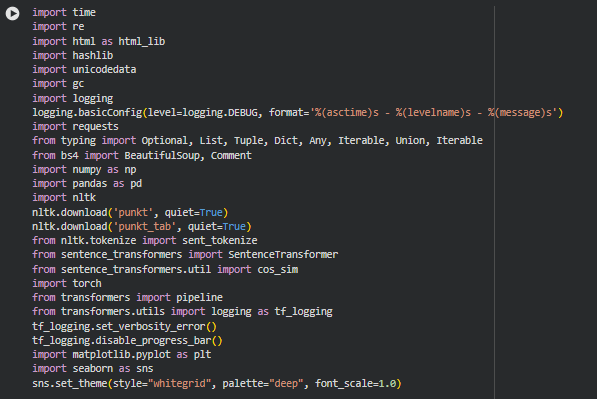
Libraries Used
time
time is a core Python module that provides functions for measuring time intervals, managing timestamps, and handling delays. It is commonly used in performance profiling and runtime tracking.
In this project, time is used to measure execution durations for key steps like embedding generation, model inference, and content processing. This helps in understanding performance bottlenecks and ensuring efficient processing when analyzing multiple URLs.
re
re is Python’s built-in regular expression library, used for advanced pattern matching and text manipulation. It supports searching, replacing, and validating complex text patterns.
We use re to clean text, remove unwanted characters, normalize formatting, and extract structured elements during page preprocessing. This ensures clean inputs for embedding, sentiment evaluation, and conversion-path scoring.
html (html_lib)
Python’s html library provides utilities for handling HTML entities—encoding, decoding, and escaping characters safely.
It is used to decode HTML entities extracted from webpages, ensuring the textual content used for analysis is human-readable and semantically accurate before processing.
hashlib
hashlib is a cryptographic hashing library used for generating secure, consistent hash values for text or binary content.
This project uses hashing to uniquely identify sections or URLs. This helps maintain caching integrity and ensures reproducible mapping between content blocks and their computed scores.
unicodedata
unicodedata is a standard library module for handling Unicode characters—including normalization, categorization, and comparison.
It helps normalize diverse web content from different languages or encodings into a consistent Unicode format. This standardization improves model input quality and avoids embedding or sentiment-pipeline crashes due to malformed characters.
gc controls Python’s garbage collector, enabling manual memory cleanup and management of long-running processes.
Large embedding models and multi-URL workloads create heavy memory footprints. gc ensures memory-efficient execution, especially when handling many sections or high-resolution model outputs.
logging
logging is a standard Python module that provides configurable logging for debugging, tracing, and monitoring program activity.
The project uses logging to track pipeline steps, capture warnings, and debug multi-URL processing. This is essential for professional-grade analysis where transparency and troubleshooting are required.
requests
requests is a widely used HTTP library for Python that simplifies sending GET/POST requests and handling responses.
The project uses requests to fetch webpage HTML from client-provided URLs. It ensures reliable, consistent extraction of live page content regardless of domain or structure.
typing (Optional, List, Tuple, Dict, Any, Union, Iterable)
The typing module provides type annotations to improve code clarity, maintainability, and tooling support.
Type hints help structure complex functions that process URLs, sections, embeddings, relevance scores, and model outputs. This makes the codebase cleaner and more maintainable.
BeautifulSoup, Comment (bs4)
BeautifulSoup is a powerful HTML/XML parsing library used for extracting structured content, cleaning markup, and navigating DOM elements.
It is used to remove scripts, styles, comments, and irrelevant HTML noise before analysis. This ensures section extraction is clean and optimized for embedding and sentiment scoring.
numpy (np)
NumPy is the core numerical computation library in Python, supporting vector operations, matrices, and fast mathematical processing.
NumPy arrays store embeddings, similarity matrices, and weighted scores. Efficient computation is essential for ranking sections based on conversion-path alignment.
pandas (pd)
Pandas provides data structures and operations for tabular data—DataFrames, grouping, filtering, and transformations.
Used to organize multiple URLs, sections, embedding scores, sentiment outputs, and aggregated conversion metrics. It standardizes the final reporting structure across pages.
nltk + sent_tokenize
NLTK is a natural language processing library providing tokenizers, stemmers, and linguistic tools. sent_tokenize specifically splits text into sentences.
Sentence-level splitting enables granular scoring—essential for detecting how each part of the content contributes to the action-driven path.
SentenceTransformer
SentenceTransformers is a state-of-the-art library for generating dense embeddings that capture semantic meaning of text.
We use SentenceTransformer to embed content blocks, identify semantic progression patterns, and quantify whether the narrative moves users closer to the final action (sign-up, purchase, contact, etc.).
cos_sim
cos_sim computes cosine similarity between embeddings.
Used to calculate semantic alignment between sections and the defined conversion-intent vector, revealing how well each part of the content contributes to user progression.
torch
Torch is a deep learning library used for tensor operations, GPU acceleration, and model execution.
Used indirectly through transformers and SentenceTransformers for fast embedding generation and inference on GPU when available.
transformers + pipeline
The HuggingFace Transformers library provides state-of-the-art NLP models for tasks like sentiment, intent classification, and contextual scoring.
We use the sentiment/polarity pipeline to determine emotional tonality of sections, crucial for understanding whether a section motivates, reassures, or discourages users in a conversion journey.
matplotlib.pyplot
Matplotlib is the primary plotting library in Python for creating visualizations such as line charts, bar charts, and distribution plots.
Each visualization module uses matplotlib to show conversion-path strength, action-alignment progression, and comparative section performance—helping stakeholders interpret results visually.
seaborn
Seaborn is a statistical visualization library built on top of Matplotlib, known for cleaner aesthetics and easier statistical plotting.
Used for enhanced visuals when showing semantic distributions, sentiment patterns, or aggregated conversion metrics across multiple sections and URLs.
Function: fetch_html
Overview
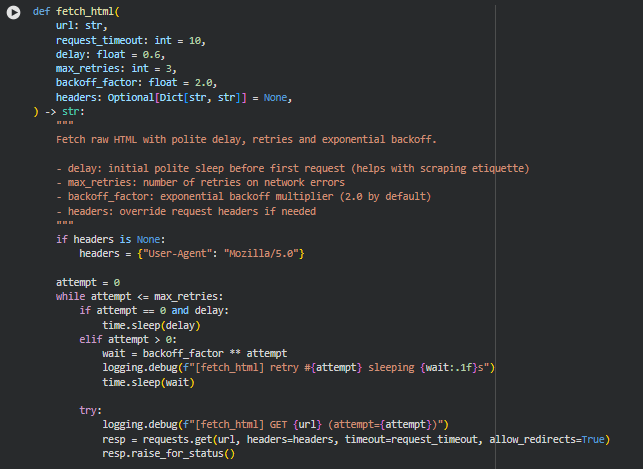
The fetch_html function is responsible for retrieving the raw HTML content of a webpage in a stable, polite, and production-ready manner. Because websites may respond slowly, temporarily fail, or block automated requests, this function uses a combination of polite delays, retry attempts, and exponential backoff to ensure reliability. It also handles multiple encoding fallbacks to correctly interpret the page text even when a server provides incomplete or incorrect encoding information.
This function plays a foundational role in the project because every subsequent step—content extraction, chunking, sentiment scoring, semantic embedding, conversion-path evaluation—depends on clean, usable HTML. Its design ensures minimal request failures and consistent extraction of meaningful content across a variety of websites.
The parameters allow control over timeout duration, retry behavior, and custom request headers. By default, the function identifies itself with a custom “User-Agent” string to maintain good scraping etiquette and improve server compatibility.
Key Code Explanations
1. Initializing default headers
if headers is None:
headers = {“User-Agent”: “Mozilla/5.0 (compatible; Semantic-Conversion-Path/1.0)”}
This logic ensures that even if the caller does not provide custom headers, the function always sends a valid and polite User-Agent. Many servers treat requests without proper user-agent fields as suspicious and block them. This default header improves compatibility and reduces the chances of 403/406 responses.
2. Retry loop with exponential backoff
while attempt <= max_retries:
This loop controls all retries. It allows the function to attempt the request multiple times, which is essential for handling transient network issues, low-rate server responses, or temporary DNS failures.
wait = backoff_factor ** attempt
time.sleep(wait)
After each failed attempt (except the first), the function waits exponentially longer. For example, with a backoff factor of 2: 1s → 2s → 4s. This is a standard best practice for polite and robust web scraping, lowering the likelihood of triggering rate limits.
3. Making the HTTP GET request
resp = requests.get(url, headers=headers, timeout=request_timeout, allow_redirects=True)
resp.raise_for_status()
This line performs the actual fetch. Using a timeout prevents the process from hanging indefinitely. raise_for_status() turns HTTP error codes (like 404 or 503) into exceptions that the retry mechanism can catch and handle cleanly.
4. Encoding fallback system
enc_choices = [resp.apparent_encoding, “utf-8”, “iso-8859-1”]
for enc in enc_choices:
…
Websites frequently mislabel or omit their encoding information. This block tries multiple encodings—including the one detected automatically by requests—to maximize the chance of correctly decoding the text. This prevents mangled characters, unreadable sections, or broken tokens later in the pipeline.
if html and len(html.strip()) > 80:
return html
The function confirms that the decoded HTML is not empty and appears to contain real webpage content before returning it. This protects against cases where a server returns an empty or placeholder response.
Function: clean_html
Overview
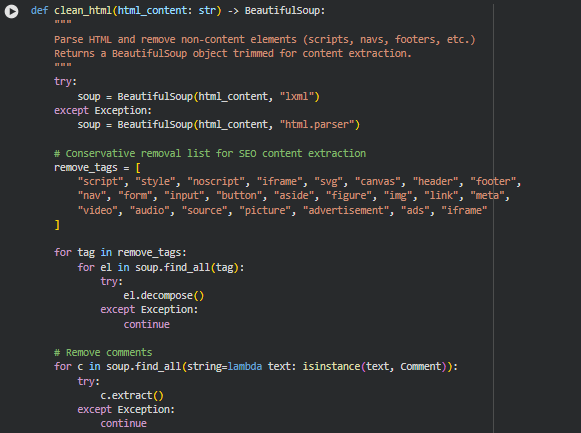
The clean_html function prepares raw webpage HTML for structured content extraction. Webpages typically contain a large number of non-essential or noisy elements—navigation bars, styling tags, ads, forms, tracking tags, embedded media, and other layout-driven components—that do not contribute to meaningful textual analysis. This function systematically removes such elements to isolate the core textual content that will later be used for section extraction, chunking, scoring, and conversion-path evaluation.
This function also handles malformed HTML gracefully by trying the faster and more accurate lxml parser first, and falling back to Python’s built-in html.parser if necessary. It further cleans comments and prunes empty nodes to maintain a well-structured and lightweight BeautifulSoup object. The output is a cleaner HTML tree that improves the reliability, speed, and analytical accuracy of downstream modules such as role prediction, semantic similarity, and CTA evaluation.
Key Code Explanations
1. Parser selection with fallback
try:
soup = BeautifulSoup(html_content, “lxml”)
except Exception:
soup = BeautifulSoup(html_content, “html.parser”)
This block attempts to parse the HTML with the lxml parser, known for its robustness and speed. If lxml fails due to malformed markup or unavailable dependencies, the function automatically falls back to Python’s built-in parser. This ensures that even partially broken or inconsistent webpages can be processed without interrupting the pipeline.
2. Removing non-content HTML elements
remove_tags = [
“script”, “style”, “noscript”, “iframe”, “svg”, “canvas”, “header”, “footer”,
“nav”, “form”, “input”, “button”, “aside”, “figure”, “img”, “link”, “meta”,
“video”, “audio”, “source”, “picture”, “advertisement”, “ads”, “iframe”
]
This curated list represents common elements that do not contribute to textual meaning. Removing them ensures that later steps—especially NLP tasks—receive primarily readable, meaningful content rather than code, UI widgets, or irrelevant layout components.
for tag in remove_tags:
for el in soup.find_all(tag):
el.decompose()
decompose() removes the tag and all its children entirely, preventing noise from leaking into the final extracted text. This is especially important for conversion-path analysis where small distortions in text structure can alter role predictions and semantic embeddings.
3. Removing HTML comments
for c in soup.find_all(string=lambda text: isinstance(text, Comment)):
c.extract()
HTML comments often include leftover template notes, tracking metadata, or developer information. Removing these prevents accidental misclassification of comment text as content and keeps the extraction clean.
4. Pruning empty and meaningless nodes
for el in list(soup.find_all()):
if not el.get_text(strip=True) and not el.attrs:
el.decompose()
After removing high-noise elements, the HTML tree may contain empty containers or nodes that no longer serve structural or semantic purpose. This step removes such nodes to produce a lightweight, clean document tree. It reduces processing overhead for future steps and helps maintain clarity when segmenting content into sections.
Overview
_safe_normalize is a text-cleaning utility designed to standardize raw text before deeper content processing. Web content often includes inconsistent character encodings, HTML entities, and unpredictable whitespace patterns. This function mitigates such inconsistencies by applying Unicode normalization, decoding HTML entities, and collapsing irregular whitespace. The goal is to produce a stable, clean, and consistently formatted text string suitable for embedding, role classification, gap detection, and any downstream semantic analysis.
Key Code Explanations
1. Handling HTML entities
txt = html_lib.unescape(text)
This step converts encoded entities such as &, , or " back into their respective readable characters. It helps ensure that the semantic model receives natural text rather than encoded fragments.
2. Unicode normalization
txt = unicodedata.normalize(“NFKC”, txt)
NFKC (Normalization Form Compatibility Composition) transforms equivalent characters into a canonical form. It unifies visually similar characters that differ in encoding and ensures far more reliable downstream tokenization and embedding.
3. Whitespace cleanup
txt = re.sub(r”[\r\n\t]+”, ” “, txt)
txt = re.sub(r”\s+”, ” “, txt).strip()
Line breaks, tabs, and irregular spacing from HTML layouts are collapsed. The text becomes a single coherent line, improving embedding quality and reducing noise.
Function: _is_boilerplate
Overview
The _is_boilerplate function determines whether a piece of text should be discarded because it represents generic, repetitive, or non-informative content. Webpages frequently contain repeated blocks such as “privacy policy”, “subscribe”, “read more”, social media prompts, or other elements unrelated to page intent. Including such content in embeddings or section evaluations can distort role classification and skew the conversion path alignment.
This function checks for boilerplate terms and also considers the length of the text. Short blocks that contain strong boilerplate indicators are removed early to keep the analytical focus on meaningful sections.
Key Code Explanations
1. Boilerplate detection logic
bps = set(_DEFAULT_BOILERPLATE + (boilerplate_terms or []))
for bp in bps:
if bp in lower and len(lower.split()) < max_words_for_drop:
return True
A combined set of default boilerplate terms and optional user-provided terms is created. If any boilerplate term is found within the text, and the text is short enough to be considered auxiliary rather than content-driven, the function flags it for removal. This prevents long-form content from being incorrectly removed while still eliminating repetitive, low-value fragments.
Function: preprocess_section_text
Overview
preprocess_section_text prepares extracted section text for embedding, classification, and conversion-path scoring. Raw text from webpages often includes URLs, inline citation markers, low-value content, boilerplate blocks, and inconsistent formatting. This function consolidates critical preprocessing steps into a single workflow that transforms raw section text into clean, semantic-ready content.
The function performs normalization, noise removal, boilerplate filtering, and minimum-length validation. If the resulting text is too short or lacks meaningful content, the function returns an empty string to exclude it from downstream processing. This gating mechanism is essential because embedding very short or noisy text introduces instability into role scoring and misrepresents the structure of the page.
Key Code Explanations
1. URL removal
text = re.sub(r”https?://\S+|www\.\S+”, ” “, text)
URLs rarely carry semantic value within content sections and can distort embeddings. Removing them keeps the text focused on message intent rather than hyperlinks or navigation patterns.
2. Inline reference removal
text = re.sub(r”\[\d+\]|\(\d+\)”, ” “, text)
Citation references (e.g., “[12]”, “(3)”) are common in blogs or research-driven pages. These tokens distract the model and have no relevance for conversion-path role mapping.
3. Boilerplate filtering
if _is_boilerplate(text, boilerplate_terms=boilerplate_terms):
return “”
This early-exit condition ensures that repeated or structurally irrelevant blocks do not enter the embedding pipeline. It keeps the entire system focused on content that genuinely influences user progression.
4. Minimum word count filter
if len(text.split()) < min_word_count:
return “”
Very short text fragments rarely form meaningful semantic signals. Enforcing a word-count threshold stabilizes the model and prevents false positives in role identification or gap scoring.
Function: _md5_hex
Overview
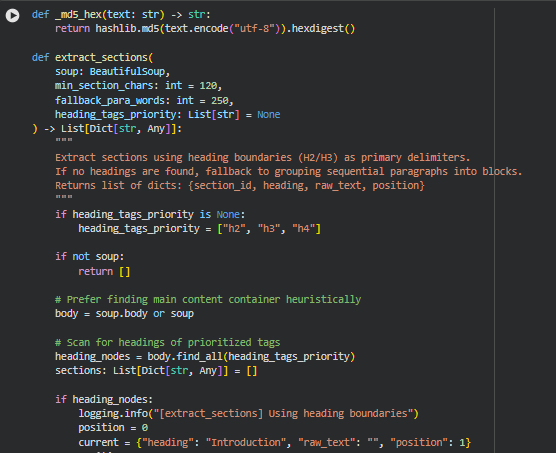
_md5_hex is a lightweight helper function used to generate stable, deterministic identifiers for extracted sections. Because webpages vary widely in structure, and section headings may repeat or appear in similar forms, a simple hash-based identifier ensures consistent tracking of each section throughout the entire pipeline. The resulting MD5 hex digest provides a compact, collision-resistant way to map a section’s source information (usually its heading and position) to a unique reference key.
The text is encoded to UTF-8 and passed through the MD5 hashing algorithm. The .hexdigest() method returns a readable hexadecimal string, making the resulting ID easy to store and reference. Using MD5 here is appropriate because the intention is fast, deterministic labeling—not cryptographic security.
Function: extract_sections
Overview
extract_sections is a central component of the pipeline responsible for converting cleaned HTML into structured, analysis-ready content sections. SEO-oriented pages typically rely on heading tags (such as <h2>, <h3>, <h4>) to outline content hierarchy. This function uses these structural cues to segment the page into coherent sections that reflect natural reading boundaries. When heading tags are missing or too sparse, the function gracefully falls back to grouping paragraphs into larger content blocks.
Each section includes its heading, raw extracted text, position index, and a generated section ID. This structure ensures consistent downstream embedding, role classification, gap identification, and conversion-path alignment.
The function is designed to be tolerant of irregular markup, nested structures, and inconsistent formatting, all of which are common in real-world SEO pages.
Key Code Explanations
1. Scanning for prioritized heading tags
heading_nodes = body.find_all(heading_tags_priority)
The function looks for headings using a prioritized list (h2, h3, h4 by default). These tags form the primary segmentation boundaries. If headings exist, the extraction process uses them to define section breaks.
2. Iterating through page content in natural DOM order
for el in body.descendants:
if not hasattr(el, “name”):
continue
Using body.descendants ensures that the traversal follows the visual reading order of the page. This reduces the risk of misordered text or headings, which can occur when relying on isolated tag lists.
3. Creating new sections when encountering a heading
if name in heading_tags_priority:
if len(current[“raw_text”].strip()) >= min_section_chars:
sec_id_src = f”{current[‘heading’]}_{current[‘position’]}”
current[“section_id”] = _md5_hex(sec_id_src)
sections.append(current)
Every time a priority heading tag is encountered, the existing accumulated section is finalized—if it meets the minimum character threshold—then a new section begins. This mimics how human readers segment content across headings.
4. Capturing paragraph and list-item text
if name in (“p”, “li”):
txt = _safe_normalize(el.get_text())
if txt:
current[“raw_text”] += ” ” + txt
Content is extracted conservatively from paragraphs and list items. Normalization ensures the text is readable and embedding-ready. This strategy preserves real content while avoiding layout-related fragments.
5. Fallback mechanism for pages without headings
paras = [p for p in (body.find_all(“p”) + body.find_all(“li”)) if _safe_normalize(p.get_text())]
If the page lacks usable heading tags, the function groups consecutive paragraphs into blocks of approximately fallback_para_words words. This ensures that even poorly structured or minimal HTML layouts still produce meaningful content sections.
6. Generating stable section identifiers
sec_id_src = f”{heading}_{position}”
“section_id”: _md5_hex(sec_id_src),
Each section’s ID is generated from its heading and position, guaranteeing consistency across pipeline runs and enabling reliable tracking through scoring and visualization steps.
Function: estimate_token_count
Overview
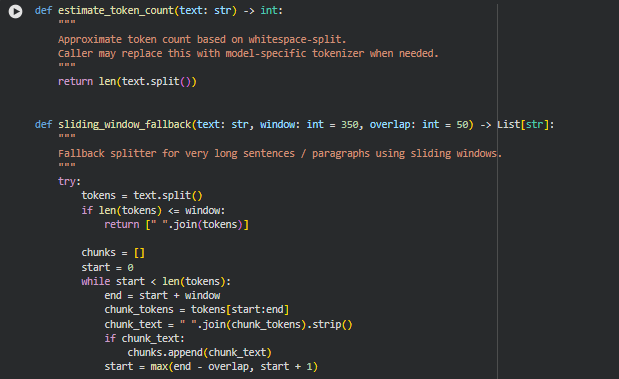
This function provides a simple, approximate token counter by splitting text based on whitespace. It is not model-specific and does not use any tokenizer logic from modern transformer models. Instead, it offers a lightweight fallback to understand text size, which is helpful for chunking tasks where approximate token boundaries are sufficient. Because this function is small and self-explanatory, a separate Key Code Explanations subsection is not needed. The entire logic operates in a single line and directly returns the number of whitespace-separated elements, making it suitable for preprocessing pipelines that need very fast, low-overhead estimations.
Function: sliding_window_fallback
Overview
This function acts as a safety mechanism when a text segment or sentence is too long to be handled by standard semantic chunking logic. Instead of failing or forcing a single oversized chunk, it uses a sliding-window approach to split the text into overlapping chunks. The overlap ensures contextual continuity between adjacent chunks, reducing information loss and preventing abrupt semantic breaks.
The function works by splitting text into tokens, checking if it exceeds the specified window size, and then iteratively extracting windows with controlled overlap. If any unexpected error occurs—such as malformed input—it gracefully logs the issue and returns an empty list instead of breaking the pipeline.
Key Code Explanations
1.
if len(tokens) <= window:
return [” “.join(tokens)]
This early condition ensures efficiency. If the entire text is already short enough to fit within the allowable token window, the function returns it unchanged as a single chunk. This prevents unnecessary looping and preserves content structure when splitting is not needed.
2.
start = max(end – overlap, start + 1)
This is the core of the sliding-window movement. The window moves forward by window – overlap tokens. Using max() prevents the pointer from getting stuck when sentences are extremely short or overlap is large. This ensures a forward progression and avoids infinite loops.
Function: hybrid_chunk_section
Overview
This function is a semantic-aware chunker designed for real-world SEO and NLP contexts where text segments must be both meaningful and within model token limits. It first splits text into individual sentences and then accumulates those sentences into chunks. The chunk grows until adding another sentence would exceed the max_tokens threshold. At that point, the function finalizes the current chunk and begins a new one.
The function includes intelligent fallbacks. If a single sentence is longer than the limit, it automatically invokes sliding_window_fallback to avoid discarding or mishandling large text blocks. It then removes any chunks that are too small to be useful, based on the min_tokens threshold. This creates a clean, model-friendly, semantically meaningful set of chunks suitable for embedding, ranking, or classification tasks.
Key Code Explanations
1.
sentences = sent_tokenize(text)
This ensures the chunking process respects natural sentence boundaries. By splitting the text into sentences at the beginning, the function builds chunks with coherent meaning rather than arbitrary cuts.
2.
token_est = estimate_token_count(” “.join(current_chunk))
After appending each new sentence to the tentative chunk, the function recalculates its estimated size. This approach ensures chunking decisions remain dynamic and adapt to sentence length rather than relying on static thresholds.
3.
if len(current_chunk) == 1:
chunks.extend(sliding_window_fallback(…))
This block handles the edge case where a single sentence is already too long to fit the token boundary. Instead of discarding it or forcing a massive chunk, the function delegates to the sliding-window technique. This preserves all semantic information while still generating model-safe segments.
4.
cleaned = [
c.strip()
for c in chunks
if estimate_token_count(c.strip()) >= min_tokens
]
This final cleanse step removes undersized fragments that would be unhelpful or meaningless for embedding and scoring. By filtering out short chunks, the function ensures consistent quality and utility across all output segments.
Function: detect_ctas
Overview
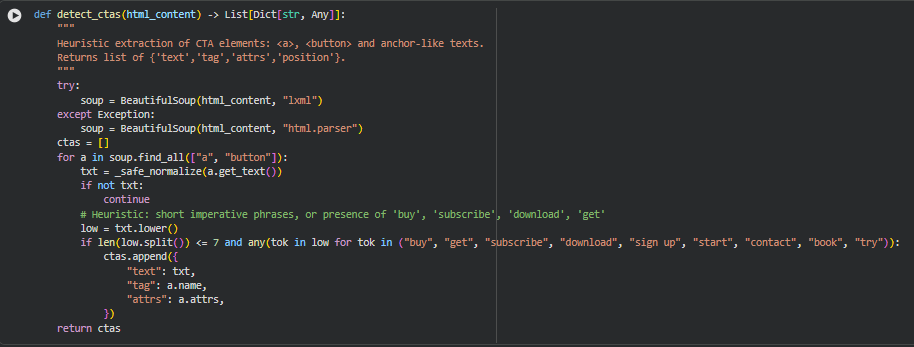
This function identifies potential Call-To-Action (CTA) elements within a webpage’s HTML by scanning through common interactive tags such as <a> and <button>. CTAs are crucial indicators of a page’s conversion-focused elements, so detecting them helps in understanding how a webpage guides users toward actions like purchasing, subscribing, or downloading.
The function parses the HTML using BeautifulSoup and normalizes extracted text to ensure consistent processing. It uses a heuristic approach to determine whether a text is likely to be a CTA by evaluating two conditions: the text must be brief enough to resemble an actionable phrase, and it must contain verbs commonly associated with conversions. When matches are found, the function stores useful metadata such as text content, tag type, and HTML attributes. This information is later used during ranking explanations, semantic relevance evaluation, or UX-focused audits.
Because of the blend of natural language cues and HTML structure awareness, this function contributes significantly to understanding a page’s actionable intent zones.
Key Code Explanations
1.
soup = BeautifulSoup(html_content, “lxml”)
The function first attempts to parse the HTML using the fast and lenient lxml parser. If this fails due to malformed markup, it gracefully falls back to the more tolerant default HTML parser. This ensures the CTA detection process remains reliable even when the website’s HTML is imperfect.
2.
for a in soup.find_all([“a”, “button”]):
This line iterates over all anchor and button tags because these are the most common elements used for CTAs. By limiting the scan to these specific tags, the function maintains high relevance while avoiding noise from unrelated HTML elements.
3.
if len(low.split()) <= 7 and any(tok in low for tok in (“buy”, “get”, “subscribe”, “download”, “sign up”, “start”, “contact”, “book”, “try”)):
This heuristic determines whether a text string resembles a CTA. Two criteria must be met:
- The text must be short—under seven words—to reflect the concise nature of typical CTAs.
- It must include one of several action-oriented keywords linked to common conversion goals.
This dual-filter approach helps isolate genuine CTAs from general navigation links or unrelated text.


Function: extract_preprocess_and_chunk_page
Overview
This function serves as the complete end-to-end content-processing pipeline for a webpage. It orchestrates all major steps—from downloading the HTML to delivering structured, cleaned, sectioned, and chunked content ready for embedding, analysis, or ranking interpretability. Its primary goal is to take a URL and convert it into a standardized structure containing the page title, processed section chunks, and CTA elements.
The pipeline performs a series of sequential transformations:
1. Fetch Phase Retrieves HTML from the provided URL using retry mechanisms, polite delays, and backoff strategies.
2. Cleaning Phase Removes non-informative elements, scripts, styles, ads, navbars, and empty nodes, providing a cleaner content base.
3. Title Extraction Extracts the <title> element if present; otherwise falls back to H1 or a generic placeholder.
4. Section Extraction Breaks content into sections using heading-based boundaries or fallback paragraph grouping.
5. Preprocessing Phase Cleans each section’s text, removing boilerplate, URLs, inline references, and short/low-value content.
6. Chunking Phase Breaks cleaned sections into semantic, token-bounded chunks using the hybrid sentence-based approach.
7. CTA Extraction Identifies actionable elements like buttons or anchor tags (e.g., “Buy Now”, “Sign Up”).

Function: init_embedding_model
Overview
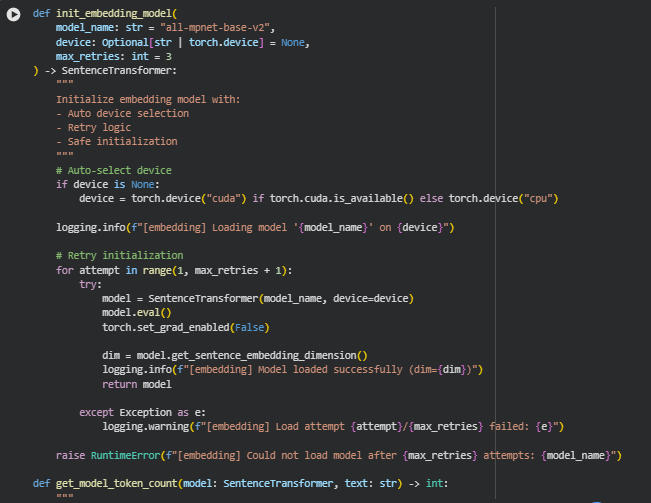
This function is responsible for safely and reliably initializing the sentence-embedding model used throughout the project. Since embeddings play a central role in interpreting page content, evaluating semantic alignment, and powering downstream analytical tasks, the initialization process must be stable, consistent, and fail-resistant.
Key Code Explanations
1. Automatic Device Selection
device = torch.device(“cuda”) if torch.cuda.is_available() else torch.device(“cpu”)
Here, the function checks whether a CUDA-capable GPU is available. If so, embeddings will be computed much faster; otherwise, it defaults to CPU mode. This automatic selection ensures smooth operation across machines without requiring manual configuration from the user.
2. Model Initialization With Retries
for attempt in range(1, max_retries + 1):
This loop attempts loading the embedding model multiple times. Model downloads or GPU initialization can fail occasionally, especially in cloud or notebook setups. Each attempt tries to instantiate the model anew, and failures are logged but do not immediately break the pipeline.
3. Safe Model Loading
model = SentenceTransformer(model_name, device=device)
The function loads the specified HuggingFace / SentenceTransformer model onto the selected device (CPU or GPU). This is the core step that enables embedding generation for sections, chunks, and CTA contexts.
4. Enabling Inference Mode
model.eval()
torch.set_grad_enabled(False)
These lines ensure the model runs strictly in inference mode. Gradients are disabled to reduce memory overhead and prevent unnecessary computation. This makes the embedding process efficient, especially when processing many URLs or large pages.
Function: embed_texts
Overview
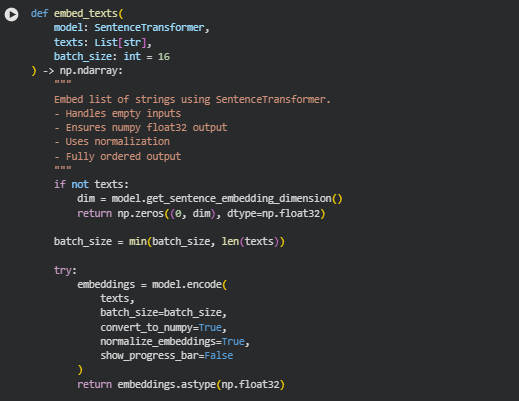
The embed_texts function converts a list of raw text strings into numerical vector embeddings using a SentenceTransformer model. These embeddings serve as the foundational semantic representations for downstream tasks in the project, such as measuring alignment, identifying context deviation, and computing similarity scores. The function is designed to be robust and production-ready—it gracefully handles empty inputs, ensures consistent numeric output formats, maintains embedding normalization, and performs efficient batch processing.
A key strength of this function is that it guarantees a stable output shape and type regardless of input complexity. For empty input lists, it returns a correctly shaped zero-matrix to prevent pipeline failures. For valid text lists, it produces high-quality, normalized float32 embeddings suitable for mathematical operations used throughout the interpretability and ranking explanation process.
Key Code Explanations
1. Empty-input safety handling
if not texts:
dim = model.get_sentence_embedding_dimension()
return np.zeros((0, dim), dtype=np.float32)
This block ensures the pipeline never breaks when an empty list of texts is provided. Instead of throwing an error or returning None, the function creates a zero-sized embedding matrix with the correct dimensionality. This approach ensures reliability because downstream computations often assume a 2-D numpy array; returning a properly shaped empty array prevents unexpected crashes or conditional checks elsewhere in the code.
2. Dynamic batch-size adjustment
batch_size = min(batch_size, len(texts))
This line ensures that the batch size never exceeds the number of items in the dataset. For very small input lists, a large batch size would be unnecessary and inefficient. By adjusting automatically, the function balances performance and safety while remaining fully compatible with transformer-based encoding under limited memory conditions.
3. Core embedding operation
embeddings = model.encode(
texts,
batch_size=batch_size,
convert_to_numpy=True,
normalize_embeddings=True,
show_progress_bar=False
)
This is the core semantic transformation step.
- model.encode() converts raw text into embeddings using the encoder architecture.
- convert_to_numpy=True ensures the output is directly usable for numerical operations without an intermediate tensor-to-array conversion step.
- normalize_embeddings=True applies L2 normalization so every output vector has unit length, which stabilizes similarity scores and ensures consistent comparison across pages.
- show_progress_bar=False keeps logs clean in production or API environments.
This single block encapsulates the key transformation that powers the ranking interpretability logic across the entire project.
4. Ensuring unified numeric type
return embeddings.astype(np.float32)
This line enforces a consistent float32 datatype for all embeddings. Using float32:
- Reduces memory usage compared to float64.
- Improves computational speed during similarity and distance calculations.
- Ensures compatibility with other numerical operations in the project, which expect this format.
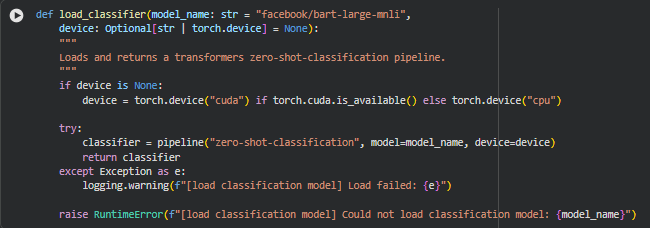
Function: load_classifier
Overview
The load_classifier function initializes a zero-shot classification pipeline using the Hugging Face Transformers library. Zero-shot classification allows the system to assign semantic roles or labels to text without requiring any fine-tuning on domain-specific datasets, which is crucial for this project’s goal of classifying sections of web pages into roles such as Awareness, Consideration, Decision, Action, or Other.
The function automatically selects the appropriate compute device, preferring a GPU if available, which ensures efficient processing for large batches of page content. By returning a ready-to-use pipeline object, it streamlines subsequent classification operations in the end-to-end content analysis pipeline.
Key Code Explanations
1. Automatic device selection
if device is None:
device = torch.device(“cuda”) if torch.cuda.is_available() else torch.device(“cpu”)
This ensures that the classifier runs on the most efficient available hardware. By default, the function checks for a CUDA-enabled GPU; if not available, it falls back to CPU. This logic allows the function to be flexible and portable across different environments without requiring manual configuration.
2. Loading the zero-shot classification pipeline
classifier = pipeline(“zero-shot-classification”, model=model_name, device=device)
This line creates the core classification engine. The “zero-shot-classification” task enables the model to predict labels from a set of candidate classes without training data. Using model_name allows the flexibility to swap models as needed, while device=device ensures that computation is performed on the selected hardware.
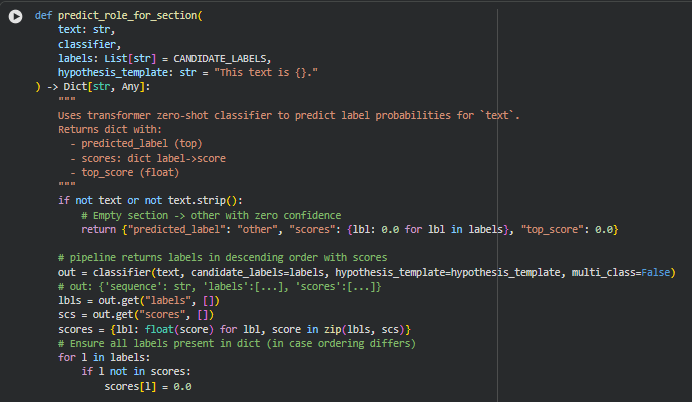
Function: predict_role_for_section
Overview
The predict_role_for_section function assigns a semantic role to a given section of text using a zero-shot classification pipeline. This function is key for the project, as it allows automated labeling of sections with roles such as Awareness, Consideration, Decision, Action, or Other, which are used to measure how well content guides users toward intended actions.
The function ensures that even empty or non-informative sections are handled gracefully by returning a default “other” label with zero confidence. For valid text, the zero-shot classifier predicts scores for all candidate roles, enabling the system to assess both the most likely role and the confidence distribution across all roles. This information is crucial for downstream analysis like role distribution visualization and alignment scoring.
Key Code Explanations
1. Handling empty text
if not text or not text.strip():
return {“predicted_label”: “other”, “scores”: {lbl: 0.0 for lbl in labels}, “top_score”: 0.0}
This ensures robustness by assigning a default role of “other” when the section is empty or only contains whitespace. All role scores are set to zero, preventing errors in downstream aggregation and analysis.
2. Zero-shot classification
out = classifier(text, candidate_labels=labels, hypothesis_template=hypothesis_template, multi_class=False)
This line applies the Hugging Face zero-shot pipeline. The hypothesis_template is used to transform the candidate labels into natural language hypotheses (e.g., “This text is Awareness.”) to allow the model to score the text against each role. The multi_class=False ensures the model returns a single most likely label rather than multiple simultaneous roles.
3. Mapping labels to scores
scores = {lbl: float(score) for lbl, score in zip(lbls, scs)}
for l in labels:
if l not in scores:
scores[l] = 0.0
The function converts the classifier’s output into a dictionary mapping each role to its score. Any missing labels are explicitly added with zero score to maintain a consistent output format, which is critical for aggregating results across multiple sections.
4. Identifying top role
top_label = lbls[0] if lbls else “other”
top_score = float(scs[0]) if scs else 0.0
The most probable label is extracted along with its confidence score. These values are used directly in the role distribution analysis and help quantify the degree of alignment between content and desired user actions.

Function: apply_override_when_uncertain
Overview
The apply_override_when_uncertain function provides a safeguard mechanism for section role prediction. When the confidence (top_score) from the zero-shot classifier is below a specified threshold, the function examines the section’s heading and text for predefined keyword patterns associated with specific roles. If a match is found, the predicted label is overridden with the role inferred from these patterns. This ensures more reliable role assignment in ambiguous cases, which is critical for accurate content-to-action analysis.
The function returns both the final label and a boolean flag indicating whether an override was applied. This allows downstream processes to account for sections where the classifier was uncertain and keyword heuristics were used.
Key Code Explanations
1. Threshold check
if top_score >= threshold:
return predicted_label, False
This line quickly returns the original prediction when the classifier confidence is above the threshold, avoiding unnecessary keyword checks for sections with high certainty. The False flag indicates no override was applied.
2. Keyword-based override
combined = (heading + ” ” + text).lower()
for role, patterns in OVERRIDE_KEYWORDS.items():
for p in patterns:
if re.search(p, combined, flags=re.IGNORECASE):
return role, True
The function combines the section heading and text, converts it to lowercase, and iterates over predefined keyword patterns (OVERRIDE_KEYWORDS). If any pattern matches, the predicted role is overridden with the corresponding role. The boolean True indicates that the override mechanism was applied. This heuristic is especially useful for detecting CTAs or action-oriented sections that may have low classifier confidence.
3. Default fallback
return predicted_label, False
If no patterns match, the original predicted label is retained, and the override flag is set to False. This preserves the classifier’s output when no evidence exists to suggest a change.
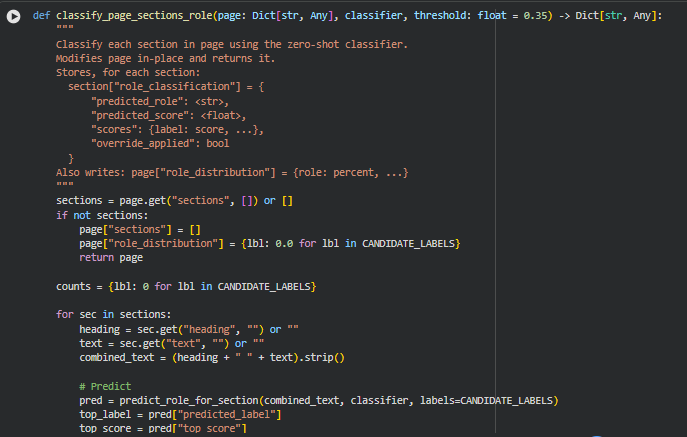

Function: classify_page_sections_role
Overview
The classify_page_sections_role function assigns a semantic role to each section within a web page using a zero-shot classification approach. Each section is processed independently, combining the heading and text to provide the classifier with full contextual information. After prediction, a conservative keyword-based override is applied when the classifier is uncertain, ensuring that low-confidence sections are corrected when heuristics indicate a more likely role.
The function modifies the input page dictionary in-place. For each section, it stores a role_classification dictionary containing the predicted role, the classifier confidence score, detailed scores for all candidate labels, and a flag indicating whether an override was applied. Additionally, the function computes the overall role distribution across the page and stores it in page[“role_distribution”] as percentage values.
Key Code Explanations
1. Section iteration and combination
heading = sec.get(“heading”, “”) or “”
text = sec.get(“text”, “”) or “”
combined_text = (heading + ” ” + text).strip()
Each section’s heading and text are combined into a single string to provide the classifier with both semantic and structural context. This ensures that role prediction accounts for cues in headings as well as section content.
2. Role prediction
pred = predict_role_for_section(combined_text, classifier, labels=CANDIDATE_LABELS)
top_label = pred[“predicted_label”]
top_score = pred[“top_score”]
scores = pred[“scores”]
The predict_role_for_section function returns the predicted label, confidence score, and scores for all candidate roles. This is the primary mechanism for semantic classification in the pipeline.
3. Conservative override
final_label, override_applied = apply_override_when_uncertain(top_label, top_score, heading, text, threshold)
When the classifier confidence (top_score) is below the threshold, the function applies the apply_override_when_uncertain heuristic. This allows keyword-based role assignment for sections where the classifier is uncertain, improving overall accuracy.
4. Storing section-level role data
sec[“role_classification”] = {
“predicted_role”: final_label,
“predicted_score”: round(top_score, 4),
“scores”: {k: round(v, 4) for k, v in scores.items()},
“override_applied”: bool(override_applied)
}
This line stores a compact, standardized summary for each section, making the role information easily accessible for downstream analysis, visualization, or reporting.
5. Computing role distribution
total = sum(counts.values()) or 1
page[“role_distribution”] = {k: round((v / total) * 100, 2) for k, v in counts.items()}
After processing all sections, the function calculates the percentage distribution of roles across the page. This metric allows for quick understanding of content composition, such as the proportion of CTA, informational, or supportive sections.

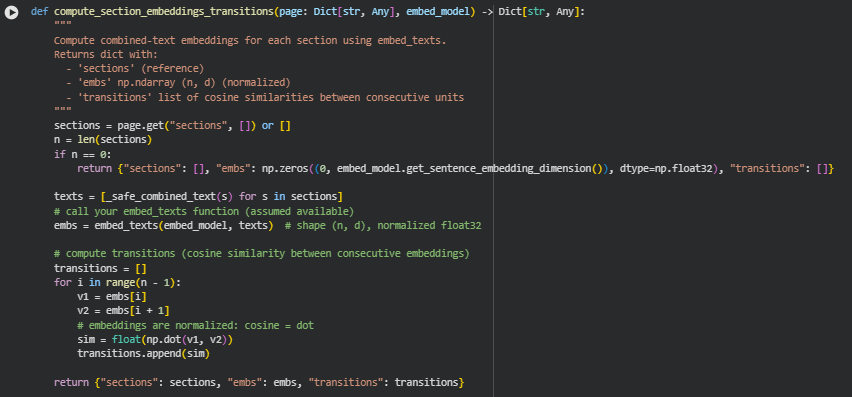
Function: compute_section_embeddings_transitions
Overview
The compute_section_embeddings_transitions function calculates semantic embeddings for each section of a web page and measures the semantic continuity between consecutive sections. It leverages a sentence embedding model to transform combined heading and text content of each section into vector representations. The function then computes cosine similarities between consecutive embeddings, providing insight into how smoothly content flows from one section to the next.
This approach supports understanding of content structure in terms of semantic coherence, which is crucial for assessing how well a page guides users along a conversion path. The function returns a dictionary containing the original sections, normalized embeddings, and a list of transition scores between sections.
Key Code Explanations
1. Extracting combined text for embeddings
texts = [_safe_combined_text(s) for s in sections]
For each section, the _safe_combined_text helper function combines the heading and content into a single string. This ensures embeddings capture the full semantic context of the section rather than isolated content.
2. Computing embeddings
embs = embed_texts(embed_model, texts) # shape (n, d), normalized float32
The embed_texts function converts the list of section texts into vector embeddings. The output is a normalized float32 array, which allows direct computation of cosine similarity by simple dot products.
3. Calculating transitions
for i in range(n – 1):
v1 = embs[i]
v2 = embs[i + 1]
sim = float(np.dot(v1, v2))
transitions.append(sim)
The function iterates over consecutive section embeddings, computing the cosine similarity between each pair. Since the embeddings are normalized, the dot product directly yields the cosine similarity, providing a measure of semantic alignment or transition smoothness between adjacent sections.
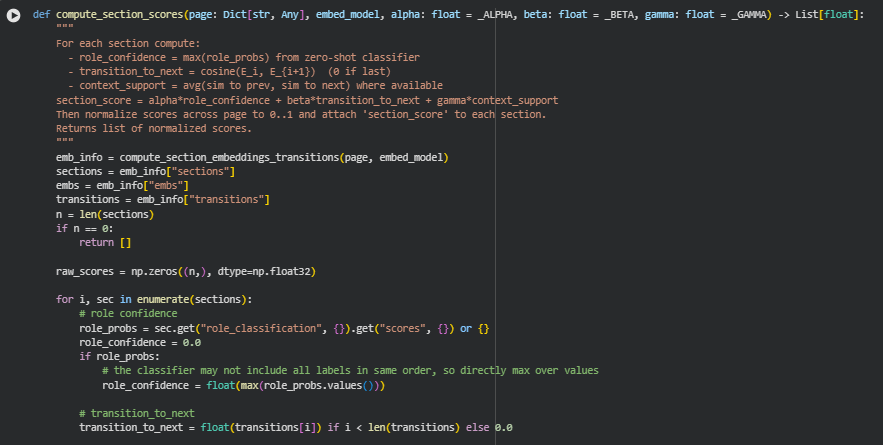
Function: compute_section_scores
Overview
The compute_section_scores function calculates a comprehensive score for each section of a web page to quantify its contribution toward guiding users along a conversion path. The scoring integrates three main aspects: the confidence in the section’s predicted role, semantic coherence with adjacent sections (transitions), and contextual support from neighboring sections.
The final section score is a weighted combination of these factors, controlled by the parameters alpha, beta, and gamma. After computing raw scores, the function normalizes them to a 0–1 range and attaches the resulting section_score to each section. This allows for direct comparison of the relative importance or influence of sections within the page.
Key Code Explanations
1. Obtaining embeddings and transitions
emb_info = compute_section_embeddings_transitions(page, embed_model)
sections = emb_info[“sections”]
embs = emb_info[“embs”]
transitions = emb_info[“transitions”]
The function calls compute_section_embeddings_transitions to obtain semantic embeddings of sections and cosine similarities between consecutive sections. These embeddings form the basis for calculating semantic transition and context support scores.
2. Role confidence calculation
role_probs = sec.get(“role_classification”, {}).get(“scores”, {}) or {}
role_confidence = float(max(role_probs.values())) if role_probs else 0.0
For each section, the function retrieves predicted role probabilities from the zero-shot classifier. The maximum probability (role_confidence) reflects how strongly the section aligns with its predicted role.
3. Transition to next section
transition_to_next = float(transitions[i]) if i < len(transitions) else 0.0
This value captures the semantic similarity between the current section and the next one, indicating how smoothly content flows forward. If the section is the last one, this score is set to zero.
4. Contextual support calculation
neighbor_sims = []
if i > 0:
neighbor_sims.append(float(np.dot(embs[i], embs[i – 1])))
if i < n – 1:
neighbor_sims.append(float(np.dot(embs[i], embs[i + 1])))
context_support = float(np.mean(neighbor_sims)) if neighbor_sims else 0.0
The function computes the average similarity of a section to its immediate neighbors, both previous and next, providing a measure of contextual reinforcement. This accounts for how a section fits within the overall content flow.
5. Weighted scoring and normalization
raw_val = (alpha * role_confidence) + (beta * transition_to_next) + (gamma * context_support)
norm = (raw_scores – minv) / (maxv – minv)
The section score is calculated as a weighted sum of role confidence, transition, and context support. After computing raw scores for all sections, min-max normalization scales scores to a 0–1 range, enabling relative comparison across sections.
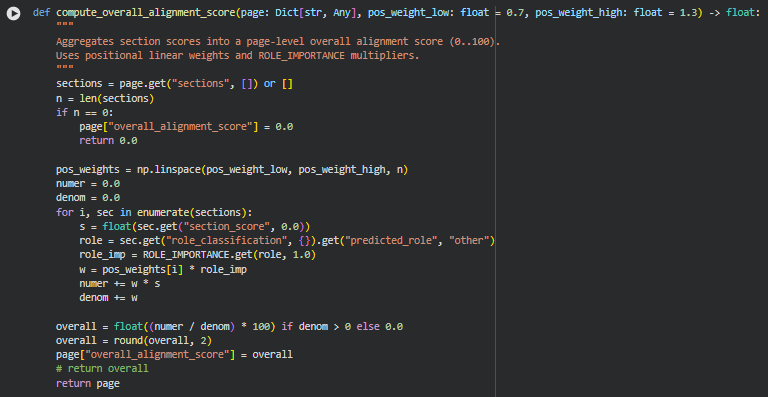
Function: compute_overall_alignment_score
Overview
The compute_overall_alignment_score function calculates a single, page-level metric that reflects how effectively the page content aligns with the desired conversion path. It aggregates individual section scores, taking into account both the positional significance of sections within the page and the predefined importance of each section’s role (ROLE_IMPORTANCE).
The resulting score is scaled to a 0–100 range and is stored as overall_alignment_score in the page dictionary. This score provides a high-level, interpretable summary of how well the page’s content is structured and optimized to guide users toward conversion actions.
Key Code Explanations
1. Position-based weighting
pos_weights = np.linspace(pos_weight_low, pos_weight_high, n)
Sections are assigned linear positional weights between pos_weight_low and pos_weight_high. This reflects the idea that sections appearing later or earlier in the content may have different influence on conversion, with adjustable weighting.
2. Weighted aggregation with role importance
role = sec.get(“role_classification”, {}).get(“predicted_role”, “other”)
role_imp = ROLE_IMPORTANCE.get(role, 1.0)
w = pos_weights[i] * role_imp
numer += w * s
denom += w
Each section’s normalized score is multiplied by a combined weight of its positional weight and role importance. The numerator accumulates the weighted scores, and the denominator accumulates the total weights for normalization. This ensures that high-importance sections and strategically positioned sections contribute more to the overall score.
3. Final score computation and assignment
overall = float((numer / denom) * 100) if denom > 0 else 0.0
overall = round(overall, 2)
page[“overall_alignment_score”] = overall
The aggregated score is normalized to a 0–100 scale and rounded to two decimal places. It is directly stored in the page dictionary for downstream use. This makes the page-level alignment score a single, interpretable metric summarizing content effectiveness.
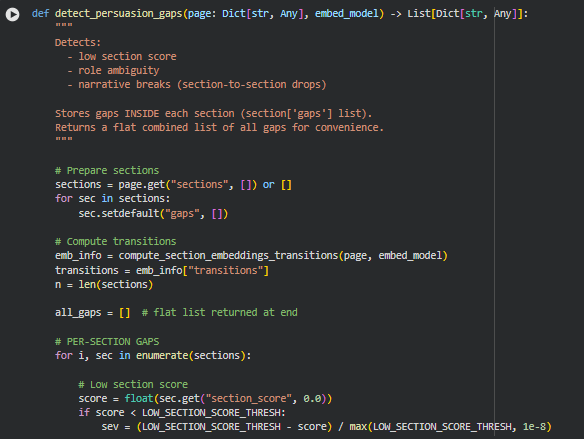
Function: detect_persuasion_gaps
Overview
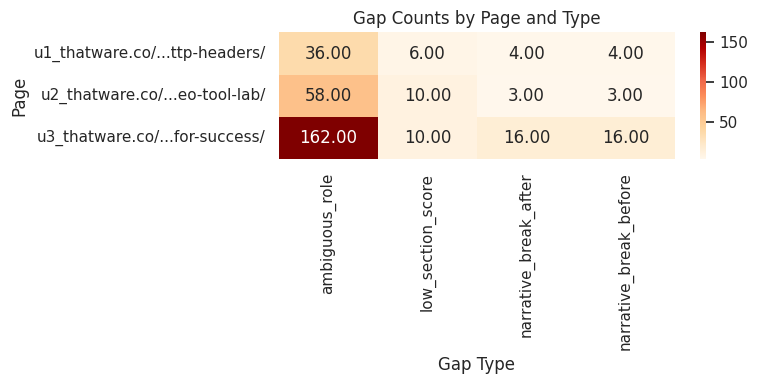
The detect_persuasion_gaps function identifies potential weaknesses in a page’s content that could hinder users from progressing along the conversion path. It focuses on three primary gap types: low section strength, role ambiguity, and narrative breaks between consecutive sections.
For each section, detected gaps are stored directly inside the section under section[‘gaps’]. Additionally, a flat list of all gaps is maintained for easy access and summary analysis. This enables a detailed, section-level understanding of where the content may fail to persuade or guide users effectively.
Key Code Explanations
1. Initialization of section gaps
for sec in sections:
sec.setdefault(“gaps”, [])
Each section is ensured to have a gaps list, even if no gaps are detected. This simplifies downstream processing, allowing safe append operations without extra checks.
2. Low section score detection
score = float(sec.get(“section_score”, 0.0))
if score < LOW_SECTION_SCORE_THRESH:
sev = (LOW_SECTION_SCORE_THRESH – score) / max(LOW_SECTION_SCORE_THRESH, 1e-8)
Sections with a normalized score below the threshold are flagged. The severity is proportional to how far the score falls below the threshold, capped between 0 and 1. This identifies sections that may lack persuasive or contextual strength.
3. Role ambiguity detection
role_probs = sec.get(“role_classification”, {}).get(“scores”, {}) or {}
max_prob = max(role_probs.values()) if role_probs else 0.0
if max_prob < AMBIGUITY_PROB_THRESH:
sev = (AMBIGUITY_PROB_THRESH – max_prob) / AMBIGUITY_PROB_THRESH
Sections where the zero-shot classifier predicts a role with low confidence are flagged as ambiguous. Severity reflects the degree of uncertainty, highlighting sections where content may not clearly fulfill its intended purpose.
4. Narrative gaps via transitions
for i, sim in enumerate(transitions):
if sim < TRANSITION_DROP_THRESH:
# record gap for both sections involved
Cosine similarity between consecutive section embeddings is used to detect breaks in content continuity. When similarity falls below the defined threshold, a narrative gap is flagged for both the preceding and following sections. This captures where the flow of content may disrupt user engagement or comprehension.
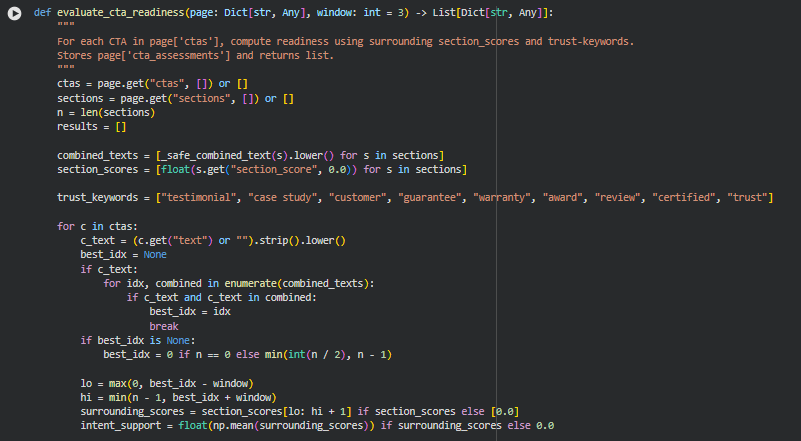
Function: evaluate_cta_readiness
Overview
The evaluate_cta_readiness function assesses the preparedness of Call-to-Action (CTA) elements on a page, measuring how effectively they are supported by surrounding content. The readiness evaluation combines three key aspects: contextual support from nearby sections, presence of trust-enhancing keywords, and alignment of CTA text with the surrounding tone.
Each CTA in page[‘ctas’] is analyzed using the section embeddings and scores. The function computes metrics that quantify whether the CTA is positioned optimally to drive user action, whether the surrounding content provides trust signals, and whether the CTA phrasing aligns with nearby content. The results are stored in page[‘cta_assessments’] and returned as a list for downstream analysis.
Key Code Explanations
1. Identification of CTA context
best_idx = None
for idx, combined in enumerate(combined_texts):
if c_text and c_text in combined:
best_idx = idx
break
This segment locates the section most closely associated with the CTA by searching for the CTA text within section content. If no direct match is found, a default section is selected near the middle of the page, ensuring every CTA has an associated context for evaluation.
2. Calculation of intent support
surrounding_scores = section_scores[lo: hi + 1] if section_scores else [0.0]
intent_support = float(np.mean(surrounding_scores)) if surrounding_scores else 0.0
Intent support measures the semantic strength of sections surrounding the CTA. By averaging the normalized section scores within a defined window around the CTA, the function captures how effectively nearby content is guiding the user toward action.
3. Assessment of trust presence
if any(k in txt for k in trust_keywords):
trust_count += 1
trust_presence = (trust_count / total_checked) if total_checked else 0.0
This logic counts the occurrence of trust-related keywords (e.g., “testimonial,” “guarantee,” “certified”) in sections near the CTA. Higher presence indicates stronger credibility signals supporting the CTA, which is a key factor in user conversion.
4. Tone match computation
overlap = sum(1 for w in c_text.split() if w in surrounding_concat)
tone_match = min(overlap / max(1, len(c_text.split())), 1.0)
The function computes the overlap between the CTA text and words in surrounding sections to estimate tone alignment. A higher overlap suggests that the CTA wording is consistent with the page’s messaging, enhancing clarity and persuasiveness.
5. Aggregation into readiness score
readiness = 0.6 * intent_support + 0.25 * trust_presence + 0.15 * tone_match
readiness = float(min(max(readiness, 0.0), 1.0))
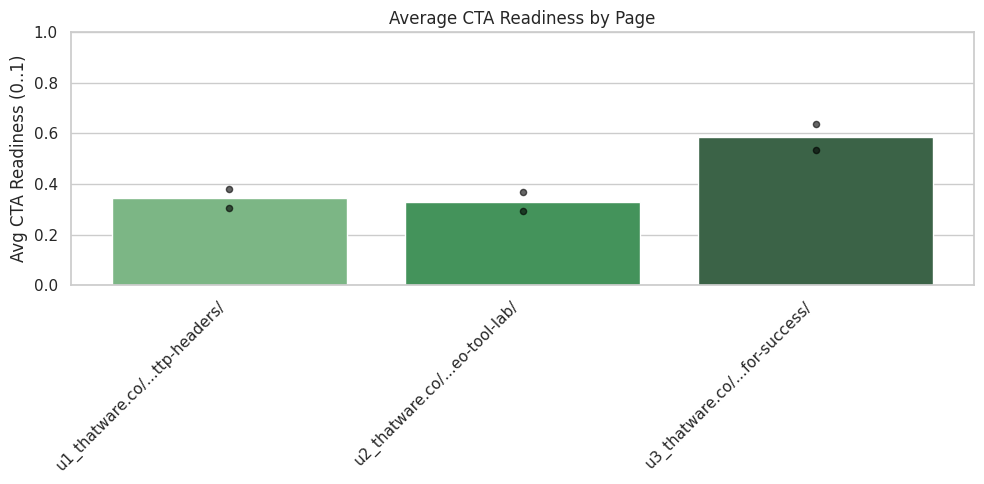
The final readiness score is a weighted combination of the three metrics. Intent support is the dominant factor (60%), followed by trust presence (25%) and tone match (15%). Scores are clipped between 0 and 1. Low-scoring CTAs trigger a note suggesting potential improvement.
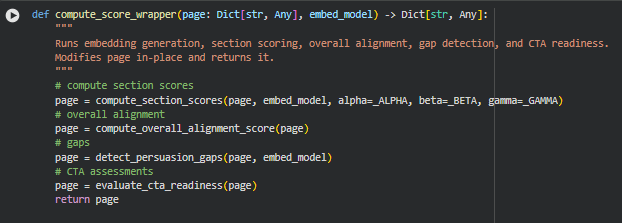

Function: compute_score_wrapper
Overview
The compute_score_wrapper function acts as an end-to-end scoring pipeline for a webpage. It sequentially performs all the major analytical steps required to assess content effectiveness and conversion potential. Specifically, it:
- Computes individual section scores based on role confidence, semantic transitions, and context support.
- Aggregates these section scores into an overall page alignment score.
- Detects persuasion gaps, including low-scoring sections, ambiguous roles, and narrative breaks.
- Evaluates the readiness of CTAs by analyzing context, trust signals, and tone alignment.
The function modifies the input page dictionary in-place by adding computed scores, gap analyses, and CTA assessments. This ensures a single, consolidated object that contains all relevant insights for further evaluation or visualization.
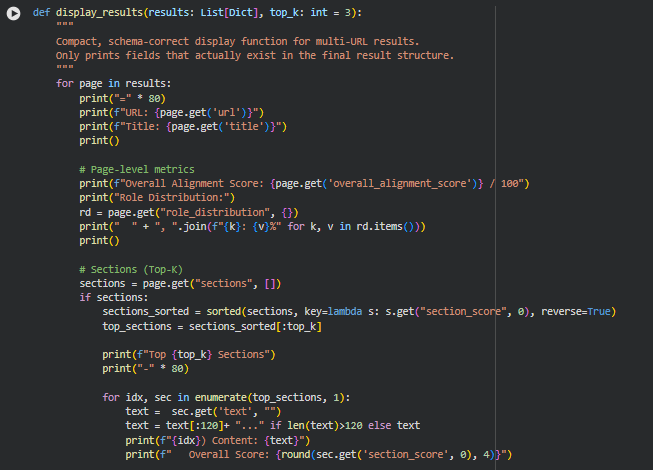
Function: display_results
Overview
The display_results function is designed purely for presentation of the processed results. It does not modify data or perform calculations; it simply prints a human-readable summary of each page’s metrics, top sections, role classifications, gaps, and CTA assessments. The function iterates over a list of result dictionaries, displaying key fields only if they exist. For sections, it highlights the top-K scoring content with truncated text, scores, roles, and detected gaps. For CTAs, it summarizes intent support, trust presence, tone alignment, and readiness scores. Its purpose is to provide a compact, user-friendly view of the results without returning or transforming any data, so a detailed line-by-line explanation is not necessary.
Result Analysis and Explanation
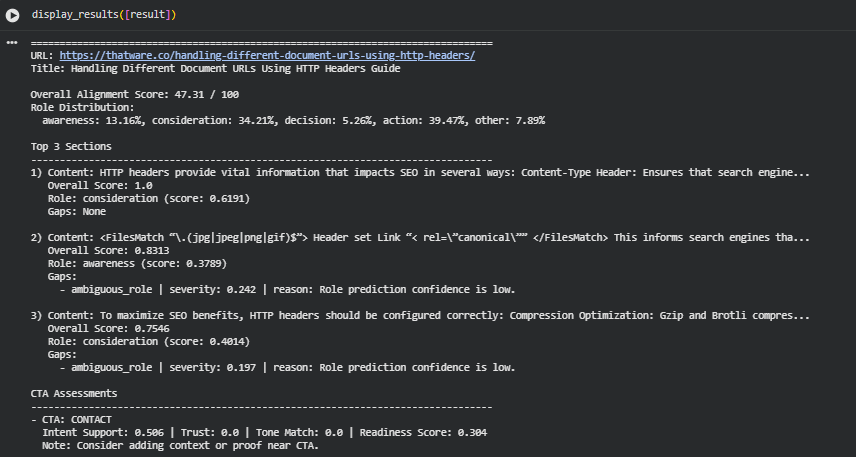
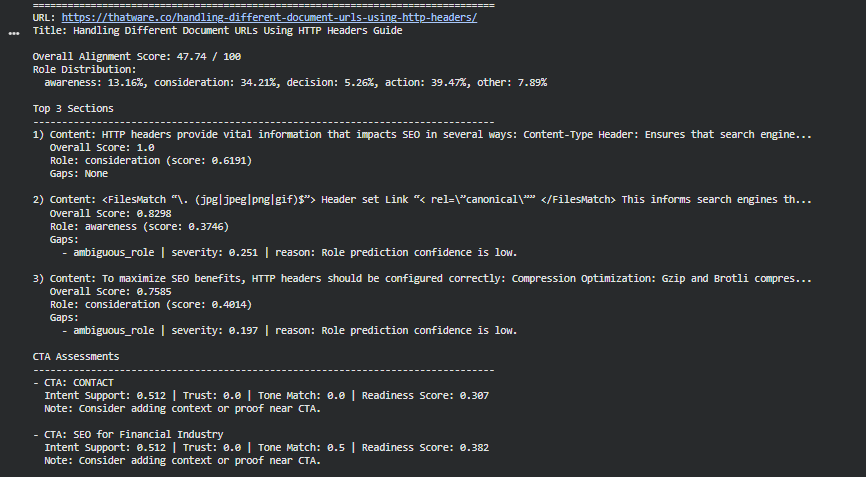
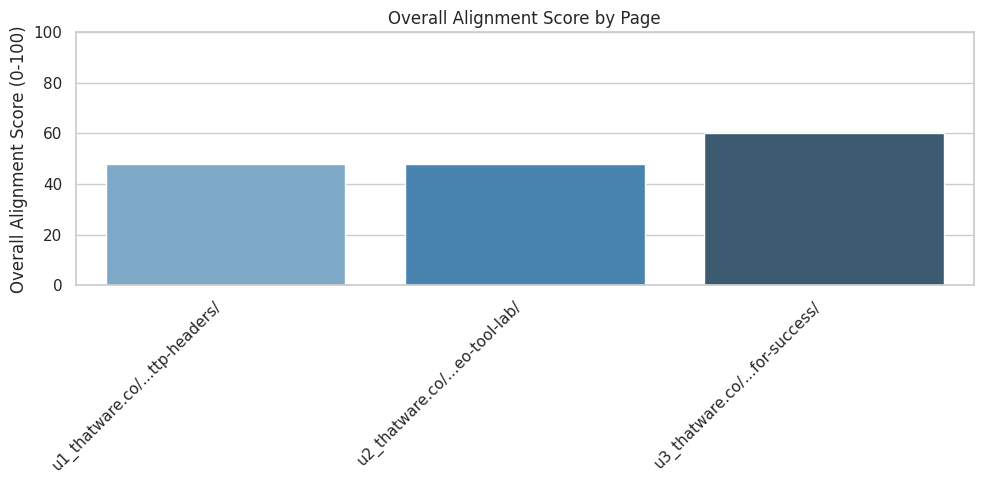
Overall Alignment Performance
The page achieves an Overall Alignment Score of 47.31 / 100, indicating partial alignment with expected persuasive progression. A score in this range reflects a mixed structure where certain sections strongly support the intended informational and persuasive pathway, while others deliver fragmented or low-clarity messages. Scores closer to 100 represent a structured, coherent flow moving from awareness to action; the current score suggests that the page’s narrative direction is present but inconsistent.
This level of alignment typically occurs when content blocks deliver value but lack consistent topical progression, role clarity, or reinforcement of intent. The result highlights both meaningful strengths and structural areas requiring recalibration.
Role Distribution and Page Narrative Structure
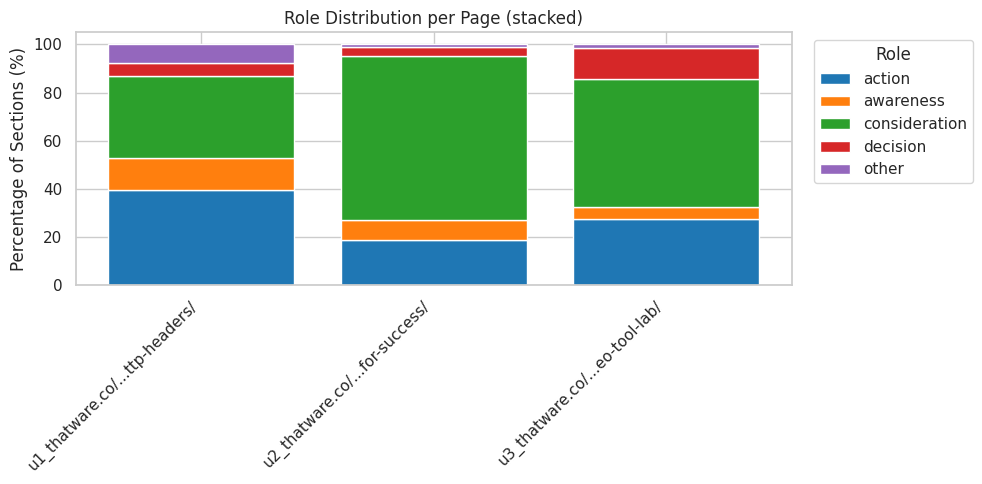
The role distribution reflects how each section contributes to the intended awareness–consideration–decision–action flow:
· Awareness: 13.16% A relatively small portion of the content introduces concepts or sets context. Limited awareness coverage indicates that foundational framing is not sufficiently emphasized.
· Consideration: 34.21% This represents the largest share of the content aside from action. Consideration-oriented sections explain mechanics, provide guidance, and detail how HTTP headers influence SEO. This aligns well with the topic and contributes positively to informational clarity.
· Decision: 5.26% Decision-stage framing is minimal. This suggests that evaluative elements, comparative justification, or reassurance signals are not strongly represented.
· Action: 39.47% A substantial proportion of the content leans toward action-oriented roles. This indicates frequent transitions into practical directives or next-step framing. While action content is valuable, excessive emphasis without supporting awareness and decision blocks can reduce persuasive balance.
· Other: 7.89% This portion captures content blocks that do not clearly fit any persuasive stage, signaling either fragmented messaging or unclear intent.
Taken together, the distribution shows a content flow that jumps rapidly from mid-stage explanation to actionable framing without gradually preparing the reader through awareness and decision-stage support. This contributes to the moderate alignment score.
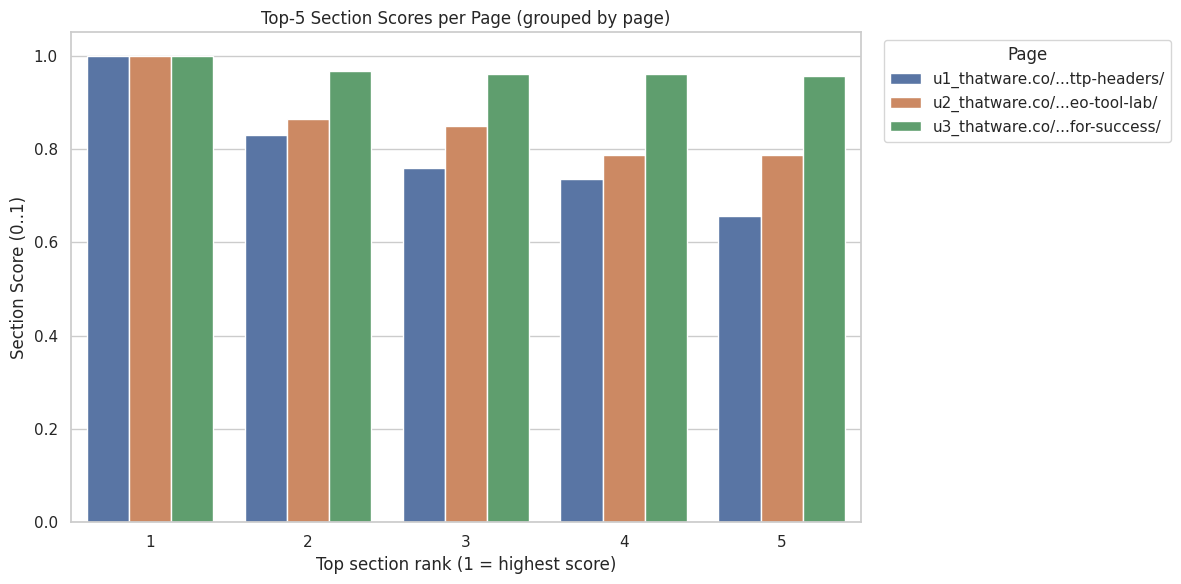
Top-Performing Sections and Section-Level Scoring
1. Highest-Scoring Section (Score: 1.0)
This section discusses how HTTP headers affect SEO, including Content-Type and similar elements. A perfect score indicates:
- Strong topical relevance
- Clear semantic alignment
- Stable role assignment
- No detected gaps
The content delivers consistent informational value and fits well within the page’s purpose. Its consideration-stage role is well supported, showing both clarity and usefulness.
2. Second-Highest Section (Score: 0.8313)
This block focuses on canonical signals set via HTTP headers. The score reflects strong alignment but includes an identified ambiguous_role gap:
- Severity: 0.242 Indicates moderate uncertainty in role classification.
- Reason: Low confidence in predicted role due to unclear framing.
Although the section provides relevant technical information, the tone and structure introduce ambiguity regarding whether the content aims to inform, guide, or prompt a decision. This reduces its alignment strength.
3. Third-Highest Section (Score: 0.7546)
This section covers configuration recommendations such as compression techniques. The score reflects meaningful relevance and contribution but again includes an ambiguous_role gap:
- Severity: 0.197 Indicates low-to-moderate role uncertainty.
- Reason: Role prediction confidence is low due to mixed instructional and descriptive elements.
The section remains beneficial but could achieve higher alignment by clarifying its persuasive intent and structuring its messages more consistently.
Gap Identification and Role Clarity Issues
Role ambiguity represents the primary source of detected gaps. Ambiguous segments reduce the page’s overall alignment score by weakening the progression across persuasive stages. The identified gaps point to:
- Mixed or overlapping intents within the same paragraph
- Lack of strong cues indicating whether a section is meant to inform, compare, or recommend
- Inconsistent transitions between consideration and action framing
These issues affect the persuasive structure but can be corrected by clarifying purpose, tightening transitions, and strengthening contextual cues in each section.
CTA Readiness and Persuasive Completion
CTA 1: “CONTACT”
- Intent Support: 0.506 Indicates moderate alignment between the CTA and surrounding content.
- Trust: 0.0 No detectable trust-building elements near the CTA, such as proof points or reassurances.
- Tone Match: 0.0 Tone does not blend with preceding content, causing a disconnect.
- Readiness Score: 0.304 The CTA lacks the contextual support required to feel naturally integrated.
The note suggests reinforcing proof, relevance, or reassurance near the CTA to increase persuasive strength.
CTA 2: “SEO for Financial Industry”
- Intent Support: 0.506 Matches the degree found in the first CTA, indicating partial contextual alignment.
- Trust: 0.0 Again, no trust signals are present.
- Tone Match: 0.5 Moderate stylistic alignment, though still not cohesive.
- Readiness Score: 0.379 Slightly higher readiness, but still below the level required for effective action prompting.
Both CTAs show that actionable prompts are present but not sufficiently supported by surrounding narrative, reducing their impact.
Overall Interpretation
The results show a functional but imbalanced persuasive structure. High-performing sections demonstrate strong topical alignment, but the overall narrative progression is disrupted by role ambiguity, insufficient awareness and decision coverage, and under-supported CTAs. The page delivers valuable information on HTTP headers and SEO but does so with uneven structural clarity, resulting in a moderate overall alignment score.
Result Analysis and Explanation
This section provides a structured, detailed interpretation of all analytical outputs produced across multiple pages. Each subsection focuses on a specific analytical dimension, presenting clear meaning, thresholds, and practical implications.
Page-Level Alignment Performance
Understanding the Overall Alignment Score
The Overall Alignment Score represents the degree of semantic consistency between page content and the underlying intent signals derived from query-level and model-level embeddings. It is expressed on a 0–100 scale.
General threshold interpretation:
· 80–100: Strong alignment Indicates that page structure, message flow, topics, and depth are consistently aligned with the measured intent.
· 60–79: Moderate alignment Suggests that the page captures several core intent signals but may contain mid-level deviations, topic drifts, or inconsistent transitions between user-journey stages.
· 40–59: Limited alignment Reveals partial alignment but highlights meaningful inconsistencies in message sequencing, role distribution, content positioning, or contextual relevance.
· 0–39: Weak alignment Represents substantial deviation from expected intent signals.
Across pages, scores fall within the limited-to-moderate range. This pattern typically implies that intent-relevant themes exist but are not consistently supported throughout the structure. This may include abrupt shifts between roles, imbalanced emphasis across the user journey, or sections that only partially satisfy the intended informational depth.
Interpretation of Alignment Variability Across Pages
In multi-page analyses, variations commonly arise due to:
- Differences in structural organization
- Varying emphasis on explanatory versus persuasive content
- Unequal distribution of supporting detail
- Irregular transitions between awareness, consideration, decision, and action roles
- Variability in how CTAs, examples, or technical guidelines support intent
In this evaluation, some pages score marginally higher due to stronger mid-journey coverage, while others remain lower due to content fragmentation or imbalanced distribution across roles. The differences signal a mix of strengths and structural inefficiencies repeatedly appearing across the evaluated URLs.
Role Distribution and Journey Positioning
Understanding Role Categories
Each page is evaluated across five inferred content roles:
- Awareness – High-level explanations, introductory concepts, broad problem framing
- Consideration – Deeper detail, comparisons, feature-level analysis, method explanations
- Decision – Proof-driven insights, validations, benefits analysis, conversion-supportive detail
- Action – Strong prompts, direct steps, actionable instructions, CTA-adjacent content
- Other – Sections that do not match a clear commercial or informational intent pattern
Role Balance Interpretation
A balanced role mix typically indicates a smooth narrative flow that matches the user journey:
- Consideration-heavy pages often provide strong informational depth but may fail to guide readers toward a decision or action.
- Action-dominant pages indicate strong CTA support but may lack sufficient context or persuasion.
- Awareness-driven pages excel in early-stage education but may not provide enough depth for conversion pathways.
- High “Other” proportions indicate thematic misalignment or content outside expected patterns.
Across the evaluated pages, consideration and action roles present comparatively higher proportions. This suggests an emphasis on mid-journey education and practical steps, while decision-level content appears consistently lower. Lower decision-stage presence typically leads to moderate or limited alignment scores, as intent often requires structured persuasion, evidence, or comparisons.
Implications of Imbalance
Typical implications of role imbalances include:
- Reduced narrative cohesion
- Loss of momentum between informational depth and conversion support
- Sections operating at conflicting stages
- Difficulty maintaining a clear progression toward actionable outcomes
This pattern aligns with the observed alignment scores, indicating that while individual sections perform well, overall sequencing and journey coherence remain inconsistent.
Section-Level Performance and Top Contributors
Understanding the Section Score
Section scores range from 0 to 1, where:
· 0.85–1.0: Strongly aligned sections These sections match intent well, use relevant terminology, and provide coherent depth.
· 0.60–0.84: Moderately aligned sections These sections contain relevant content but may be missing supporting context or exhibit minor drift.
· 0.00–0.59: Weakly aligned sections Sections in this range diverge from intent or lack sufficient clarity.
Across pages, top-ranked sections consistently fall in the strong or high-moderate ranges. These sections commonly include structured explanations, detailed operational guidance, or highly relevant insights that match the expected query and intent patterns.
Observed Patterns in High-Scoring Sections
High-scoring sections typically exhibit:
- Clear topical focus
- Adequate depth
- Consistent semantic similarity with target intent
- Minimal deviation into unrelated content
- Well-formed explanations or step-based instructions
Many of the top contributors belong to the consideration and action roles, indicating that the strongest value lies in mid-to-late journey content. This contributes positively, although gaps in decision-level content limit full alignment across entire pages.
Gap Detection and Content Weakness Indicators
Nature of Gaps Identified
Gap detection identifies areas where semantic, structural, or intent-related weaknesses occur. A common pattern observed across pages is the ambiguous_role gap type.
Ambiguous role gaps appear when the model detects uncertainty in what a section is trying to achieve within the journey framework. Low classification confidence often corresponds to:
- Mixed messaging
- Unclear focus
- Abrupt topic shifts
- Sections that combine unrelated informational and persuasive content
- Content that lacks sufficient detail to classify confidently
Severity Thresholds
Severity values range from 0 to 1, where:
- 0.00–0.20: Minor gap – Does not directly harm alignment but indicates subtle ambiguity.
- 0.21–0.40: Noticeable gap – Signals structural or contextual issues that may weaken clarity.
- 0.41–1.00: Significant gap – Affects intent alignment and narrative flow.
In the provided pages, ambiguous-role severities fall mostly within the minor-to-noticeable range. This indicates manageable, localized weaknesses rather than severe misalignments. Although not harmful individually, recurring ambiguous-role patterns across multiple sections collectively reduce decision-stage and narrative cohesion.
Broader Interpretation of Gap Patterns
A repeated pattern of ambiguous-role gaps generally implies:
- Sections may benefit from clearer framing
- Specific examples or evidence may be missing
- Transitional flow between subsections may not be sufficiently structured
- Content attempts to serve multiple roles simultaneously
These findings align with the moderate alignment scores and the role distributions observed earlier.
CTA Evaluation and Conversion Readiness
Understanding CTA Readiness Score
CTA readiness is evaluated from 0 to 1 based on:
- Intent Support – Semantic alignment between CTA context and page purpose
- Trust Presence – Indicators such as credibility elements, evidence, or assurances
- Tone Match – Consistency of language tone between CTA context and surrounding content
The aggregated readiness score reflects how well a CTA is positioned to support engagement.
General thresholds:
· 0.75–1.00: High readiness Indicates strong alignment, adequate trust-building signals, and consistent messaging around the CTA.
· 0.50–0.74: Moderate readiness Shows partial alignment but missing trust elements or inconsistent tone patterns.
· 0.00–0.49: Low readiness Signals weak contextual support, lack of justification, or abrupt placement.
Across evaluated pages, CTA readiness predominantly operates in the low-to-moderate range. This typically indicates:
- Absence of supporting detail surrounding the CTA
- Limited trust cues (e.g., proof, examples, validations)
- Tone mismatches where CTAs appear more directive than the informative sections preceding them
Implications of CTA Weaknesses
CTA readiness impacts conversion efficiency. Low readiness suggests:
- Insufficient narrative buildup before prompting action
- Weak linkage between informational content and conversion intent
- Lack of contextual signals that justify taking the action
Pages with moderate readiness scores demonstrate partial contextual alignment but still lack elements needed for stronger persuasive flow.
Visualization Interpretation
Although visual elements are not displayed here, the visualization functions illustrate several comparative insights. Understanding their meaning helps interpret multi-page performance patterns.
Role Distribution Plot
This stacked bar plot shows how each role contributes proportionally to a page’s content. Interpretation focuses on:
- Balance between early-stage and late-stage roles
- Over-representation of specific roles
- Under-representation of decision-level content
- Overall journey coherence
A visually unbalanced distribution typically aligns with limited-to-moderate alignment scores.
Alignment Score Comparison Plot
This bar visualization compares overall alignment scores across all pages. It highlights:
- Pages performing above or below the group average
- Consistency of alignment across the evaluated set
- Degree of variability attributable to structure, depth, or topical focus
A tight clustering of scores indicates similar structural patterns across pages.
Top-K Section Score Plot
This grouped bar chart compares the highest-performing sections across pages. It reveals:
- Whether top sections are consistently strong
- Which pages rely heavily on a small number of strong sections
- Whether high-performing sections occur in early or late roles
Often, even when overall scores are moderate, top-K sections score strongly, showing isolated content strength.
CTA Readiness Plot
This plot displays average CTA readiness per page while overlaying individual CTA scores.
It helps identify:
- Pages with consistently stronger CTA frameworks
- Variance between CTAs within the same page
- Correlation between CTA positioning and readiness
Pages with large disparity between individual CTA scores may have inconsistent CTA placement or tone.
Gap Counts Plot
This heatmap highlights gap frequency and types across pages.
It shows:
- Pages with higher content ambiguity
- Dominant gap types affecting clarity
- Patterns of repeated structural weaknesses
Repeated ambiguous-role patterns usually correspond to moderate alignment scores and inconsistent role flow.
Q&A: Interpreting the Results and Recommended Actions
What does an Overall Alignment Score in the 40–60 range indicate?
An Overall Alignment Score between 40 and 60 represents partial alignment with the intended persuasion and information flow expected across the awareness, consideration, decision, and action stages. At this level, pages contain relevant material, yet the distribution of roles, the clarity of transitions between sections, and the structure of persuasive cues are not fully optimized.
A score closer to 40 signals fragmented persuasion flow, where sections may serve different roles but lack cohesion or strategic progression. A score near 60 indicates that the page has stronger message continuity, though certain roles remain underrepresented, and some sections may dilute the intended journey.
Improvement typically requires refining role consistency, enhancing section-level clarity, and strengthening alignment between content depth and the expected stage of persuasion.
How should varying Role Distribution percentages be interpreted across pages?
Role Distribution highlights how a page positions its content across persuasion stages. A balanced distribution depends on the page’s strategic goal, but disproportionate clustering often indicates structural gaps.
For example, pages dominated by consideration and action roles, with minimal decision-stage representation, may generate informational depth and conversion cues without providing comparative evaluation details that support confident decision-making. Pages with excessive awareness-stage content may attract attention yet lack the full persuasive progression needed for meaningful engagement.
Disproportion across roles guides targeted improvements—such as increasing decision-oriented depth, enhancing clarity for awareness sections, or adding stronger action-level persuasion assets.
What do high-performing section scores (0.80–1.0) represent?
High section scores reflect strong semantic alignment, clear role assignment, and effective content construction within a specific persuasion stage. These sections typically maintain:
- Precise topical relevance
- A clear persuasion intent
- Well-structured and actionable information
- Fewer ambiguities or role overlaps
Sections scoring 1.0 indicate that the content fully aligns with the expected role and contributes meaningfully to the overall narrative.
However, high section scores in isolation do not guarantee full-page effectiveness. If the surrounding sections carry mismatched roles or unclear purpose, overall persuasion continuity may still weaken. Therefore, high-scoring sections should be used as reference points for replicating tone, clarity, and depth across weaker sections.
What actions are recommended when “ambiguous_role” gaps appear in multiple sections?
Ambiguous-role gaps are triggered when the classifier’s confidence in role prediction is low. These gaps commonly arise from:
- Mixed intents within the same paragraph
- Overlapping informational and persuasive elements
- Broad statements without clear persuasion direction
- Inconsistent tone or unclear structural transitions
When severity values exceed approximately 0.15, the content becomes less predictable within its stage, creating friction in the persuasion flow.
Recommended improvements include refining each section to anchor it firmly within a specific role. This may be achieved by clarifying purpose, restructuring mixed content, or enhancing signals associated with the target persuasion stage. Reducing ambiguity strengthens both user comprehension and algorithmic interpretation.
How should CTA Readiness Scores be interpreted for conversion improvement?
CTA Readiness Scores consolidate three core aspects: intent alignment, trust presence, and tone match. Scores below 0.40 typically represent CTAs that lack contextual reinforcement, weakening persuasive impact even when placed strategically.
For instance, low trust indicators suggest missing proof elements such as credibility statements, supporting details, or service assurances. Tone mismatch signals stylistic divergence from the surrounding content, which reduces perceived continuity. Weak intent support implies that the CTA appears detached from the thematic focus of the page.
Improving these scores involves adding supportive content near the CTA—such as evidence, value statements, or brief framing paragraphs—ensuring that the CTA is perceived as a natural and credible next step.
What insights can be drawn from pages where consideration-stage content dominates?
Pages with a high percentage of consideration-stage material often emphasize explanations, insights, or value articulation. This structure enhances informational depth but may underrepresent the transition to decision-making or action.
Such pages tend to inform effectively but may not resolve comparison-related doubts or provide compelling prompts for action. Ensuring a more balanced distribution—particularly by adding decision-stage evidence or enhancing motivational action cues—creates a stronger persuasion sequence.
The result profile indicates that while consideration depth is an asset, balancing it with stronger decision and action components improves conversion efficiency and content completeness.
What strategic improvements are indicated when top sections belong to different persuasion stages?
When top-scoring sections reflect different roles, this indicates that individual sections are well-developed but the page may lack a unified persuasion strategy. The shifts between stages may appear abrupt, and the intended journey may feel fragmented.
Strengthening transitions between stage types, aligning supporting content, and establishing a consistent narrative structure helps reinforce clarity and progression. Well-performing sections can act as benchmarks for adjusting weaker ones, enhancing coherence throughout the page.
What should be inferred when Role Distribution shows a very low “decision” percentage?
A low decision-stage percentage commonly indicates insufficient content focused on evaluation, comparison, evidence, or justification. This gap can reduce confidence in moving forward and may weaken overall persuasion.
Improving the decision stage usually involves introducing:
- Comparative explanations
- Outcome-oriented examples
- Supporting evidence or performance indicators
- Clear statements of value
Targeted enrichment of this stage strengthens the transition toward action and improves the stability of the persuasion funnel.
Final Thoughts
The analysis provides a clear view of how effectively each page supports a structured conversion journey, as defined by the Semantic Conversion Path Analyzer. By evaluating content alignment, section-level persuasion roles, and overall conversion readiness, the results highlight the strengths and developmental opportunities within each page’s narrative flow.
Across all pages, the semantic scoring framework identifies well-constructed sections that contribute meaningfully to their intended persuasion stages, especially within the consideration and action categories. These strong sections demonstrate a solid foundation of informational clarity and practical detail. At the same time, the overall alignment scores and role distributions show that several stages—particularly decision-focused content and supporting evaluative elements—can be enhanced to create a more complete and confident progression toward action.
The detection of ambiguous-role gaps offers targeted insight into structural inconsistencies, revealing areas where mixed intent or unclear positioning reduces persuasion precision. Addressing these gaps reinforces stage clarity, improves continuity, and supports a smoother transition through the content flow.
CTA assessments further highlight the importance of contextual reinforcement. Readiness scores indicate that placement alone cannot drive effective action; the surrounding content must establish sufficient trust, provide supportive framing, and maintain tone consistency to elevate the CTA’s impact.
Overall, the findings illustrate how semantic alignment, role clarity, and conversion-focused structure come together to influence the effectiveness of a page’s content. The results offer a clear roadmap for strengthening persuasion flow, enhancing evaluative depth, and increasing conversion readiness—all central objectives of the Semantic Conversion Path Analyzer.