SUPERCHARGE YOUR ONLINE VISIBILITY! CONTACT US AND LET’S ACHIEVE EXCELLENCE TOGETHER!
For years, Google Search Console was viewed as an essential SEO dashboard — but mostly a backward-looking one.
It answered questions like:
- “What queries brought traffic last month?”
- “Which pages gained impressions?”
- “Where did rankings drop?”
Helpful — but fundamentally reactive.
Now, in December 2025, Google took a clear step toward changing Search Console’s identity. Instead of functioning only as a performance ledger, it’s gradually becoming a decision-support system: more assistant-driven, more workflow-aware, and noticeably closer to a unified marketing measurement hub.
That matters because modern SEO teams don’t struggle with data access anymore — they struggle with efficiency and clarity:
- Too much time is spent configuring dashboards, slicing filters, and building comparisons…
and not enough time is spent interpreting patterns, identifying root causes, and making decisions. - Organic visibility is no longer limited to websites.
YouTube channels, social profiles, creator pages, and other non-site entities appear constantly in SERPs — sometimes even more prominently than webpages for certain intents.
Google is responding to both of these realities with two major experimental Search Console enhancements:
- AI-powered configuration inside the Performance report (natural-language report setup)
- Social channel visibility inside Search Console Insights (combined website + social discovery reporting)
These experiments reveal a clear direction: Search Console is evolving from a “reporting tool” into a guided intelligence workspace — one that helps teams measure visibility across surfaces and reduce friction in analysis.
December 2025 GSC Updates — Quick Summary (TL;DR)
Here’s the fastest way to understand what changed.
TL;DR — December 2025 Google Search Console Experiments
In December 2025, Google introduced two major experimental enhancements inside Search Console:
- AI-powered configuration in the Performance report, allowing users to type natural-language prompts (e.g., “compare blog traffic this quarter vs last year”) and automatically generate report filters, comparisons, and metric selections.
- Social channels integration inside Search Console Insights, enabling eligible properties to view performance metrics for detected social profiles and channels — including clicks, impressions, trending content, top queries, and audience location — all within the same Insights dashboard.
Together, these two upgrades signal one bigger shift: Search Console is becoming AI-assisted and multi-platform, designed to support faster analysis and broader visibility measurement.
AI-Powered Configuration in Performance Report
Google Search Console’s Performance report has always been one of the most important tools in an SEO’s workflow — but also one of the most tedious. If you’ve ever built the same report view repeatedly (filtering queries, comparing time windows, switching devices, isolating pages), you know how much time goes into setting up analysis before you even get to the insight.
That’s exactly the problem Google’s newest experiment aims to solve.
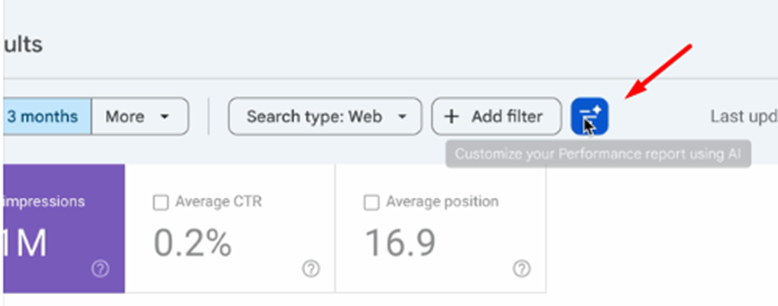
In December 2025, Google introduced an experimental feature called AI-powered configuration inside the Search results Performance report, allowing users to configure reporting views using natural-language prompts rather than manual clicks and filtering.
This is one of the clearest signs yet that Search Console is evolving beyond a passive reporting dashboard — and into a more intelligent, assistant-driven performance workspace.
What Google Launched
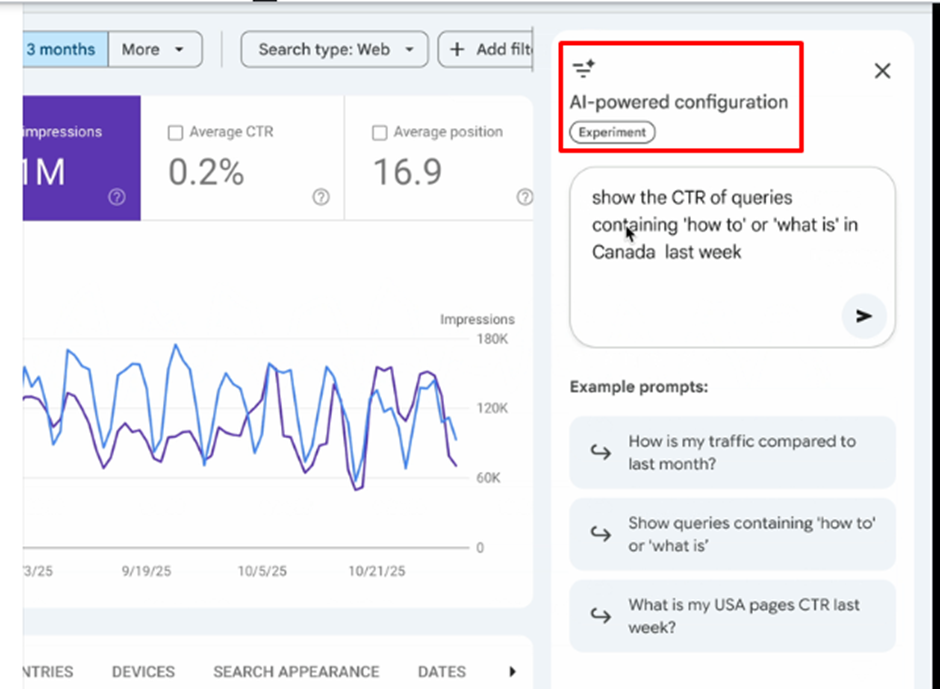
Google has rolled out an experimental feature called AI-powered configuration within Search Console’s Performance report for Search results. Instead of clicking through multiple menus to apply filters, comparisons, and metrics manually, users can now simply describe what they want to analyze — and Search Console automatically generates the report configuration based on that request.
For example, you can type:
- “Compare traffic for pages containing /blog this quarter vs the same quarter last year.”
- “Show mobile queries in the last 6 months that include sports.”
And the AI will automatically set up the report view — applying the correct filters, selecting relevant metrics, and creating comparison windows if needed.
This reduces one of Search Console’s biggest friction points: manual report construction.
Why now?
This move makes sense within Google’s broader AI strategy. Over the last couple of years, Google has steadily introduced assistant-driven features across its ecosystem — such as AI advisors in Google Ads and automated analysis support in Analytics. Search Console is now following the same path.
It also reflects a practical reality:
- Search Console analysis often involves repetitive reporting tasks
- teams spend too much time configuring views instead of interpreting data
- marketers and smaller teams need faster access without advanced technical fluency
This update is essentially Google saying: “Stop clicking. Just tell us what you want.”
Where It Appears + Who Gets It
AI-powered configuration appears inside the Performance report → Search results, typically in the same area where users normally set filters and comparisons.
Importantly, this is still an experimental rollout, meaning:
- it’s currently available only to a limited number of properties
- rollout is gradual
- many users won’t see it yet
Search Engine Land and Search Engine Journal both noted that the feature is still in testing and not universally visible.
What You Can Ask It: Example Prompts SEOs Will Actually Use
The true power of this feature isn’t that it can answer random questions — it’s that it can automate the exact types of filters and comparisons SEOs build manually every day.
Here are prompt categories that align directly with real workflows:
A) Content segmentation
These are perfect for content teams and SEO reporting:
- “Show performance of URLs that contain /blog in the last 90 days.”
- “Compare product pages vs blog pages for impressions this quarter.”
B) Device & SERP behavior
Great for diagnosing performance drops or UX issues:
- “Show mobile queries with low CTR but high impressions.”
- “Compare desktop vs mobile clicks for branded queries.”
C) Brand vs non-brand analysis
Essential for understanding demand vs discoverability:
- “Show non-brand queries driving traffic to pages about [topic].”
- “Compare branded query trends month-over-month.”
D) Opportunity discovery
These prompts turn Search Console into a prioritization tool:
- “Find pages that dropped in clicks last 28 days compared to the previous 28.”
- “Show queries where average position improved but CTR fell.”
What AI Actually Builds (3 Core Functions)
To understand why this experiment is useful, it helps to break down what the AI is actually doing behind the scenes. According to early reporting, AI-powered configuration automates three core setup components: filters, comparisons, and metric selection.
1) Filters
The AI converts your prompt into structured report filters, such as:
- query filter
- page filter
- country filter
- device filter
- search appearance filter
- date range filter
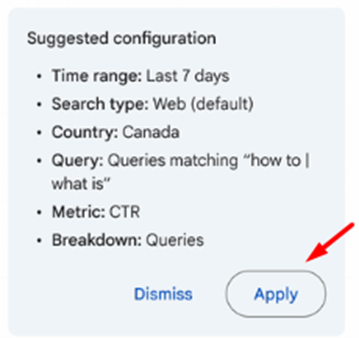
So if you ask: “Show mobile queries containing sports in the last 6 months”
Search Console might automatically apply:
- Device: mobile
- Query contains: sports
- Date range: last 6 months
- Metrics: impressions + clicks
This matters because manual filtering is often the slowest part of analysis — especially for less experienced SEOs.
2) Comparisons
Comparison setup is where Search Console reporting gets messy — because users need to manually select date windows and configure comparisons across periods.
AI configuration makes this frictionless.
For example:
- “this quarter vs same quarter last year”
- “last 28 days vs previous 28 days”
- “compare December vs November”
- “compare last 90 days year-over-year”
The AI creates the comparison instantly, which saves time and reduces human error.
3) Metric selection
Search Console offers four core metrics:
- Clicks
- Impressions
- CTR
- Average position
The AI decides which ones to enable based on the prompt’s intent. For instance:
- “low CTR” requests might automatically prioritize impressions + CTR
- “ranking improvements” might surface position trends
- “traffic drops” typically highlights clicks comparisons
Limitations (Important!)
Like any early-stage AI feature, AI-powered configuration is helpful — but not perfect.
Google has made it clear that this is experimental, and early coverage has emphasized several limitations:
- It works only in the Search results Performance report
- It does not apply to Discover or Google News reports yet
- It can misinterpret user requests (filters may be incorrect)
- It does not sort tables, export data, or replace manual deep analysis
Some reports also indicate that Google may cap usage (for example, around 20 prompts per day, though availability may vary depending on your rollout stage). Users should confirm any limits inside their own interface. optimixed.com
Mini-checklist: Before you trust the report
- Confirm filters match your intent
- Validate comparison date windows
- Ensure metrics align with the question
- Spot-check against baseline data before making decisions
This checklist not only improves user outcomes — it builds credibility in your post by showing you’re not blindly hyping AI.
Why This Matters for SEO Teams
AI-powered configuration isn’t just a “cool UI upgrade.” It changes the behavior of SEO reporting and analysis.
Old behavior:
- SEOs spend 10–15 minutes building the same filtered views repeatedly
- junior analysts struggle with correct filter logic
- reporting becomes slower than interpretation
- analysis becomes limited to what’s easiest to set up
New behavior:
- AI configures complex report setups instantly
- junior SEOs can explore and segment data faster
- teams spend more time interpreting patterns and making decisions
- non-technical stakeholders can self-serve answers faster
This shift is strategic: Search Console becomes less about accessing raw data and more about guided analysis.
It also impacts operations:
- faster onboarding for new SEO hires
- less friction for marketing teams who struggle with advanced filtering
- encourages curiosity-driven exploration (people ask more questions because setup is easier)
In many ways, this is Google turning Search Console into an SEO equivalent of an “assistant-powered analytics workspace.”
How to Use AI-Powered Configuration in Real SEO Workflow
The biggest value comes when you integrate this feature into repeatable workflows, not one-off curiosity.
Here are three practical ways to use it immediately:
A) Weekly SEO reporting
Prompt: “Compare clicks and impressions last 7 days vs previous 7 days for blog pages.”
Workflow:
- let AI build the view
- export the report manually (since AI doesn’t export)
- paste into your weekly template
- add commentary + action items
This alone can cut reporting setup time drastically.
B) Content refresh prioritization
Prompt: “Show pages where impressions remain high but clicks dropped over the last 3 months.”
Workflow:
- identify declining winners
- refresh meta titles + CTR optimization
- improve content relevance and intent match
- monitor recovery week-over-week
This turns Search Console into a content prioritization engine.
C) Diagnostic analysis after ranking drops
Prompt: “Compare queries for /category/ pages this month vs last month, mobile only.”
Workflow:
- check technical changes (mobile usability, speed, indexing)
- evaluate SERP feature shifts (AI, snippets, video)
- check competitors gaining visibility
- identify query-level losses vs page-level losses
Suggestion: Create a shared “Prompt Library”
Teams should maintain a prompt bank grouped by:
- reporting
- diagnostics
- opportunity discovery
- content performance
- technical visibility
This becomes a scalable way to standardize reporting — while still enabling flexibility.
Social Channels Integration in Search Console Insights
Google Search Console Insights has always been designed as the “simplified, story-based” layer of Search Console — a place where marketers can quickly understand what’s working, what’s trending, and where organic performance is coming from without needing deep technical knowledge.
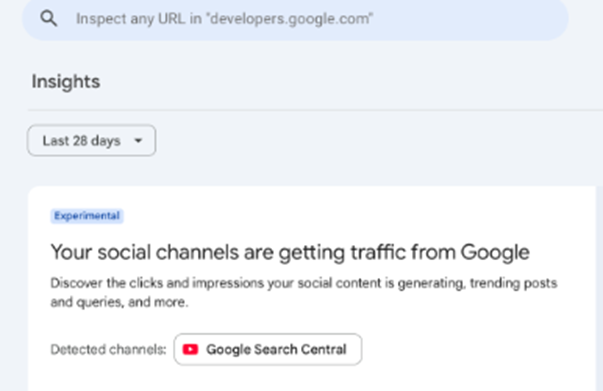
But in December 2025, Google took a major step toward redefining what “organic visibility” means.
Instead of limiting insights to website performance alone, Google is now experimenting with a feature that brings social channel performance reporting directly into Search Console Insights — allowing select users to see how people discover their social profiles and content through Google Search, alongside website reporting.
This is one of the clearest signals yet that Google recognizes a reality most SEO teams have already been adapting to:
- Search visibility is no longer “website-only.”
- It’s multi-surface, multi-platform, and increasingly social-first.
Let’s break down what Google launched, what this new social channels view shows, how channels are added, and why this experiment matters for SEO strategy moving into 2026.
What Google Launched
In an experimental rollout announced in early December 2025, Google began testing social channels integration inside Search Console Insights. The test is currently limited and only available for some properties, but it marks an important change in direction for Search Console.
Traditionally, Search Console Insights has focused on website-focused metrics like:
- Top pages
- Top queries
- Traffic sources
- Trending content
Now, Google is testing an Insights view that may also include:
- Visibility and clicks to social channels associated with the website (e.g., YouTube channel, social profiles)
- Search queries that drive discovery directly to those social channels, not just to web pages
Why this is huge
Because Google Search itself has become a multi-surface discovery engine.
People find brands through different kinds of digital entities — not just websites:
- Websites
- YouTube channels
- TikTok profiles
- Instagram pages
- LinkedIn pages
- Creator profiles
- Brand/community pages across multiple platforms
And for the first time, Google is beginning to measure and unify that reality inside Search Console — the platform SEOs already rely on to evaluate organic growth.
What the Social Channels Report Shows
The most powerful part of this experiment is that it doesn’t just tell you “your social channel exists.” It brings structured, Search Console-style reporting into the Insights experience — making it possible to evaluate the reach and search visibility of social entities.
Here’s what the new social channels view can include:
1) Total Reach
This section shows the combined reach of your detected social profile(s) through Google Search:
- Total clicks
- Total impressions
- Traffic coming from Google Search that lands on your social profile/channel
This matters because social channels increasingly rank for brand and discovery queries — and now you can quantify that visibility.
2) Content Performance
Similar to how Insights shows website page performance, the social view may show:
- Top-performing content
- Trending content that is rising
- Content declining in visibility
- Growth patterns over time
This is essential for identifying which social content is becoming a search-driven traffic asset (and which content is fading).
3) Top & Trending Search Queries
Instead of only showing queries that lead to your site, the experiment also includes:
- Queries that send traffic directly to your social profiles
- Trending queries, helping you spot emerging search behavior
This is one of the most strategic metrics in the entire experiment because it reveals what people actually type into Google to find your brand’s social content.
4) Audience Location
Similar to the country-level breakdown in the Performance report, this report may show:
- Top countries sending traffic
- Where visibility is strongest geographically
This can become especially valuable for global brands, localized creators, or region-specific campaigns.
5) Additional Traffic Sources
One of the most interesting parts of this integration is that it may also show traffic coming from surfaces beyond classic Search results, including:
This reinforces what SEOs have seen for years: Google is not just “10 blue links.” It’s a portfolio of surfaces where content competes for attention.
Important clarification: What this isn’t
This is not in-app social analytics.
It doesn’t replace:
- YouTube Studio
- TikTok Analytics
- Instagram Insights
- LinkedIn Page Analytics
Instead, it shows Google Search-driven discovery — meaning how often Google exposes your social entity and how often users click it from Google Search results.
So it complements your platform dashboards rather than replacing them.
How Channels Get Added
Google has made this integration deliberately controlled (at least for now).
As of the December 2025 rollout:
- The social channel view is available only to a limited set of sites as an experiment
- Social channels must be automatically identified and associated by Google
- Users may then see a prompt inside Insights to “add” the detected social channel
- There is currently no manual “connect any channel” system (meaning you can’t just link an account yourself)
In other words: Google is connecting the dots through its own entity association systems — not through a “log in and authorize your social accounts” model.
Implication: Entity recognition matters
This automatically introduces a problem for brands with weak or inconsistent signals.
If Google doesn’t strongly associate a social channel with your site, it may not show up.
That means if your brand has:
- inconsistent naming
- multiple social handles
- weak profile-to-site linking
- missing schema
…you may not get access, even if the feature is available.
Mini tip: How to improve your chances
To strengthen your entity associations:
- Use the same brand name across social profiles
- Link all social channels clearly from your website
- Add schema markup with Organization + sameAs
- Maintain consistent profile branding, metadata, and bio linking
- Build stronger Knowledge Panel/entity signals through authoritative mentions
These are long-term SEO fundamentals — but they now directly impact how well you’re measured inside Search Console.
Why This Matters (Strategy)
This experiment matters because it changes how organic visibility should be defined.
A) Modern SERPs reward creators + social profiles
Search results now regularly include ranking entities like:
- YouTube channels
- TikTok videos
- Instagram profiles
- LinkedIn pages
- Creator accounts and branded profiles
And often, these rank even when users never click a website.
That means SEO success is no longer just:
- Website visibility
It’s also:
- Social visibility
- Creator footprint visibility
- Search-driven platform reach
The “website-first” definition of SEO has become outdated.
B) Brand presence vs website traffic
This is where things become strategic.
Sometimes social profiles support your site:
- they expand reach
- improve brand recall
- push top-of-funnel discovery
But sometimes they compete:
- they rank for the same query as your site
- users click the social profile instead of the website page
Now, the question becomes measurable:
- Do your social profiles steal clicks from your web pages?
- Or do they expand total reach and improve multi-touch brand discovery?
This is exactly the kind of visibility question modern SEO teams need answered — and Google is finally instrumenting it.
C) Multi-platform intent mapping
Different search intents naturally prefer different surfaces:
- “How-to” intent → video often wins (YouTube)
- Short tips/trends → short-form wins (TikTok)
- Visual products → visual wins (Instagram)
- Professional authority → LinkedIn wins
- Pricing/comparison → web pages often win
Now, if your brand shows up in both social and web surfaces, you can correlate:
- which surfaces win for which query types
- where your content strategy should lean
Example:
- If intent is “how to” → YouTube often dominates
- If intent is “pricing” → your website should dominate
With social integration in Insights, you can track both and design content accordingly.
How SEOs + Content Teams Can Use This Immediately
Even in experimental form, this feature opens up practical, high-leverage workflows.
SERP dominance strategy
You can now measure whether your brand is occupying multiple placements in SERPs:
- website listing
- YouTube result
- profile panel
- social ranking
The goal: don’t just rank once — own the results page.
Insights gives visibility signals for how your social entities contribute to that dominance.
Measure content repurposing ROI
If a blog performs well, you can repurpose it into:
- YouTube explainer
- TikTok summary
- LinkedIn carousel
- Instagram reel
Then, using Insights, you can track whether those social assets also receive organic reach through Google Search.
This finally creates an SEO-driven loop where repurposing is measurable beyond engagement.
Identify social content that ranks
Insights can reveal:
- which topics drive discovery to your social profiles
- which queries trigger profile impressions
- which social content is trending up
This gives SEO teams new content seed ideas:
- replicate high-performing social topics into web pages
- build keyword clusters around emerging social queries
- identify format opportunities (video vs article vs carousel)
Improve entity association
If your social channels aren’t showing up:
- unify branding
- strengthen linking from your site
- update schema sameAs links
- ensure bios link back to your site
- align handles and naming conventions
This is not just branding hygiene anymore — it’s visibility measurement infrastructure.
The Bigger Picture — Search Console’s New Strategic Direction
Google Search Console has traditionally played one role in the SEO ecosystem: a reliable reporting platform for what happened in Google Search. It told you which queries drove clicks, which pages gained impressions, and whether technical issues might be limiting performance. Powerful? Absolutely. But also rigid—often requiring manual report-building and spreadsheet-heavy workflows to extract meaningful insight.
That model is changing.
With the December 2025 experiments, Search Console is signaling a strategic shift: from a passive reporting tool into a unified, intelligent performance workspace—one designed to reduce friction, expand what “organic visibility” means, and make analysis more assistant-driven.
From Reporting Tool → Unified Performance Workspace
Historically, Search Console was built around three main functions:
- Keyword + page performance reporting (queries, pages, devices, countries)
- Technical diagnostics (indexing, coverage, Core Web Vitals, manual actions)
- Manual analysis (filters, comparisons, exports, interpretation outside the tool)
But now Google is pushing Search Console toward a broader and smarter identity:
- AI-assisted analysis setup (less friction)
The new AI-powered configuration experiment transforms report creation into a prompt-based experience. Instead of clicking through filters and comparison settings, SEOs can simply describe what they want—and Google builds the view for them. This positions Search Console as assistant-led reporting, where the interface increasingly supports analysis rather than just data access.
- Cross-surface visibility reporting (wider footprint)
With social channels integration in Search Console Insights, Google is acknowledging a major behavioral reality: discovery doesn’t happen only through web pages anymore. Users find brands through YouTube, social profiles, and creator pages—often directly from Google Search results. Search Console is beginning to track that broader “search footprint,” moving beyond website-only SEO measurement.
- A single place for SEO + search discovery measurement
Together, these updates signal a future where Search Console isn’t just for webmasters. It’s evolving into a centralized workspace for search-driven growth, combining smarter configuration and wider performance visibility.
Old Workflow vs New Workflow (Easy Comparison Table)
| Old Workflow (Traditional GSC Use) | New Workflow (December 2025 Direction) |
| Manually filter and configure data views | “Ask AI” to generate the reporting view |
| Analyze website performance only | Analyze combined brand footprint (site + social surfaces) |
| Social/YouTube tracked in separate tools | Social visibility begins inside Insights |
| More time spent on setup than insight | Faster insights → faster decisions |
How to Prepare Your SEO & Reporting Workflows (Implementation Framework)
Google’s December 2025 Search Console experiments aren’t just “nice upgrades”—they signal a fundamental shift in how SEO teams will operate going forward. When reporting becomes AI-configurable and visibility tracking expands beyond websites into social profiles, your workflows need to evolve from page-level SEO dashboards into multi-surface performance systems. This section breaks down exactly how to prepare.
Build a Prompt Bank for AI-Powered Configuration
AI-powered configuration inside the Performance report can dramatically reduce time spent on repetitive filtering and comparisons—but only if your team uses it consistently. The fastest way to enable that is by building a Prompt Bank: a shared internal document containing proven natural-language prompts your team can reuse.
Start with a simple Google Doc or Notion page and organize prompts into categories such as:
- Performance drops
Example: “Show pages that lost clicks in the last 28 days compared to the previous 28 days.”
- Opportunity discovery
Example: “Show queries with high impressions but CTR below 1% in the last 3 months.”
- Segment reporting
Example: “Compare blog performance vs product page performance this quarter.”
- Device differences
Example: “Show mobile queries where position is top 5 but CTR is lower than desktop.”
- Brand vs non-brand
Example: “Compare branded vs non-branded query clicks over the last 6 months.”
The key is to treat the Prompt Bank like a living asset. Update it monthly—add prompts that worked, remove confusing ones, and refine them based on what the AI configures correctly. Over time, this becomes a productivity multiplier: new SEOs onboard faster, reporting becomes standardized, and teams stop wasting time reinventing the same filters every week.
Redesign Your SEO Reporting Templates
Most SEO dashboards today are still built around the idea that “organic visibility = website performance.” But Search Console’s Insights social integration introduces a new reality: your brand’s organic footprint is multi-platform.
That means your reporting templates should evolve to include three layers:
- Website performance
- clicks, impressions, CTR, position trends
- top pages, query groups, content segments
- Social profile performance from Google Search
- clicks + impressions that lead users to YouTube channels and social profiles
- trending queries and top-performing social content
- Blended reach metrics
- total visibility across both website + social surfaces
- combined search impressions for brand presence
The goal is to prevent a common reporting blind spot: situations where website traffic declines but brand visibility actually rises because social profiles are ranking and absorbing demand. Without a redesigned template, teams will interpret that as “SEO is down,” even though discovery is simply shifting across surfaces.
Expand KPI Definitions Beyond Traditional SEO Metrics
If your KPIs remain limited to clicks and rankings, your measurement model will become outdated fast. Traditional KPIs still matter, but they no longer tell the full story.
Old KPI set (still useful, but incomplete):
- Clicks
- Rankings
- CTR
- Conversions
New KPI set (visibility + footprint-based):
- Brand reach across surfaces
Total discovery impact across website + social profiles.
- Total organic footprint
Combined impressions and clicks from all Google surfaces (web, video, image, social profiles).
- SERP presence share
How often your brand appears in multiple placements for the same query (website + social + video).
- Query coverage across surfaces
Whether you are winning search demand with the best format for the query (page, video, profile, etc.).
This KPI expansion shifts SEO reporting from “traffic-based” to “presence-based,” which is where Google Search behavior is increasingly heading. Brands that measure total visibility—not just website clicks—will make smarter content and channel decisions.
Align SEO + Social Teams Into One Visibility Strategy
The biggest workflow shift here isn’t technical—it’s organizational. Once Search Console starts showing social-channel performance, SEO and social teams can no longer operate in silos.
Here’s why:
- SEO teams need to understand how social profiles are performing in Google Search.
- Social teams need search-intent insights so their content aligns with discoverability patterns.
To make this work, establish shared goals and decision rules:
- Which queries should social dominate?
Example: short-form trends, visual-first topics, creator-driven queries.
- Which queries should the website dominate?
Example: transactional keywords, pricing, product comparison, conversions.
- Where should both appear?
Brand-defining queries where domination matters (e.g., “Brand name review,” “Brand name tutorial”).
Once you define these rules, reporting becomes a shared effort—not two separate narratives. SEO stops being only “site optimization,” and becomes what it’s becoming in reality: multi-surface visibility engineering.
Conclusion: What SEOs Should Do Next
Google’s December 2025 Search Console experiments aren’t just minor interface upgrades — they’re clear signals that the future of SEO measurement is shifting fast. With AI-powered configuration, Google is removing the most time-consuming part of reporting: building views, applying filters, and setting comparisons manually. Instead, SEOs can move directly into what actually drives results — interpreting performance patterns and taking action. At the same time, the addition of social channels inside Search Console Insights confirms what many teams have already felt: organic visibility is no longer limited to website pages. Social profiles, creator channels, and video surfaces increasingly compete for attention in Google Search, and Search Console is beginning to track that footprint in one place.
Together, these updates suggest a bigger transformation: Search Console is evolving into a multi-platform growth dashboard, not just a search performance report. That shift changes what modern SEO work should look like.
To stay ahead, SEO teams should take clear next steps now:
- Start building prompt workflows for AI-powered configuration so recurring analyses (weekly reports, drop investigations, opportunity discovery) can be generated instantly with consistent logic.
- Align SEO and social reporting so teams can measure how website content and social channels work together — or compete — inside search results.
- Update KPI models to reflect total organic visibility, not just website clicks. Reach, queries, and SERP presence across surfaces will increasingly matter.
- Prepare for a future where “SEO” means multi-surface discovery, spanning websites, videos, profiles, and branded entities.
The direction is obvious: SEO is becoming broader, smarter, and more integrated. And the brands that treat Search Console as a growth intelligence platform — not just a report — will win in 2026.