SUPERCHARGE YOUR ONLINE VISIBILITY! CONTACT US AND LET’S ACHIEVE EXCELLENCE TOGETHER!
The SEO Loss You Don’t See Coming
Your website migration is complete.
The new site is live.
Pages load faster than before.
QA testing shows no 404 errors.
Core rankings look stable.
Traffic hasn’t fallen off a cliff.
By all visible measures, the migration looks like a success.
And yet—four, six, or eight weeks later—something feels off.

Organic traffic begins to soften. Long-tail keywords quietly disappear. Conversion rates dip slightly. Search Console impressions trend downward, but nothing looks “broken” enough to trigger alarm bells. Stakeholders struggle to pinpoint a clear cause, because technically, everything still works.
This is the illusion of a “successful” migration.
Most SEO losses don’t arrive as dramatic crashes. They arrive silently.
The Shocking Reality: Most Migrations Lose 20–40% SEO Value
Across redesigns, CMS changes, platform migrations, and rebrands, a hard truth repeats itself: most website migrations quietly lose between 20–40% of their SEO value, even when executed with care.
Why? Because SEO loss is rarely catastrophic. Google doesn’t punish migrations outright—it reassesses them. Rankings don’t vanish overnight; they erode gradually as trust signals weaken, internal equity shifts, and crawl behavior changes. The site keeps ranking, just not as strongly, not as broadly, and not as consistently as before.
This creates a dangerous gap between visible failure (broken pages, missing redirects, indexing errors) and silent decay—the slow loss of authority, relevance, and long-tail visibility that most dashboards don’t immediately surface.
By the time teams recognize the problem, recovery is far harder and far more expensive.
Who This Article Is For
This guide is written for:
- SEO professionals responsible for protecting organic performance
- Founders and CMOs accountable for growth and revenue
- Developers and product teams leading technical migrations
- Agencies managing redesigns, CMS shifts, or platform changes
If you’ve ever launched a migration that looked perfect but underperformed months later, this article is for you.
What You’ll Learn
By the end, you’ll understand:
- Why “perfect” migrations still lose SEO value
- The invisible mechanisms behind gradual traffic loss
- How to detect early-stage SEO decay before it compounds
- A practical framework to prevent long-term organic damage
Because in SEO migrations, what you don’t see is often what costs you the most.
What “SEO Value” Really Means (And Why It’s Fragile)
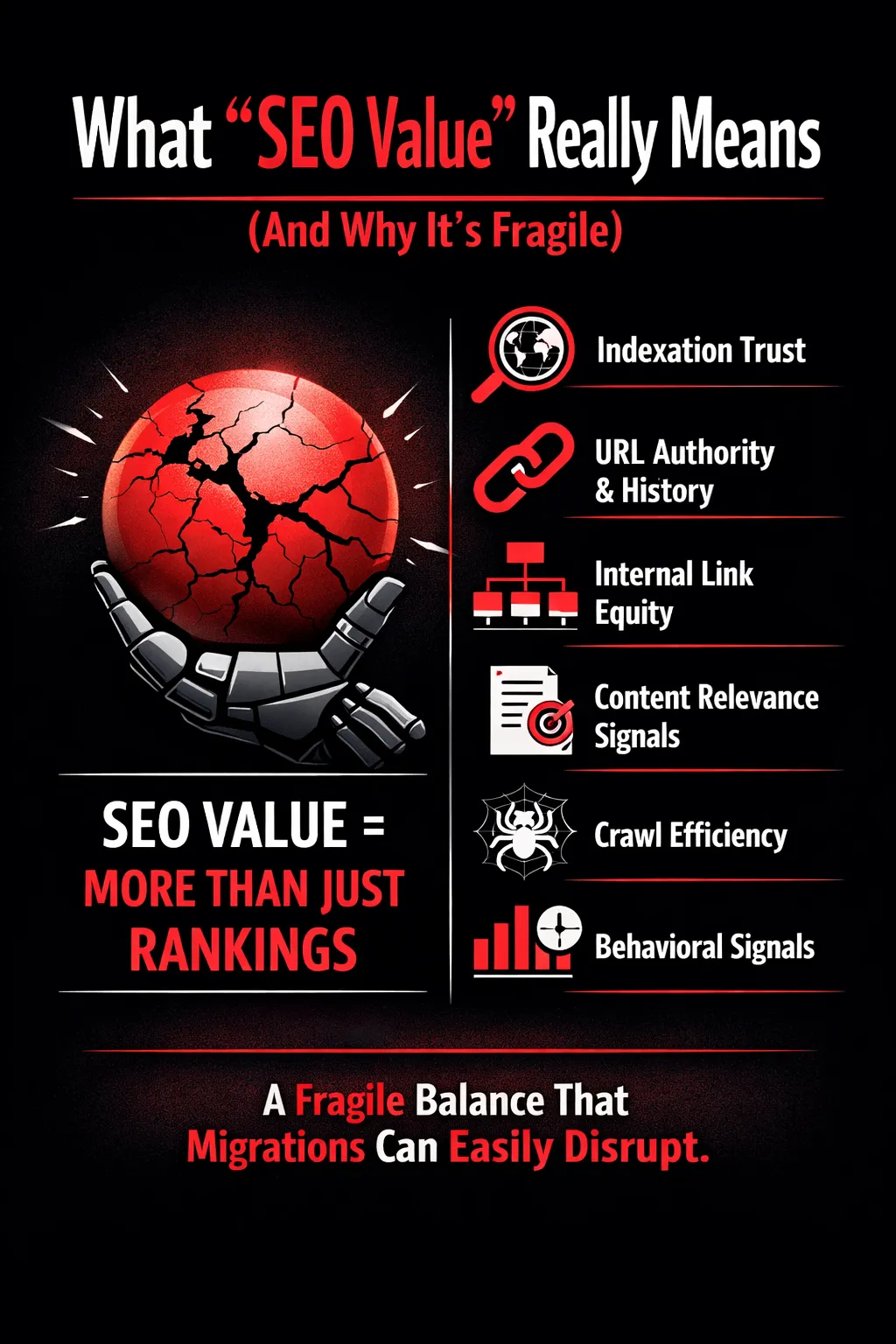
When teams talk about losing SEO after a migration, the conversation almost always starts and ends with rankings. Did our top keywords drop? Did traffic go down? But rankings are only the surface-level symptom. True SEO value is far more complex—and far more fragile—than most people realize.
SEO Value ≠ Rankings Alone
SEO value is the aggregate trust and efficiency Google has built around your site over time. Rankings are simply the output of that trust. Under the hood, several interconnected components determine whether your pages continue to perform after a migration:
- Indexation trust
Google learns which URLs are worth crawling, indexing, and revisiting frequently. Long-standing URLs with stable content earn a level of trust that new or altered URLs do not automatically inherit.
- URL authority & history
Every URL carries historical signals—links earned, engagement patterns, stability over time. When URLs change, even with redirects, that accumulated history is transferred, not cloned—and some of it is inevitably lost.
- Internal link equity
Your internal linking structure tells Google what matters most. Menu links, contextual links, and crawl depth all distribute authority. Small changes here can quietly weaken important pages.
- Content relevance signals
Headings, semantic structure, internal anchors, and topical relationships help Google understand intent. Even “light” rewrites or template changes can dilute relevance.
- Crawl efficiency
How easily Googlebot can discover, crawl, and prioritize pages. Changes in navigation, JavaScript rendering, or URL patterns can waste crawl budget without triggering obvious errors.
- Behavioral signals (CTR, dwell time)
User interaction data helps validate relevance. Design or layout changes that affect engagement can indirectly weaken rankings—even if the content itself hasn’t changed.
Why Migrations Disrupt These Signals
One of the biggest misconceptions is that Google treats migrations as a clean slate. It doesn’t reset—it re-evaluates. During a migration, Google reassesses your site’s structure, URLs, and content relationships from scratch.
Trust is transferred, not assumed. Redirects help, but they are a recommendation, not a guarantee. Even minor structural changes—like deeper click paths, altered internal anchors, or new URL hierarchies—can compound and reduce overall SEO value over time.
The Myth of “Google Will Figure It Out”
“Google will figure it out” is one of the most expensive assumptions in SEO. Relying on re-crawling alone is dangerous because re-crawling does not equal instant trust restoration. There is always a time lag between discovery, evaluation, and ranking stabilization.
During that lag, competitors fill the gaps, long-tail rankings erode, and authority quietly leaks away. By the time traffic drops are obvious, the damage is already well underway—and far harder to reverse.
Why SEO Loss Is Silent, Not Immediate
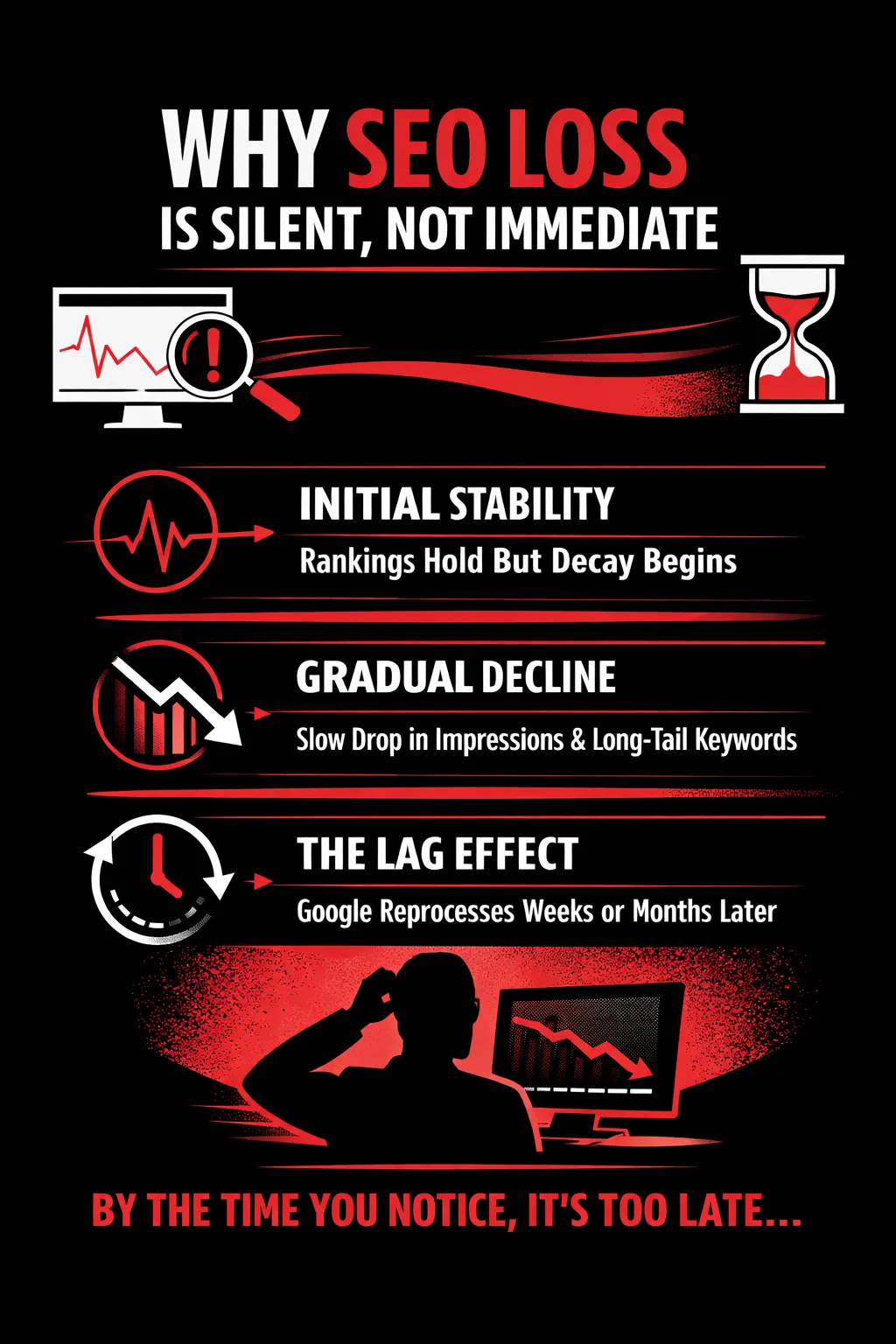
One of the most misunderstood aspects of website migrations is how SEO damage unfolds over time. Most teams expect failure to be loud—404 spikes, ranking crashes, or sudden traffic drops. In reality, SEO loss is usually quiet, progressive, and deceptive, which is why it often goes unnoticed until meaningful revenue or leads are already affected.
The Gradual Decay Model
After a migration, rankings often appear stable at first. Core keywords may hold their positions, branded queries continue performing, and analytics dashboards show no immediate cause for alarm. This creates a false sense of security.
Then the decay begins.
Impressions start to decline subtly—not across the board, but within specific page types or keyword clusters. Long-tail queries, which often drive high-intent traffic, are the first to erode. These losses rarely trigger alerts because they are distributed across hundreds or thousands of keywords rather than a few head terms.
Before traffic numbers visibly collapse, conversions drop. Pages still receive visits, but they no longer attract the same intent, relevance, or depth of engagement. By the time overall traffic reflects the damage, the SEO value loss is already entrenched and significantly harder to reverse.
Why Teams Miss Early Warning Signs
Most organizations rely on aggregated metrics—total sessions, average rankings, or top-line impressions. These numbers mask granular losses at the URL, query, or intent level. A 30% decline spread across thousands of keywords can look like “normal fluctuation” in summary reports.
Branded traffic further distorts reality. Strong brand demand often remains unaffected by migration issues, temporarily propping up overall performance while non-brand discovery quietly collapses.
At the same time, stakeholders are celebrating visible wins: faster load times, cleaner UI, better UX. SEO decline doesn’t align with these improvements, so it’s deprioritized or dismissed as temporary volatility.
The “Lag Effect” in Google’s Reprocessing
Google doesn’t instantly reassess a migrated site. There is a delayed sequence: crawl → index → re-rank. During this window, Google slowly reinterprets signals such as internal linking, content relationships, and authority transfer.
That delay is why SEO losses often surface weeks or even months later—long after the migration is declared a success. By then, restoring lost trust and visibility requires far more effort than preventing the decay in the first place.
Silent SEO loss isn’t a mystery. It’s a process problem—one that only shows itself if you know where and when to look.
9 Silent SEO Killers During Website Migrations (and why they’re so easy to miss)
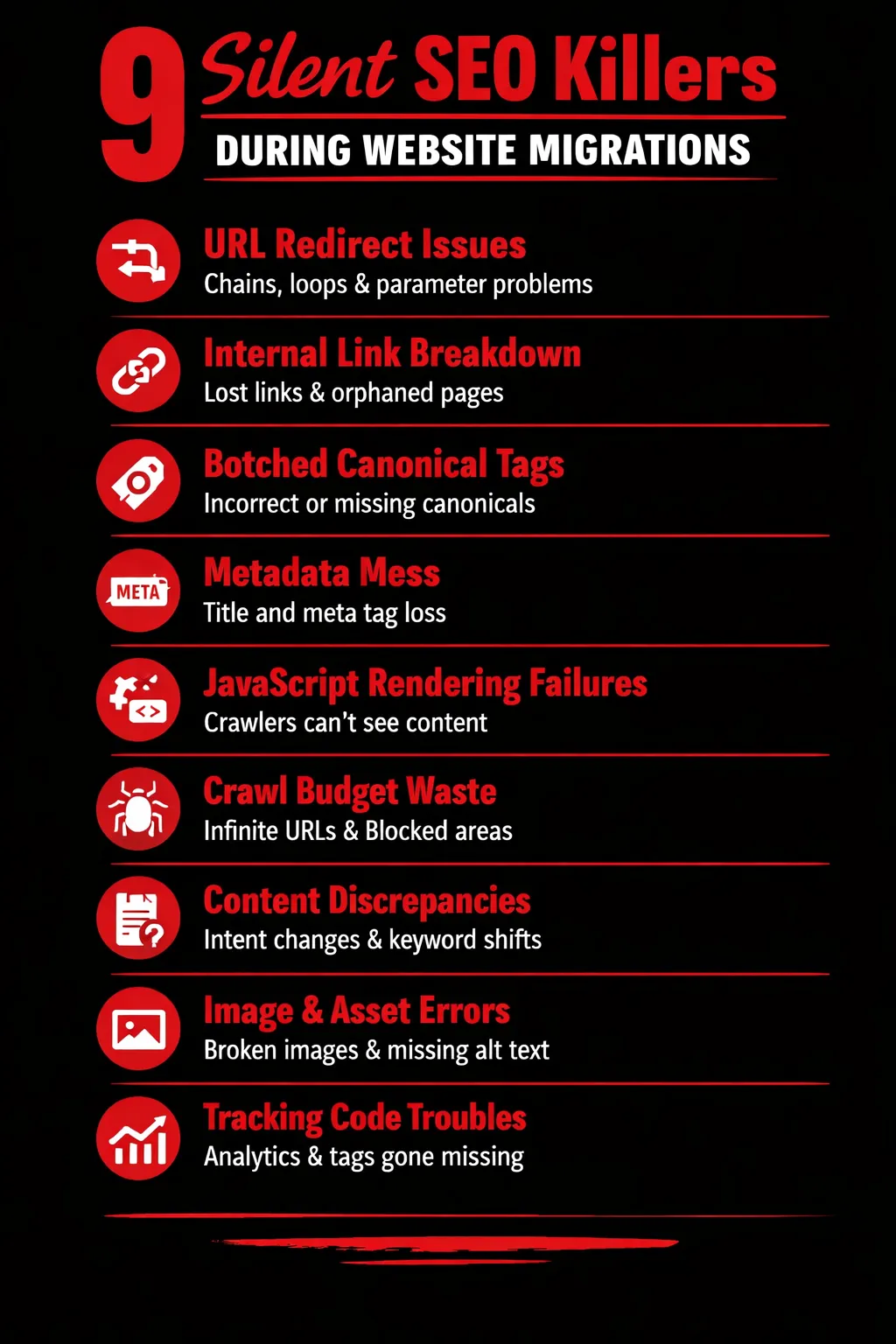
Most migration “SEO failures” don’t look like failures. Pages load. The design is polished. The QA checklist is green. And yet, a few weeks later, you notice something weird:
- Rankings are mostly fine… but impressions are down.
- Brand traffic is steady… but non-brand is slipping.
- A handful of top pages are stable… but long-tail pages are bleeding.
That’s silent SEO loss. Below are nine migration traps that cause the 20–40% value leak—often without throwing obvious errors.
1) URL Changes That Technically Work — But Kill Equity
Redirects make migrations possible—and that’s exactly why teams over-trust them. A redirect can preserve access, but it doesn’t guarantee you preserve equity, relevance, and historical signals cleanly.
Over-reliance on redirects
A common pattern is: “We changed the URL structure, but it’s okay—everything 301s.” The catch: if you’ve changed a lot, you’ve also changed how Google understands your site. Too many redirects at once can:
- slow down crawling,
- dilute signals (especially when mapping isn’t 1:1),
- and delay re-evaluation.
Parameterized URLs
Migrations to new CMSs or platforms often introduce query parameters (?ref=, ?category=, ?sort=) or new tracking patterns. Even if you think canonicals cover it, parameters can:
- multiply crawlable URLs,
- split link equity across variants,
- and create duplicate content clusters.
Trailing slash / case sensitivity issues
This one is brutally common because it looks harmless:
- /page vs /page/
- /Product vs /product
Depending on your server and CMS rules, those can become distinct URLs. If redirects aren’t consistent, Google may index both, causing duplication and weakening the “main” version.
Redirect chains & loops
A chain like A → B → C feels okay in testing because the browser resolves it. But for crawlers, chains:
- waste crawl budget,
- slow discovery,
- and increase the chance Google stops following before the final destination.
Loops are worse: Google may treat sections as unstable and reduce crawling frequency.
What to watch for early
- Rising “Redirect error” / “Page with redirect” patterns in crawls
- More URLs indexed than expected
- Crawl stats showing more hits on redirected URLs than final URLs
2) Internal Linking Structure Collapse
This is one of the biggest silent killers, because nothing “breaks.” The site works—people can navigate—but Google’s crawl paths and priority signals change.
Menu changes reducing crawl depth
Design teams love simplifying navigation. But when you reduce menu items or bury categories, you often increase crawl depth:
- important pages move from 2 clicks → 4 clicks,
- Google visits them less often,
- they lose internal equity,
- and rankings quietly slip.
Footer & contextual link removal
Footers and in-content links are frequently “cleaned up” during redesigns. But those links often:
- distribute authority site-wide,
- reinforce topical clusters,
- and help long-tail pages stay discoverable.
Removing them can deflate an entire content section—especially blogs, resource hubs, and legacy pages.
Orphaned pages after CMS restructuring
A migration can accidentally create orphans: pages that still exist, still index, but are not linked internally anywhere meaningful. They don’t 404, so QA misses them. But Google slowly stops prioritizing them.
What to watch for early
- Drop in internal links to key pages (before vs after crawl comparison)
- Spike in “Orphan URLs” in your crawler
- A decline in long-tail traffic even when top pages hold
3) Canonical Tag Mismatches
Canonical tags are supposed to simplify SEO. During migrations, they often become the opposite: a quiet source of self-sabotage.
Old canonicals pointing to retired URLs
Templates get reused. Canonicals get hardcoded. Suddenly your shiny new page is telling Google:
“Hey, the real version is the old URL that doesn’t exist anymore.”
This is surprisingly common after CMS migrations where legacy logic remains.
Self-canonicals lost in templates
Sometimes the opposite happens: canonicals disappear or become inconsistent across templates. Without strong canonical signals, Google may index duplicates:
- with parameters,
- with alternate paths,
- or with trailing-slash variants.
Canonicals conflicting with redirects
This one is nasty: you redirect A → B, but B’s canonical points back to A (or to a different variant). That creates mixed signals and can lead to:
- indexing delays,
- wrong URL versions ranking,
- or “Duplicate, Google chose different canonical” behavior.
What to watch for early
- Search Console: “Duplicate, Google chose different canonical”
- Crawls showing canonicals that don’t match final URLs
- Index pages ranking under unexpected URL versions
4) Metadata Loss or Rewriting
People underestimate metadata because it doesn’t “feel” like infrastructure. But at scale, small metadata changes can nudge entire rankings downward.
Title tags truncated or duplicated
New CMS templates often generate titles like:
- “Product Name | Brand”
- or worse, the same title across hundreds of pages.
Even if your content is identical, duplicated titles reduce relevance and CTR—and CTR shifts often show up as impression loss first.
Meta descriptions removed by CMS defaults
Meta descriptions don’t directly “rank” like a magic switch, but they influence click behavior. After migration, teams discover:
- descriptions disappeared,
- were replaced with auto-generated snippets,
- or got duplicated across templates.
That can quietly reduce CTR, which can reduce performance over time.
H1/H2 hierarchy damage
A redesign can unintentionally change heading structure:
- multiple H1s,
- missing H1 entirely,
- H2s used for styling rather than structure.
Google can still index the page, but relevance interpretation may drift—especially for long-tail queries.
What to watch for early
- Template-level metadata audits (not just page-by-page spot checks)
- CTR drops in Search Console without ranking changes
- Duplicate titles/descriptions at scale
5) JavaScript Rendering & Hydration Issues
Modern frameworks are powerful—and migration teams often assume “if users can see it, Google can too.” That assumption is expensive.
Content visible to users but not crawlers
If key content is injected client-side, delayed, or hidden behind interactions, crawlers may index:
- partial content,
- empty shells,
- or minimal placeholder HTML.
You won’t see obvious “errors.” You’ll just see gradual ranking decay as relevance drops.
Deferred rendering affecting indexation
Lazy-loading everything might help performance, but if the main text and internal links appear only after hydration, Google may:
- delay indexing,
- miss internal links,
- and under-crawl deep pages.
Framework migrations (React, Next.js, Vue) pitfalls
Many “SEO-ready” setups still fail when:
- SSR/SSG isn’t configured properly,
- canonical/meta tags are rendered incorrectly,
- robots directives differ by environment,
- or staging rules accidentally ship to production.
What to watch for early
- Compare “View Source” vs “Rendered HTML”
- Test key templates in URL Inspection (live test)
- Crawl with JS rendering enabled and compare output
6) Crawl Budget Misallocation
Crawl budget issues are usually invisible until you’re losing traffic. Migrations often create a crawl environment Google doesn’t like.
Infinite URL paths
Some CMSs and filter systems generate near-infinite combinations:
- /category/shoes?color=black&size=9&sort=price
- pagination + parameters + facets = explosion
Google spends time crawling junk while important pages get visited less.
Faceted navigation explosions
E-commerce and large catalogs are the classic case. If facet URLs become indexable unintentionally, you end up with:
- duplication,
- thin pages,
- and index bloat.
Even if canonical tags exist, crawlers can still waste time discovering and re-checking variants.
Robots.txt changes that block important sections
During migration, robots.txt is frequently edited for staging—then accidentally pushed live. Teams often block:
- CSS/JS needed for rendering,
- critical folders,
- or entire parameter patterns incorrectly.
What to watch for early
- Index Coverage changes: “Crawled – currently not indexed”
- Crawl stats: big spikes in low-value URLs
- Sudden shifts in number of discovered URLs
7) Content Parity Fallacy
One of the most dangerous lines in any migration project is:
“We migrated all the content.”
That statement can be true while SEO value still collapses.
“We migrated all content” ≠ preserved SEO value
If the page text exists but:
- the internal links changed,
- headings changed,
- schema changed,
- or the content placement shifted…
…Google may reclassify the page’s relevance.
Keyword intent dilution
A “cleaned up” rewrite might replace specific language with generic marketing copy. That can destroy long-tail intent matching:
- fewer supporting terms,
- less topical depth,
- weaker query coverage.
Semantic shifts from rewrites
Even “better” writing can be worse for SEO if it changes:
- the primary topic focus,
- the query alignment,
- or the structure that helped the page rank historically.
What to watch for early
- Before/after content diff for top pages (not just eyeballing)
- Long-tail query count shrinking in Search Console
- Ranking stability on head terms but erosion on mid/long-tail
8) Image & Asset Migration Errors
Images rarely cause immediate SEO disasters—but they quietly influence performance, accessibility, and discovery.
Lost alt attributes
Alt text contributes to:
- image search visibility,
- accessibility,
- and semantic reinforcement.
During migrations, alt attributes often vanish when fields don’t map cleanly between CMSs.
Broken image URLs
If old image paths break and new ones load, you might not notice. But:
- older indexed images may drop out,
- pages may lose visual relevance signals,
- and performance can degrade if new images are heavier.
CDN path changes affecting page weight
New CDN configurations can lead to:
- slower load times,
- more render-blocking,
- and layout shifts.
That doesn’t always show as a big “Core Web Vitals fail,” but it can quietly reduce competitiveness.
What to watch for early
- Bulk checks: missing alt attributes after migration
- Lighthouse / CWV monitoring on key templates
- Crawl reports showing broken asset calls
9) Analytics & Tracking Blind Spots
This is the meta-problem: your SEO is bleeding, and your measurement system hides it.
GA4 resets hiding performance trends
GA4 migrations or property changes often break continuity. Without consistent baselines:
- “traffic looks fine” becomes a guess,
- attribution shifts mask real organic loss,
- and you lose the ability to prove what changed.
Lost historical comparison data
If your URL structure changes and you don’t maintain mapping, your dashboards may not compare apples to apples. You end up measuring:
- new URLs only,
- without understanding which old pages they replaced,
- and where value leaked.
Misaligned Search Console properties
Domain property vs URL-prefix property, http vs https, subdomain changes—Search Console setup errors can make teams think:
- clicks dropped less than they did,
- pages are indexed when they aren’t,
- or issues don’t exist.
What to watch for early
- Confirm GSC properties cover the full site correctly
- Track page groups with old-to-new URL mapping
- Build migration dashboards that compare equivalent sections
The key takeaway
Most SEO migration losses aren’t caused by one dramatic mistake. They’re caused by many small “technically fine” changes that collectively weaken:
- how Google crawls your site,
- how it understands topical relevance,
- and how link equity flows.
How to Detect SEO Value Loss Before Traffic Drops
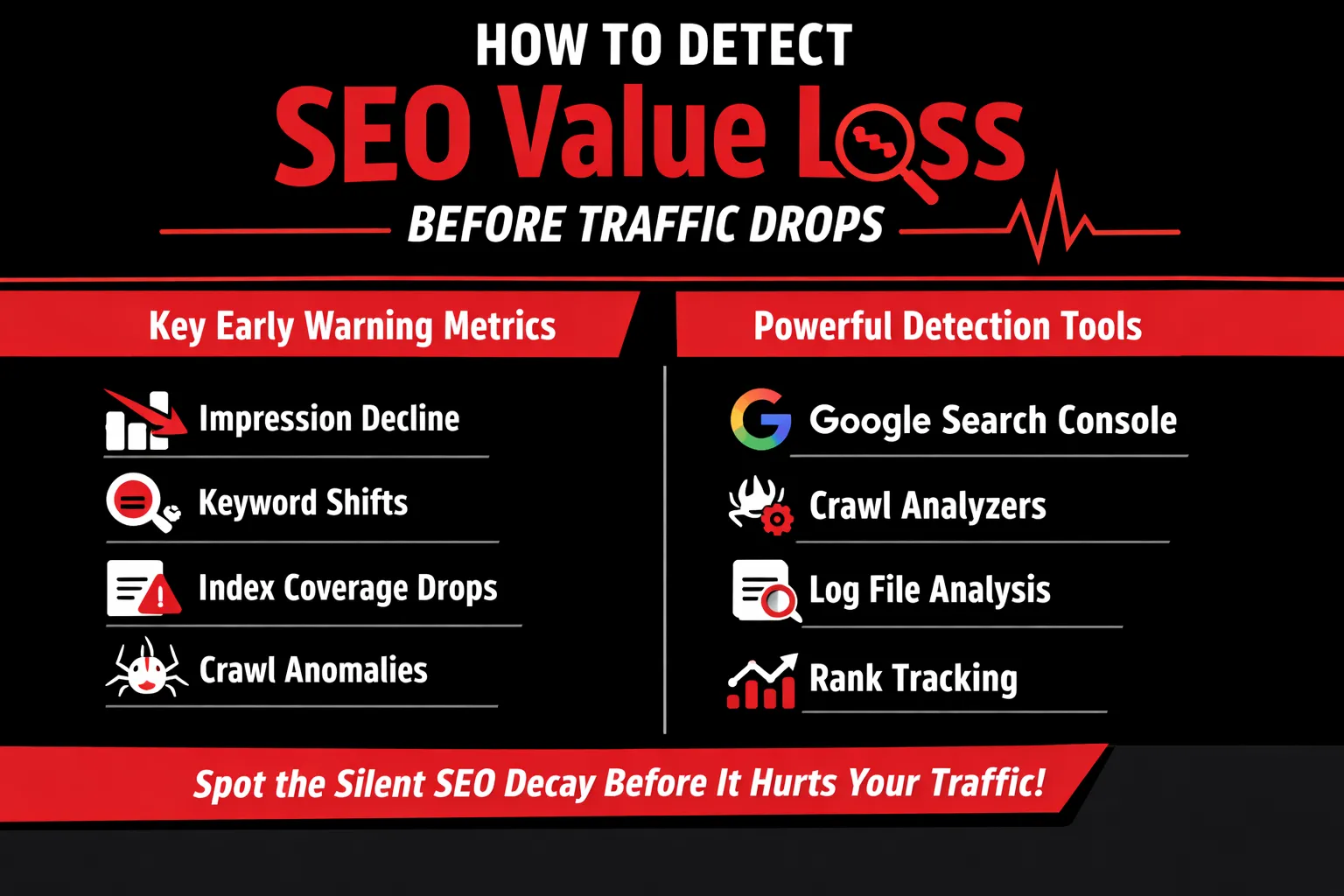
Most migrations don’t fail with a dramatic traffic cliff. They fail with a slow leak—one that starts in search visibility, crawl behavior, and index quality long before your sessions chart shows anything alarming. If you want to avoid the “everything looked fine… until it wasn’t” scenario, you need to monitor the right early signals and compare them correctly.
Early Warning Metrics Most Teams Ignore
1) Impression velocity (not just impressions)
Most teams look at total impressions week-over-week and call it a day. That’s too blunt. What you actually want is velocity: the rate at which impressions are growing or shrinking across key page groups. A subtle but consistent slowdown—especially on non-branded queries—often signals Google is reevaluating relevance, internal link equity, or template quality.
What to watch:
- Day-by-day trendline slope (not weekly averages)
- Non-brand impression share
- Pages that used to “ramp up” impressions quickly but now plateau
2) Keyword distribution shifts
Traffic can stay stable while your keyword mix quietly worsens. After migrations, it’s common to see rankings hold on head terms but erode on long-tail queries that actually drive qualified visits. That’s because long-tail performance is sensitive to internal linking, content parity, indexation stability, and subtle on-page changes.
What to watch:
- Drop in number of ranking keywords (even if top 10 stays similar)
- Long-tail terms (3–6+ words) losing impressions
- Query intent drift: informational terms replaced by navigational/branded
3) Index coverage fluctuations
Indexation isn’t binary—it’s a quality signal. When a migration causes duplicate content, canonical confusion, or thin template output, Google may keep pages “known” but not confidently indexed (or indexed intermittently). That instability is an early clue that SEO value is bleeding out.
What to watch:
- “Crawled – currently not indexed” increasing
- “Duplicate, Google chose different canonical” rising
- Indexed pages count oscillating (especially across categories/directories)
4) Crawl stats anomalies
Crawl behavior is one of the earliest indicators that Googlebot is encountering friction. If your new architecture produces more URLs, deeper paths, or heavier render requirements, Google can crawl “more” but understand “less.” Or crawl less efficiently and deprioritize important sections.
What to watch:
- Crawl requests shifting to low-value URLs (filters, parameters)
- Spike in 3xx/4xx or redirect chains hit by bots
- Longer response times or heavier downloads per request
Pre- vs Post-Migration Comparison Framework
A migration comparison fails when you compare totals. Totals hide which parts of the site are losing value. Instead, compare at three layers:
1) URL-level benchmarking
Before launch, snapshot performance for your priority URLs:
- Top landing pages by organic impressions/clicks
- Top revenue/lead pages
- Most-linked pages (internal and external if available)
Post-migration, compare each URL (or its redirected equivalent) to its baseline:
- Impressions, clicks, average position
- Index status
- Canonical target
- Internal link count (approx. via crawl tools)
This reveals if you preserved equity where it matters, not just “overall traffic.”
2) Template-level analysis
Most migrations change templates—navigation, headers, structured data, content rendering. If one template is flawed (e.g., missing H1s, broken canonicals, JS rendering delays), it can drag down hundreds or thousands of pages quietly.
Group pages by template type:
- Product pages, category pages, blog posts, location pages, etc.
Then compare pre vs post at the group level: - Average impressions/page
- Indexation rates
- Internal link depth and crawl frequency
3) Section-wise visibility tracking
Track site directories separately—because Google often reevaluates sections at different speeds. Your blog might recover quickly while your product categories degrade slowly.
Examples:
- /blog/
- /features/
- /category/
- /locations/
- /resources/
If one section is bleeding impressions while the rest stays stable, you’ve just found your “silent loss” zone.
Tools & Data Sources That Reveal Silent Loss
Google Search Console (Performance + Pages) is your first stop. Use it to:
- Compare date ranges: pre-launch vs post-launch
- Filter by page groups (directories/templates)
- Inspect sudden query mix changes
Add log file analysis if you can. Logs show what bots actually crawl:
- Are key pages crawled less frequently?
- Are bots stuck on redirects or parameter traps?
- Are important sections being deprioritized?
Use crawl tools (Screaming Frog, Sitebulb) to validate:
- Redirect accuracy and chains
- Internal linking depth changes
- Canonical consistency
- Thin/duplicate template output
Finally, implement rank tracking segmentation:
- Track by page type and directory
- Separate branded vs non-branded
- Monitor long-tail keyword groups explicitly
The “SEO Retention Scorecard” Concept
To stop silent loss, treat migrations like risk management. Build a simple SEO Retention Scorecard that assigns risk scores to common migration failure points, such as:
- URL changes complexity (low → high)
- Redirect chain probability
- Canonical reliability
- Internal link changes magnitude
- Rendering/indexability risk (JS-heavy templates)
- Parameter/facet expansion risk
- Metadata and structured data preservation
Then estimate a predicted loss percentage based on how many high-risk factors exist and how critical they are to your top-performing sections. Even a rough scorecard forces the right conversations before launch: “Where will we likely leak equity—and how do we patch it fast?”
Because the truth is: you don’t prevent SEO loss by hoping traffic holds. You prevent it by catching the invisible signals—early enough to correct course while Google’s still forming its new understanding of your site.
Real-World Migration Scenarios Where SEO Loss Happens Quietly
Not all SEO losses announce themselves with traffic crashes or ranking freefalls. In fact, the most damaging losses often occur during migrations that are celebrated internally as “successful.” Below are four real-world migration scenarios where SEO value erodes quietly—often going unnoticed until recovery becomes expensive and slow.
Website Redesigns: When Visual Upgrades Mask SEO Regression
Website redesigns are among the most common—and underestimated—sources of silent SEO loss. From a stakeholder’s perspective, the migration is a win: cleaner UI, faster load times, improved UX, and better brand alignment. But under the hood, SEO signals are frequently weakened.
Redesigns often alter internal linking structures by simplifying navigation, reducing footer links, or removing contextual links within content. While these changes improve aesthetics, they can significantly reduce crawl depth and link equity distribution. Heading structures (H1–H3) are also commonly rewritten for design consistency, unintentionally diluting keyword relevance.
Because rankings may hold steady initially, teams assume SEO is unaffected. In reality, Google begins reassessing the site’s topical authority over time, leading to slow impression loss—especially across long-tail queries.
CMS Migrations (WordPress → Headless or Custom): Template Inheritance Issues
CMS migrations, particularly from WordPress to headless or custom frameworks, introduce a different class of SEO risk. On the surface, content appears intact. Pages load, URLs resolve, and metadata exists—but often not consistently.
Template inheritance issues are common in headless setups. Canonical tags, meta robots directives, structured data, and even H1 tags may not propagate uniformly across templates. Some page types retain SEO elements while others silently lose them.
Because these issues don’t trigger crawl errors, they’re rarely flagged immediately. Over time, inconsistent signaling causes indexation instability and ranking volatility, especially on deeper content sections.
Platform Migrations (Magento → Shopify, etc.): URL Normalization Differences
E-commerce platform migrations are notorious for quiet SEO decay. Different platforms handle URL structures, parameters, pagination, and faceted navigation in fundamentally different ways.
For example, Shopify enforces rigid URL paths (such as /collections/ and /products/), which often don’t align perfectly with legacy Magento URLs. Even with redirects in place, subtle differences in URL normalization—trailing slashes, capitalization, parameter handling—can fragment authority.
Additionally, internal linking logic changes, often prioritizing product discovery over SEO equity flow. The result is a gradual loss in category and product page visibility rather than an immediate collapse.
Domain Migrations & Rebrands: Brand Strength Hides Non-Brand Losses
Domain migrations and rebrands are especially deceptive. Branded searches often recover quickly due to brand recognition and direct demand, creating the illusion of SEO stability.
However, non-branded and informational queries—where most growth potential lies—frequently decline. Legacy backlinks may not fully transfer trust, and historical relevance signals weaken. Because overall traffic appears “acceptable,” these losses remain hidden until competitors begin overtaking key non-brand positions.
In all these scenarios, the danger isn’t failure—it’s false confidence. When migrations look perfect, SEO losses are often already in motion, quietly compounding beneath the surface.
How to Prevent the 20–40% SEO Loss: A Pro-Level Framework
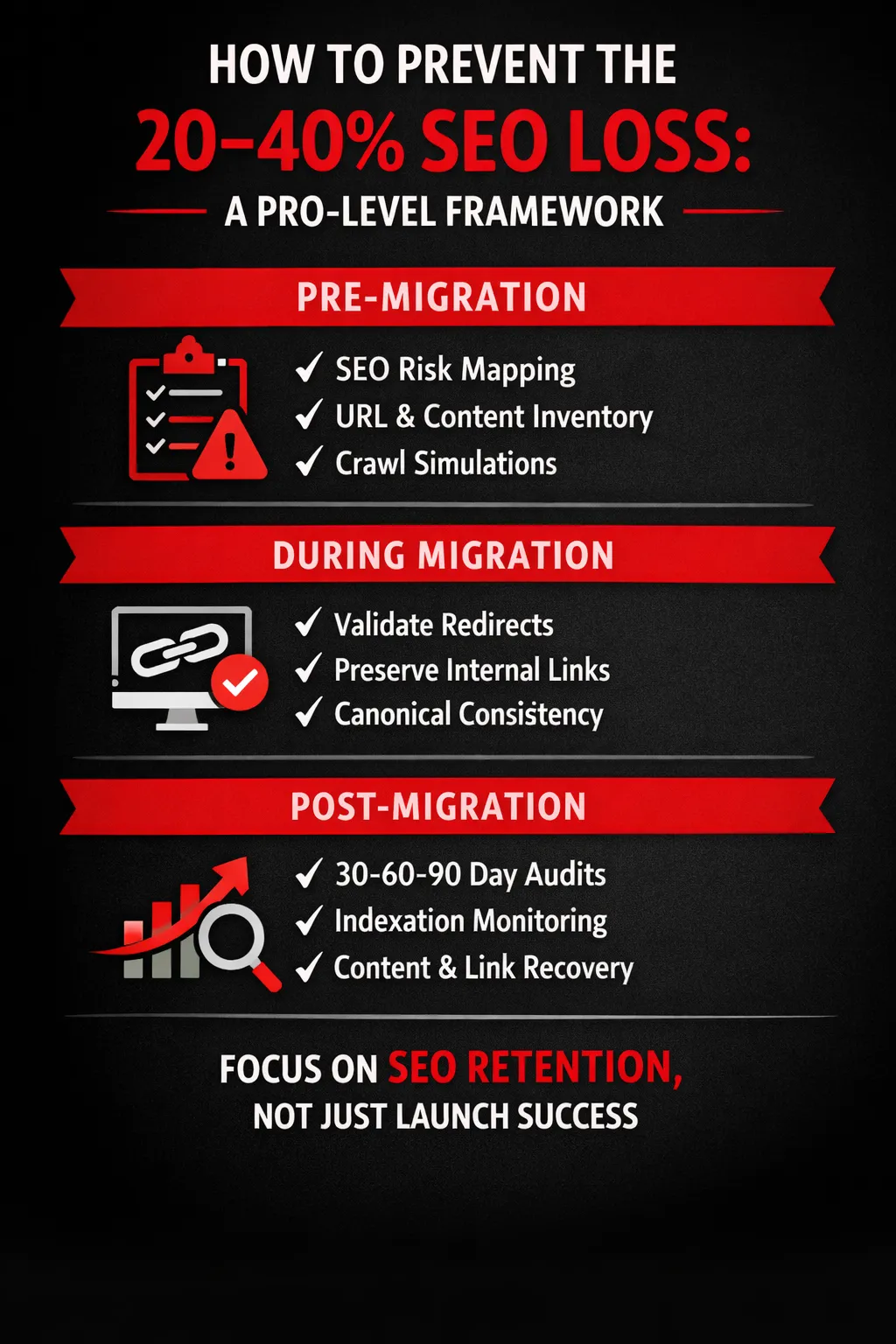
If most migration SEO losses are “silent,” the fix isn’t a single trick—it’s a system. The best teams treat migrations like high-risk deployments: they map SEO risk before launch, enforce guardrails during launch, and run a structured stabilization plan after launch. Here’s a practical framework that consistently prevents the typical 20–40% organic value leakage.
A) Pre-Migration: SEO Risk Mapping
1) URL inventory & prioritization
Before anyone touches templates or redirects, build a clean inventory of what you’re migrating. Don’t just export a sitemap and call it a day—sitemaps rarely include everything that ranks.
- Start with reality, not theory: Pull the full list of indexable URLs from a crawl, then merge it with URLs receiving impressions/clicks in Search Console and landing-page sessions in analytics.
- Segment by importance: Create tiers:
- Tier 1: URLs driving the majority of organic revenue/leads/traffic (top landing pages, top category pages, high-intent articles).
- Tier 2: URLs with meaningful long-tail visibility or link equity.
- Tier 3: Low-value or outdated pages (candidates for consolidation or removal—handled carefully).
The goal: you should know exactly which pages must not lose rankings and which can tolerate change.
2) Keyword-to-URL mapping
Most migrations lose SEO because teams migrate pages, not intent. Keyword-to-URL mapping forces you to preserve what Google already understood about each page.
- Map primary + secondary keyword themes to each high-priority URL (Tier 1 and Tier 2).
- Note the search intent type (transactional, informational, navigational).
- Identify cases where multiple pages are competing for the same keywords (a chance to consolidate before migration rather than accidentally creating cannibalization after).
This becomes your “truth table” when stakeholders suggest rewriting, merging, or moving content.
3) Crawl simulations
A crawl simulation is basically a rehearsal: “If Googlebot hits the new site, what happens?”
- Crawl a staging environment (or a controlled preview) and compare:
- Indexability signals (robots, noindex, canonical, status codes)
- Template changes that alter headings, internal links, and structured data
- Crawl depth changes (pages pushed deeper into the architecture)
- Run a redirect mapping test on a sample set of Tier 1 URLs: old → new should be one hop, clean, and consistent.
Pre-migration simulations catch the biggest losses early—before they become expensive.
B) During Migration: SEO Guardrails
1) Redirect validation
Redirects are the backbone of SEO equity transfer—but only if they’re done with precision.
Guardrails to enforce:
- One-to-one relevance: Redirect old URLs to the closest topical match, not generic categories or the homepage.
- Avoid chains: old → A → B bleeds equity and slows crawling.
- Eliminate 302s unless truly temporary: migrations should almost always use permanent redirects where appropriate.
- Check at scale: validate redirects for all Tier 1 and Tier 2 URLs immediately after launch, not weeks later.
2) Canonical consistency checks
Canonicals are one of the most common silent killers: everything “works,” but Google is told not to trust the page you want indexed.
Guardrails:
- Every indexable page should have a correct self-referencing canonical (unless you intentionally canonicalize).
- Canonicals must align with:
- final destination URLs (after redirects)
- your preferred protocol/hostname (http vs https, www vs non-www)
- Watch for template defaults that mistakenly canonicalize:
- to old URLs
- to parameter variants
- to the homepage (yes, it happens)
3) Internal linking preservation
Even with perfect redirects, you lose SEO if your internal links collapse. Internal links tell Google what matters and how authority flows.
Guardrails:
- Keep critical navigation pathways intact (top categories, key product/service hubs, cornerstone content).
- Preserve contextual links inside content (they often drive long-tail performance).
- Fix internal links so they point directly to new URLs, not redirected old ones—this reduces crawl waste and speeds equity consolidation.
C) Post-Migration: 30–60–90 Day SEO Stabilization Plan
Day 0–30: Re-crawl strategy
Your mission: help Google discover and trust the new version quickly.
- Submit updated XML sitemaps (and make sure they contain only indexable, canonical URLs).
- Request indexing for your most important pages (Tier 1).
- Run full-site crawls weekly to catch emerging issues: redirects, canonicals, broken links, accidental noindex.
Day 31–60: Indexation monitoring
This is where silent losses usually show up.
- Watch Search Console for:
- spikes in “Excluded” pages
- canonical/duplicate warnings
- coverage drops in key folders
- Compare pre/post performance at the URL group level (e.g., /blog/, /services/, /category/), not just overall traffic.
Day 61–90: Content & link equity recovery
Now you optimize the transfer, not just the technical setup.
- Identify top pages with ranking declines and audit:
- content parity (did intent shift?)
- internal links pointing away from them
- metadata changes impacting CTR
- Reclaim external links:
- update the most valuable backlinks to point directly to the new URLs (where possible)
- Fill gaps created by consolidation:
- if multiple pages were merged, ensure the new page covers the combined intent thoroughly.
A migration that “looks perfect” can still leak SEO value—unless you treat it like a controlled process with risk mapping, launch guardrails, and a stabilization runway. That’s the difference between “we launched” and “we preserved performance.”
Why Developers and SEO Teams Often Talk Past Each Other
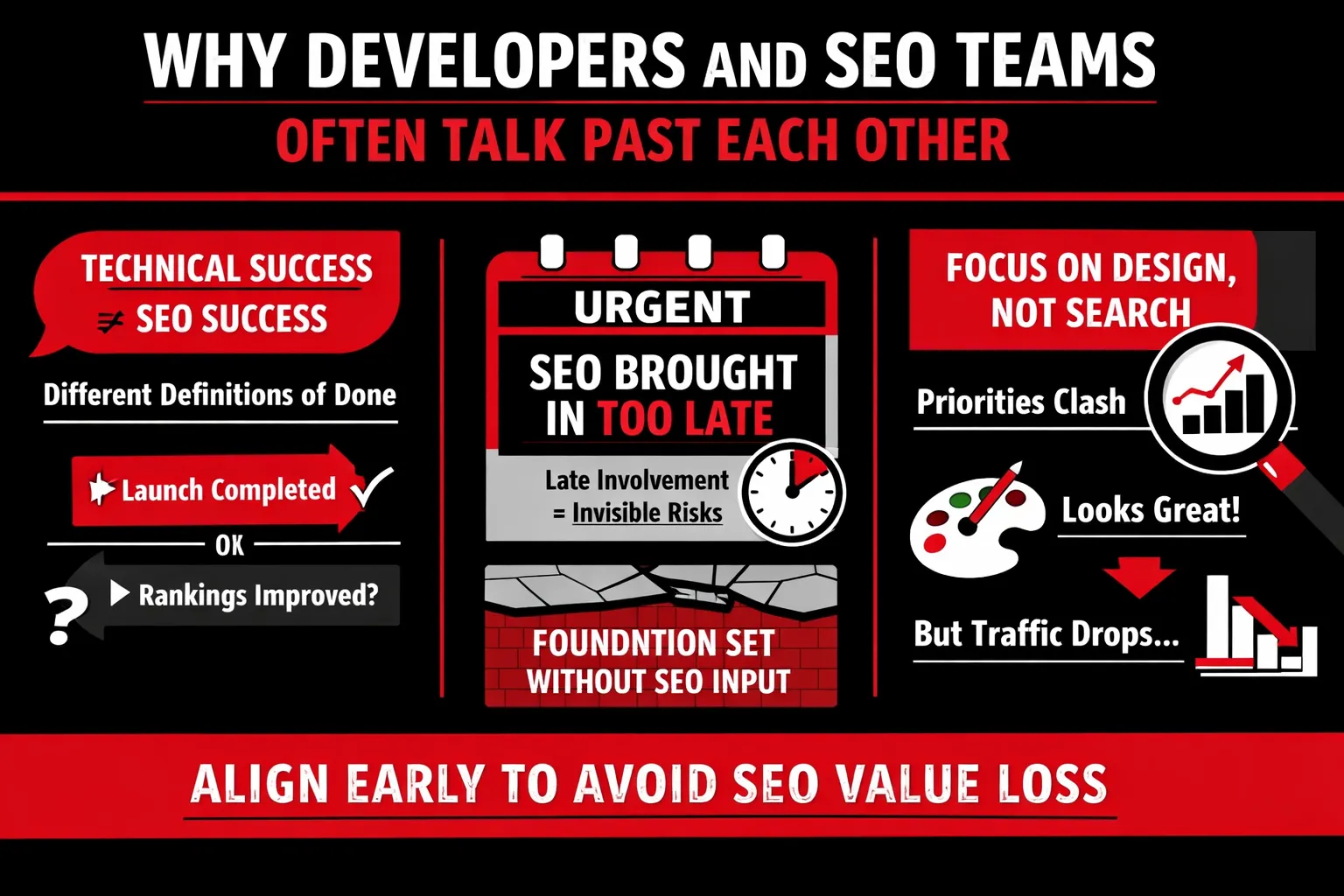
One of the most underestimated reasons behind silent SEO loss during migrations is not technical failure—but misalignment between developers and SEO teams. Both groups may be highly competent, yet still work toward fundamentally different definitions of success.
Technical “Success” vs Search “Success”
For developers, a migration is considered “done” when the site builds cleanly, pages load fast, there are no visible errors, and QA passes. The focus is on functionality, performance, and stability. If the new site works as expected for users, the migration is deemed successful.
For SEO teams, however, success is measured very differently. It’s about preserving and growing organic visibility, maintaining keyword rankings, protecting historical URL equity, and ensuring search engines can crawl, interpret, and trust the new site structure. A migration can be technically flawless and still be an SEO failure if these signals degrade. This mismatch in “definition of done” is where silent losses begin.
The Cost of Late SEO Involvement
SEO is often brought in at the final stages—after designs are approved, templates are locked, and URLs are already decided. At that point, SEO becomes reactive instead of strategic. Fixes turn into compromises, and risk mitigation becomes damage control.
SEO must lead early, not follow late. When SEO input is delayed, teams lose the opportunity to influence information architecture, internal linking logic, URL strategy, and rendering decisions—areas that directly impact long-term search performance.
How to Align Teams Before Migration
True alignment starts with shared KPIs—not just “site launched,” but metrics like index coverage stability, ranking retention, and organic traffic baselines.
Equally important is defining SEO acceptance criteria. Just as performance or security has launch requirements, SEO should too: validated redirects, preserved metadata, correct canonicals, crawlable templates, and post-launch monitoring plans. When SEO success is treated as a launch requirement—not a post-launch fix—migrations stop bleeding value silently.
The Business Cost of Silent SEO Loss
What 30% Traffic Loss Actually Means
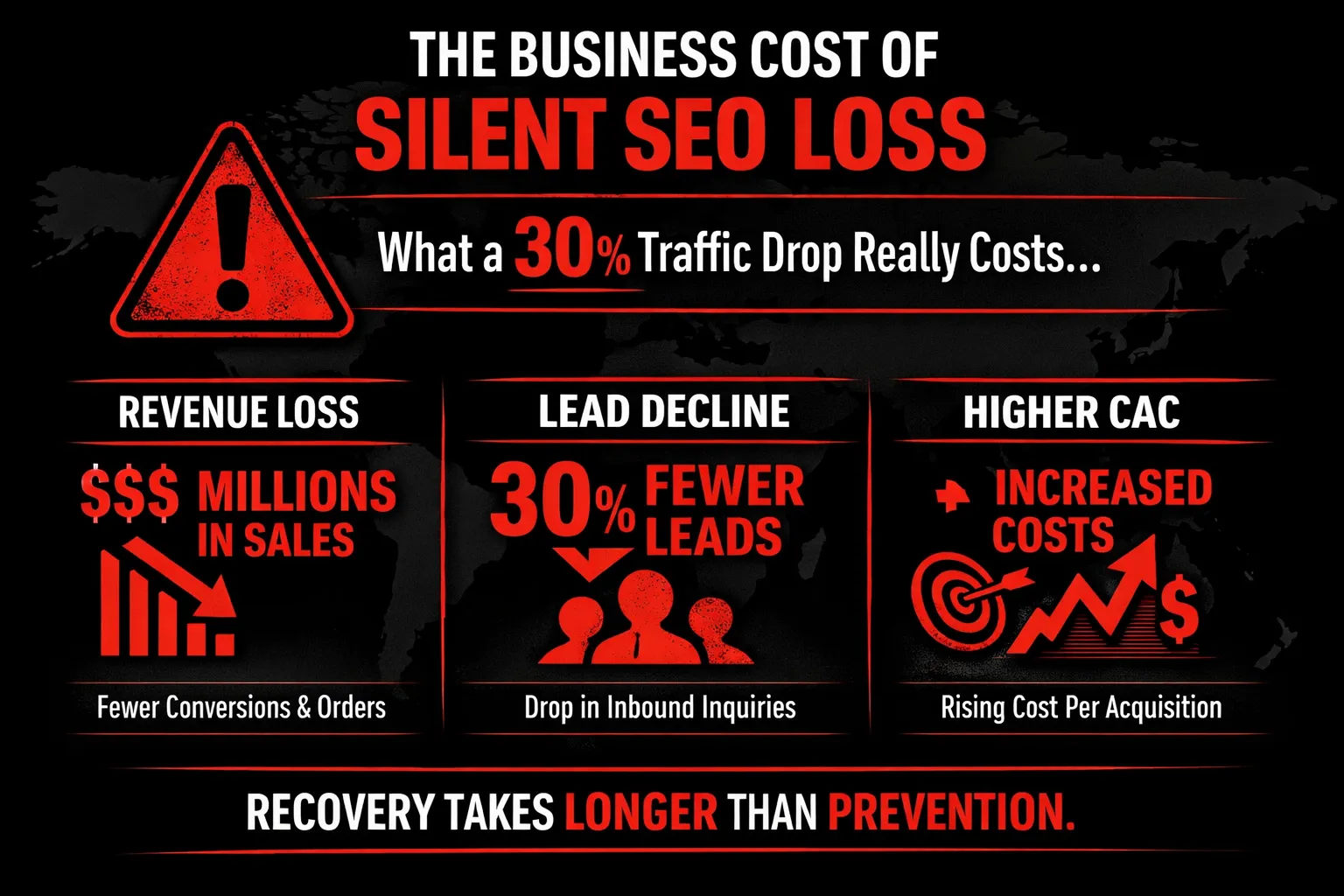
A 30% loss in organic traffic after a website migration is often dismissed as a temporary fluctuation. In reality, it represents a direct and compounding business cost that extends far beyond SEO dashboards.
First, consider revenue impact. If organic search contributes a significant share of sales or qualified inbound demand, a 30% drop doesn’t reduce revenue linearly—it disrupts the most cost-efficient acquisition channel. Unlike paid media, organic traffic compounds over time. Losing it means forfeiting both current revenue and future growth momentum. For e-commerce businesses, this can translate into immediate drops in transactions; for SaaS or B2B companies, it often surfaces as longer sales cycles and weaker pipeline quality.
Next comes lead volume decline. Organic search typically delivers high-intent users. When traffic erodes silently, top-of-funnel leads shrink first, followed by mid-funnel conversions weeks later. This delay often masks the true cause, leading teams to misattribute performance drops to market conditions, seasonality, or messaging issues.
Finally, customer acquisition cost (CAC) inflation becomes unavoidable. To compensate for lost organic demand, companies increase spend on paid search, social ads, or outbound efforts. These channels are inherently more expensive and less sustainable. What once arrived “for free” through SEO now requires ongoing budget just to maintain baseline performance.
Why Recovery Costs More Than Prevention
Recovering lost SEO value is rarely quick or cheap. Re-indexation delays mean Google must re-crawl, reassess, and rebuild trust in your new site structure—a process that can take months, not weeks. During this time, rankings remain unstable, and lost visibility continues to compound.
Worse, while you’re recovering, competitors gain momentum. They capture displaced rankings, strengthen their authority, and make recovery even harder. Prevention costs planning; recovery costs growth.
Final Thoughts: Don’t Let “Perfect” Migrations Fool You
Website migrations rarely fail because of a single technical bug. More often, SEO value is lost because of process failure—misaligned teams, incomplete checks, and assumptions that “no errors” equals “no risk.” The uncomfortable truth is that most migration-related SEO losses are preventable. They happen not because teams lack skill, but because SEO is treated as a final checkbox instead of a guiding framework throughout the migration lifecycle. When SEO considerations are reactive rather than proactive, silent erosion becomes inevitable.
The core takeaway is simple but critical: if your migration looks perfect, that’s exactly when you should be most skeptical. Clean launches, fast load times, and passing QA tests can create a false sense of security. Meanwhile, subtle issues—like diluted internal links, misaligned intent, crawl inefficiencies, or lost historical signals—begin compounding beneath the surface. By the time traffic drops enough to trigger concern, weeks or months of SEO equity may already be gone.Now is the time to act deliberately. Start by auditing your last migration, even if it “went well.” Look beyond traffic totals and examine impressions, keyword distribution, crawl behavior, and URL-level performance. Next, build an SEO-first migration checklist that prioritizes value preservation, not just technical completion. Finally, shift your mindset: invest in SEO value retention, not just launch success. A migration isn’t finished when the site goes live—it’s finished when organic visibility is fully retained and stabilized.